
Sage 100 order entry automation means web storefront orders and EDI purchase orders land in Sage 100 as sales orders without anyone re-keying them, and stock levels and invoice status flow back out to the channels that need them. The reliable route is a small middleware layer that normalizes each order source into one staging format, then writes into Sage 100 through either a Visual Integrator (VI) import job or the Business Object Interface (BOI). This guide is for distributors with an on-premise Sage 100 install and a sales desk that still types orders by hand. It covers what Sage 100 actually allows, how we choose between VI and BOI, the build steps, and where these projects go wrong.
The problem it solves
In a typical distributor, orders arrive from three or four places: a web store or customer portal, EDI purchase orders from larger retail accounts, emailed PDFs, and phone calls. Someone opens each one, looks up the customer, checks that every item code exists, and types a sales order into Sage 100. Then someone else pushes inventory counts to the web store by hand or on a nightly export, and invoice status gets emailed to customers who ask.
The failures are predictable: transposed quantities, wrong ship-to addresses, orders that sit overnight, and web stores that oversell because stock data is a day old. The work is not complicated. It is just repeated for every order.
The real question for an operator is which integration path Sage 100 will tolerate. Here is how the options compare.
| Option | Can write orders into Sage 100? | Where it runs | Main limit | Best fit |
|---|---|---|---|---|
| Visual Integrator import job | Yes, through Sage business logic | Inside Sage 100, can be driven by scripts | Rejects the whole record if any field fails validation | Mapped file imports such as web and EDI order files |
| Business Object Interface (BOI) | Yes, programmatically | COM, needs a Windows security context and Sage credentials | Traditionally 32-bit, so callers must run as x86 or go through a bridge | Per-order logic, lookups, custom rules |
| ODBC | Read only | Windows DSN | Cannot write; 32-bit and 64-bit DSN mismatches break connections | Pulling inventory, invoice and order status out |
| Zapier or Make directly | No native Sage 100 app turned up in our research | Cloud | Cannot reach an on-premise install without middleware | Only as a front door that calls your own webhook |
| Unified API gateways | Listed by some vendors, endpoints not verified by us | Vendor cloud | Adds a dependency and cost; still ends at the same on-premise constraints | Teams already standardized on a gateway |
| Custom middleware plus VI or BOI | Yes | A Windows host next to Sage 100 | You own and monitor it | Mid-market distributors with several order sources |
To be clear about the facts: we found no official, fully featured Sage 100 REST API. The supported programmatic surface is BOI, which Sage describes as automatically provided as part of your Sage 100 activation, with support limited to the BOI itself and Sage-written programs. A native Zapier or Make connector for on-premise Sage 100 is unconfirmed and probably absent, so we do not design around one.
What automating one manual process is worth
Move the sliders to your own numbers. The defaults are only an example business, not client data.
Revenue the freed hours could earn each year
$41,600
8 hrs a week × 52 × $100
- Cost of errors and rework each year
- $6,000
- $500 a month × 12
- Staff cost of doing it by hand each year
- $14,560
- 8 hrs a week × $35/hr × 52 weeks
- Hours handed to the system each month
- 35 hrs
- 8 hrs a week × 52 ÷ 12
How the automation works
Our standard pattern puts a small service on a Windows machine that can reach the Sage 100 server. Every order source is converted into one staging record, validated against Sage 100 reference data, and then written through the import path that fits the order type. Results and rejects are logged, and a separate read path sends inventory and invoice status back out.
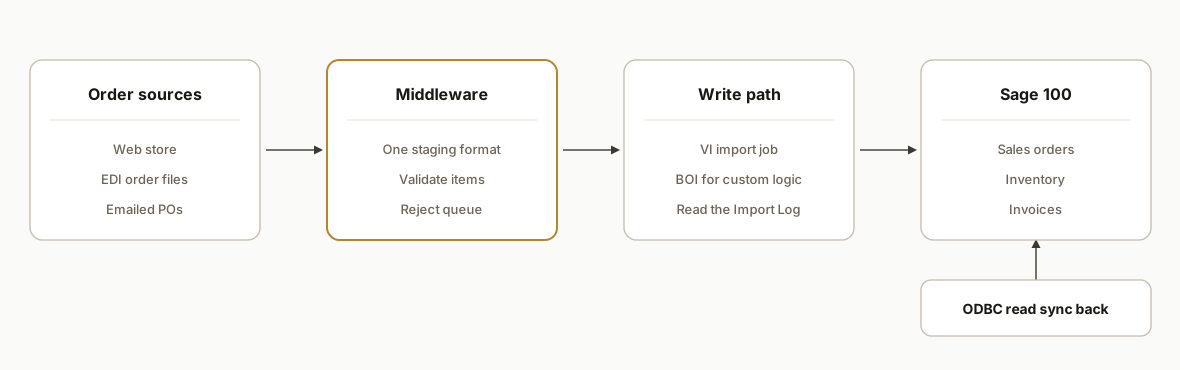
Order intake adapters. One small adapter per source: web store webhook, EDI translator output files, and an inbox parser for emailed POs. Each emits the same staging record so the rest of the pipeline never cares where an order came from.
Validation layer. Before anything touches Sage 100, we check customer number, ship-to, item codes, units of measure and quantity. Sage 100 imports run through business logic, so a bad row gets rejected later anyway. Catching it first lets us route it to a human with a clear reason.
Write path. Visual Integrator for mapped file imports, BOI for orders that need per-order logic such as pricing lookups or conditional line handling. We pick per source, not per project.
Read path. ODBC for read access to inventory and invoice data, plus VI export jobs where a scheduled file is simpler. ODBC is read only, so it never carries writes.
Exception queue. Anything rejected lands in a queue with the order, the failing field and the reason. A person fixes the master data or the order and resubmits.
Step-by-step: how to build it
Step 1: Inventory every order source and its format
List each channel, its volume, and what a clean order looks like. EDI orders usually arrive as translated flat files, web orders as JSON, emailed POs as PDFs. Decide which channels are worth automating first by volume and error rate, not by technical interest.
sources:
  - name: web_store
    format: json_webhook
    priority: 1
  - name: edi_retail_accounts
    format: translated_flat_file
    priority: 2
  - name: emailed_po
    format: pdf_extract
    priority: 3
The gotcha: the EDI layer is its own product. We treat the translator's output file as the input and do not rebuild EDI mapping inside this project.
Step 2: Define one staging record
Every adapter outputs the same shape. This is what the VI map or BOI script reads, so a new channel is just a new adapter.
{
  'source': 'web_store',
  'source_order_id': 'W-10482',
  'customer_no': 'ABC123',
  'ship_to': 'MAIN',
  'po_number': 'PO-7781',
  'lines': [
    { 'item_code': 'WIDGET-10', 'qty': 24, 'uom': 'EA' }
  ]
}
The gotcha: keep the source order ID on every record. It is your idempotency key and your audit trail.
Step 3: Validate against Sage 100 reference data
Pull customers, ship-to codes and item codes into a local cache through ODBC read access. Refresh it on a schedule. Reject early when an item or customer is unknown.
SELECT ItemCode, UnitOfMeasure, ItemType
FROM CI_Item
WHERE ItemType = '1'
The gotcha: items must exist before sales order lines can be imported through VI. A new web SKU that was never created in Sage 100 is the most common reason orders fail. Also watch 32-bit versus 64-bit ODBC DSN mismatches, which cause connection failures that look like network problems.
Step 4: Build the VI import job for file-based orders
For web and EDI order files, a mapped VI import job is usually the lowest-maintenance path. Create the job in Sage 100, map staging columns to sales order header and detail fields, and have the service drop a file for it. Sage's own guidance is to back up the destination data files before you accept the job; the source file is not changed by Visual Integrator, so it needs no backup.
Import job: SO_WEB_ORDERS
Source file : D:\\sage_drop\\so_header_lines.csv
Target      : Sales Order Header + Detail
On invalid  : skip record, write to Import Log
The gotcha: the import is strict. As Sage documents, if any data item within an import record fails the validation test, the entire record is skipped and the reason is written to the Import Log. Your service must read that log, not assume success.
Step 5: Use BOI where an order needs real logic
When an order needs conditional handling, such as splitting by warehouse, applying customer-specific rules, or returning the new sales order number to the web store immediately, we use BOI. It is a COM interface, so the caller needs a Windows security context and Sage credentials, and it is traditionally 32-bit.
# Run the BOI worker under 32-bit Windows Script Host
C:\\Windows\\SysWOW64\\cscript.exe //nologo D:\\sage_worker\\create_order.vbs D:\\sage_stage\\W-10482.json
The gotcha: a 64-bit process cannot load a 32-bit COM component. Either launch the worker as x86, or put the BOI calls behind an out-of-process bridge and let the rest of your service stay modern.
Step 6: Schedule the run and capture results
Run the pipeline on a short interval from the Windows host. Each cycle picks up staged orders, writes them, reads the Import Log or BOI return, and updates a status table.
schtasks /Create /SC MINUTE /MO 5 /TN 'Sage100OrderSync' /TR 'D:\\sage_worker\\run_cycle.cmd'The gotcha: never retry a failed write blindly. Check the source order ID against the status table first, otherwise a timeout followed by a retry creates a duplicate sales order.
Step 7: Sync inventory and invoices back out
Export available quantity and invoice status on a schedule, using ODBC reads or a VI export job, and push them to the web store and customer notifications. Because ODBC cannot write, anything that needs to change Sage 100 data goes through VI or BOI instead.
outbound:
  inventory_push:
    every: 15m
    fields: [item_code, qty_available]
  invoice_status:
    every: 30m
    notify: customer_email
The gotcha: decide which system owns stock truth. If the web store decrements on its own and Sage 100 also decrements on order import, you will double count unless the sync overwrites rather than adjusts.
Where it gets complicated
Item master hygiene. The automation is only as good as the item codes it validates against. Distributors with duplicate or retired SKUs see rejects pile up. Plan a cleanup pass and a rule for creating new items before their first order, because lines cannot import against items that do not exist.
All-or-nothing rejection. Because a failed validation skips the entire import record, one bad line can hold up a whole order. Decide up front whether a rejected order goes to a person, is split, or is retried after a master data fix, and build the exception queue before go-live.
32-bit and 64-bit mismatches. BOI is traditionally 32-bit COM and ODBC DSNs exist separately for each architecture. Most mysterious connection failures we see in these builds trace back to a worker running in the wrong bitness, so we standardize the host and document it.
Credentials and security context. BOI needs a Windows security context and Sage credentials. Use a dedicated service account with the minimum Sage role, not an employee login, so the sync does not break when someone changes a password.
No cloud connector to lean on. We did not find a native Zapier or Make app for on-premise Sage 100. A cloud tool can still be the front door, but only by calling your own webhook on the Windows host. Everything that touches Sage 100 stays local.
Support boundaries. Sage limits BOI support to the interface itself and Sage-written programs, so custom logic is yours to own and test. Keep a sandbox company and test every release of Sage 100 against it before upgrading production.
What this actually changes
We have not shipped this exact Sage 100 build for a named customer, so we will not quote results. What we can say is structural: once order sources feed one validated pipeline, order entry stops depending on someone being at a keyboard, errors surface at the door instead of at the warehouse, and stock data reaches your channels in minutes rather than overnight. The labor you recover is the sales desk time previously spent retyping, and the larger win is fewer wrong shipments. The same adapter-and-staging pattern is what we use for freight systems with no public API, as described in our ITS Dispatch load-to-invoice automation post.
Scope and cost are driven by three things: the number of order sources, how clean your item and customer master data is, and whether you need BOI logic or can stay with VI import jobs. A single web channel on VI is a small project measured in weeks. Adding EDI and custom pricing rules extends that. We quote after a short discovery because those three inputs move the number more than anything else.
Frequently asked questions
Does Sage 100 have an API for importing orders?
Not an official, fully featured REST API that we could confirm. The supported programmatic route is the Business Object Interface, a COM-based interface included with Sage 100 activation. For file-based loads, Visual Integrator import jobs write orders through Sage's business logic. Any REST layer you see is middleware someone built on top of those.
Should I use Visual Integrator or BOI for web and EDI orders?
Use Visual Integrator when orders arrive as mapped files with consistent fields, which fits most web and EDI order flows. Use BOI when each order needs custom logic, lookups, or an immediate return value such as the new sales order number. Many builds use both, chosen per order source.
Can Zapier or Make connect directly to Sage 100?
We found no native Sage 100 app on either platform, and a Zapier community thread asking about on-premise Sage 100 had no clear answer. In practice, you place middleware on a Windows host next to Sage 100 and let Zapier or Make call it through a webhook or HTTP module.
Why did my imported orders get rejected?
Usually a validation failure on a single field. Sage skips the entire record when any data item fails validation and logs the reason in the Import Log. The most common causes are item codes that do not exist yet, invalid customer or ship-to codes, and unit of measure mismatches.
Can I write data back to Sage 100 through ODBC?
No. The ODBC driver is read only, so use it for pulling inventory, orders and invoice status out. Writes should go through a Visual Integrator import job or BOI, which both enforce Sage business rules.
How long does a Sage 100 order entry integration take?
That depends on order sources and data quality. A single web channel on a Visual Integrator job is typically weeks, not months. Adding EDI, custom pricing logic, or a master data cleanup extends it. We scope it on a short call once we see your order formats.
If your sales desk is still retyping web and EDI orders into Sage 100, this is a well-trodden pattern for our workflow automation work. We build the intake adapters, the validation layer and the Sage 100 write path, and we hand you a monitored exception queue instead of a black box. Book a 20 minute call and bring one sample order from each channel, and we will tell you whether Visual Integrator or BOI fits.
Sources
- 1.Business Objects Interface FAQshelp-sage100.na.sage.com
- 2.Create an Import Job - Sage 100 Helphelp-sage100.na.sage.com
- 3.Import Job Maintenance - Sage 100 Helphelp-sage100.na.sage.com
Want us to build this for you?
Nine questions, about 90 seconds. You see the revenue it is costing you, then pick a time. No pitch.
See your options