
If most inbound calls are support, an AI receptionist still pays when it reliably deflects a slice of those calls to self-serve answers or creates clean tickets without holding a human. The breakeven hinges on three inputs: how many calls are support, how many of those the AI resolves on first touch, and your loaded cost per human-handled minute.
Definition: AI receptionist ROI is the net savings from call minutes an AI resolves or defers, minus AI stack costs, compared to your human-reception baseline.
The problem it solves
When 60, 90 percent of inbound volume is not net-new bookings, reception is a triage desk: password resets, appointment questions, hours, billing status, shipment ETAs, policy lookups. Humans are great at this, but they become the bottleneck, especially after hours and at peaks.
| Dimension | Manual reception | AI receptionist front line |
|---|---|---|
| Coverage | Business hours, overtime for peaks | 24 by 7, consistent first ring |
| After-hours | Voicemail or third party | Same experience as daytime |
| Unit cost | Wage plus benefits per minute | Per minute telephony plus inference |
| Consistency | Varies by agent, context switching | Scripted intents, on-brand guardrails |
| Routing | Memory plus SOPs | Deterministic rules plus confidence gates |
| Reporting | Anecdotes, sparse tags | Full transcripts, intent and deflection stats |
How the automation works
A safe ROI pattern is front-door triage: the AI answers every call, classifies the intent, resolves the simple ones, and cleanly hands off the rest with context.
- Intake: capture caller ID and the reason in the first turn. Set a time cap for quick wins.
- Triage engine: detect intent, pull known answers from a curated knowledge base, and enforce confidence thresholds.
- Resolution paths: answer and confirm satisfaction, schedule or create a ticket, or warm-route to a human with a short summary.
- Audit and learn: log intents and outcomes to tune scripts and measure deflection and CSAT effects over time.
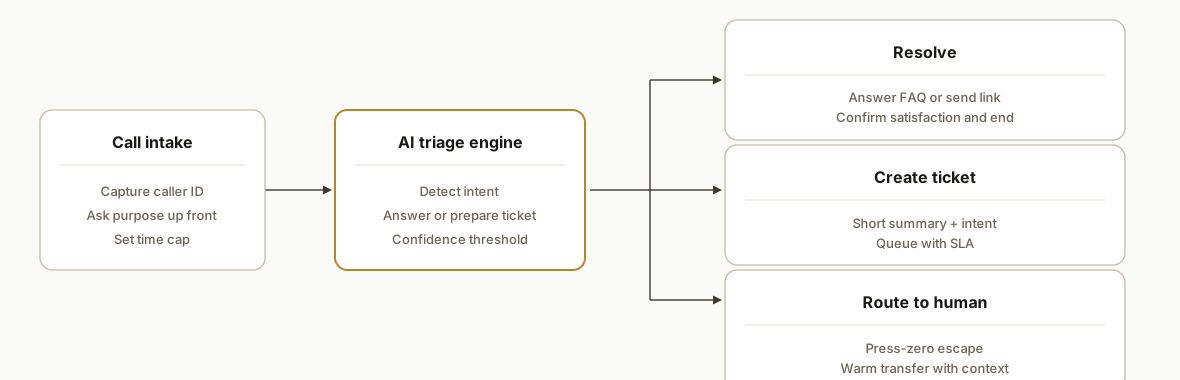
Step-by-step: how to build it
1) Quantify your baseline and set ROI inputs
Capture one month of call counts, average handle time, and support-share. Establish your loaded human cost.
# roi/assumptions.yaml
calls_per_month: 1800           # all inbound calls
support_share: 0.75             # 75% of calls are service/support
human_aht_minutes: 5.8          # average live-handle minutes when support
loaded_hourly_cost_usd: 24.00   # wage + taxes + benefits
# BLS lists median receptionist pay at $32,100/yr in May 2023 (~$15.43/hr); add ~30% benefits to approximate loaded cost.
# Sources: https://www.bls.gov/ooh/office-and-administrative-support/receptionists.htm and https://www.bls.gov/news.release/ecec.toc.htm
Gotcha: loaded cost matters more than base wage. Benefits and taxes typically add roughly 30 percent to wages in private industry (see BLS ECEC).
2) Model deflection and cost bands before building
Estimate deflection on support intents you will actually answer and create a cost band for your AI stack.
# roi/calc.py
from dataclasses import dataclass

def minutes(n):
    return n

@dataclass
class Inputs:
    calls_per_month: int
    support_share: float      # 0.6 to 0.9 typical in support-heavy shops
    human_aht_min: float
    loaded_hourly_cost: float
    ai_cost_per_min: float    # telephony + inference + platform
    ai_aht_min: float         # strict cap, e.g., 2.5, 4.0 min front-door cap
    deflection_rate: float    # share of support calls resolved by AI

def roi(i: Inputs):
    human_min_saved = i.calls_per_month * i.support_share * i.deflection_rate * i.human_aht_min
    dollars_saved = human_min_saved/60 * i.loaded_hourly_cost
    ai_minutes = i.calls_per_month * i.support_share * i.ai_aht_min  # AI greets all support calls
    ai_cost = ai_minutes * i.ai_cost_per_min
    return round(dollars_saved - ai_cost, 2)

# Example only: plug your real costs
ex = Inputs(1800, 0.75, 5.8, 24.0, 0.06, 3.0, 0.45)
print({"net_monthly_savings_usd": roi(ex)})
Gotcha: cap AI handle time. A strict first-line cap keeps AI costs predictable and prevents long meanders on sensitive calls.
3) Define allowed intents and hard guardrails
Start with a narrow, high-confidence set of intents and what the AI is allowed to do.
# intents.csv
intent,action,max_seconds,requires_human
hours-and-location,answer,60,false
appointment-lookup,summarize-and-ticket,150,true
billing-status,read-policy-and-ticket,150,true
reset-password,send-link,90,false
urgent-safety,route-to-human,30,true
new-booking,collect-and-schedule,180,true
Gotcha: add a dedicated urgent lane that bypasses AI if any red keywords or sentiment cues appear.
4) Route outcomes deterministically
Map each intent to a next action that your team recognizes.
{
  "route_rules": {
    "answer": {"log": true, "end": true},
    "summarize-and-ticket": {"queue": "support-tier-1", "sla_minutes": 30},
    "read-policy-and-ticket": {"queue": "billing", "sla_minutes": 120},
    "send-link": {"channel": "sms+email", "end": true},
    "route-to-human": {"transfer": "live-agent"},
    "collect-and-schedule": {"calendar": "bookings"}
  }
}
Gotcha: always send a short call summary with caller ID, intent, and key fields to the ticket or calendar so humans do not need to re-ask.
5) Instrument deflection and quality from day one
Track intent counts, resolved vs routed, and any escalations so you can tune weekly.
-- analytics.sql
create table if not exists call_metrics (
  ts timestamp,
  call_id text,
  intent text,
  outcome text,      -- answered, ticketed, routed, abandoned
  ai_seconds int,
  human_seconds int default 0,
  csat int null      -- optional 1-5 after-call survey
);

-- weekly deflection rate
select intent,
  sum(case when outcome='answered' then 1 else 0 end)::float / nullif(count(*),0) as deflection,
  avg(ai_seconds) as ai_aht
from call_metrics
where ts >= now() - interval '30 days'
group by intent
order by deflection desc;
Gotcha: do not overreact to a single week. Tune on rolling 30-day windows so seasonality and small numbers do not whipsaw scripts.
6) Pilot after-hours first, then expand
Run the same front-door pattern after-hours to de-risk. If deflection and CSAT hold, extend to business hours.
rollout:
  phase1: after_hours_only   # nights and weekends
  phase2: lunch_peaks        # overflow 11:30, 13:30
  phase3: all_hours_first_ring
exit_criteria:
  min_deflection: 0.30
  max_csat_drop_points: 0.2  # on a 5-point scale
  max_ai_aht_min: 3.5
Gotcha: hold a live transfer backstop during all phases. A press-zero escape and a warm transfer endpoint prevent frustration.
Where it gets complicated
- Confidence and coverage. Support-heavy mixes expose long tail questions. Keep a curated knowledge base and enforce a confidence threshold. If the answer falls below it, ticket or transfer.
- Identity and policy access. Some intents need identity checks or system lookups. Decide what the AI may see or fetch. Do not let it disclose account specifics without verification.
- Language and accents. Speech accuracy drops with noise, accents, and speaker devices. Monitor transcripts for systematic misses and adjust vocabulary and energy detection.
- Cost sprawl. Uncapped conversations or music-on-hold time inflate AI minutes. Enforce a greeting, a purpose question, and a time cap per intent.
- IVR fatigue. Do not bury callers in menus. The opening line should be a natural question, not a tree. Provide a quick escape to a human.
- Compliance logging. If you operate in regulated niches, preserve call summaries and consent flags. Build audit paths before you scale volume.
What this actually changes
When most calls are support, your ROI comes from minutes you no longer pay a human to handle. The lever is deflection: the share of support calls the AI fully resolves or compresses into a ticket without a live handoff. The labor baseline is not just wages but total compensation.
- BLS reports median pay for receptionists at 32,100 dollars per year in May 2023, roughly 15.43 dollars per hour. Benefits and taxes typically add about 30 percent of compensation in private industry. Sources: U.S. Bureau of Labor Statistics Occupational Outlook Handbook and Employer Costs for Employee Compensation.
Modeled outcome: with 1,800 calls per month, 75 percent support mix, 5.8 minute human AHT on support, 45 percent deflection, and a 24 dollars per hour loaded cost, the recovered human time is on the order of 1800 x 0.75 x 0.45 x 5.8 minutes, minus your AI minutes and stack costs. Plug your real numbers into the code above to see your net.
Frequently asked questions
Does an AI receptionist have positive ROI if most of my calls are support?
Yes when it deflects a meaningful slice of support calls and you cap AI handle time. The breakeven is a function of deflection rate, your human handle time, and loaded labor cost minus AI stack costs. After-hours first ring is often the cleanest pilot to validate ROI.
What deflection rate should I target before expanding beyond after-hours?
For support-heavy mixes, start with a 30 percent deflection target on a narrow set of intents and confirm that CSAT does not drop. As your knowledge base improves, 40 to 50 percent on simple, repetitive intents is a common plateau. Keep a human escape at all times.
Can I run AI after-hours only and still see ROI?
Often, yes. After-hours callers would otherwise hit voicemail or a costly third party. Front-door AI that answers common questions or creates actionable tickets tends to pay for itself quickly at night and on weekends. Expand to daytime once the numbers hold.
How do I avoid frustrating callers with an AI?
Open with a natural question, set clear expectations, offer a fast zero-to-human escape, and cap time per intent. Enforce confidence thresholds so the AI only answers when it is sure. Everything else should become a clean ticket or a warm transfer with a short summary.
What does this cost monthly?
Your stack cost is a blend of per-minute telephony, speech recognition and synthesis, and the AI reasoning layer. Model it as a per-minute number and cap AI handle time so you can forecast. The calculator above shows how to subtract stack costs from labor minutes saved.
Should I hire an AI automation agency or try a self-serve tool?
Self-serve can work for basic greetings and FAQs. If you need identity-aware lookups, ticket routing, CSAT monitoring, and clean analytics, an experienced AI automation agency builds the guardrails and the reporting you will wish you had later. If you want a Vancouver-based team, we can scope and model your first pilot with you.
If you want a second set of eyes on the math or a safe first pilot, we can help you design the after-hours front door, instrument deflection, and decide when to expand. See our AI voice work on the AI voice agents service and our related post on AI voice receptionist pricing and ROI. When you are ready to quantify your own case, book a 20 minute call.
Curious what this would actually save you?
Put real numbers to it. The ROI calculator estimates the hours and dollars an automation like this returns, in about a minute.
Calculate your automation ROI