
Connecting AppFolio to a CRM means moving leads, guest cards and leasing status between two systems that do not talk to each other out of the box, either through AppFolio's API on the plans that include it or through scheduled report exports that a parser reads and pushes into the CRM. Rex Automaton builds this bridge for property managers: an intake layer that matches and de-duplicates records, plus an AI layer that routes, scores and drafts follow-ups. This guide is for ops leads at property management companies who want leads and leasing status in one place without re-keying. It covers the CRM question, the plan question, what the AI should do, and when you should skip custom work entirely.
A working definition: AppFolio CRM integration is the automated, repeatable sync of prospect, guest card, tenant and leasing-status data between AppFolio Property Manager and a sales or follow-up system such as HubSpot, Salesforce, Follow Up Boss or GoHighLevel.
For the deeper API background, read our AppFolio API access and integration guide first. This post is the CRM-specific version.
The problem it solves
The unit, the guest card and the application status live in AppFolio. The follow-up sequence lives in the CRM. Two failures come from that split, and they need different fixes.
The first is a lead chased after the unit leased. The sequence keeps running because nothing told the CRM the unit status changed. Fixing it needs unit status to travel toward the CRM, which even a batch export can do, so it is solvable on every plan.
The second is a lead who toured but never got marked in AppFolio. Fixing it needs a write into AppFolio, which is only possible where write access exists (reportedly Max). On other plans the honest fix is a daily exceptions digest that lists CRM tours with no matching guest card activity, so a person closes the gap.
The route you can take depends mostly on your plan and your CRM. This is what we see when scoping it:
| Route | What it needs | Direction | Limit |
|---|---|---|---|
| Native or partner connector from the AppFolio Stack marketplace | A partner that already covers your CRM | Usually one way | Only what the partner built |
| Email parsing (Follow Up Boss) | Forward AppFolio lead notification emails to a lead email address | AppFolio to CRM, leads only | No status flowing back |
| Scheduled report CSV or email | Any plan that can schedule reports | AppFolio to CRM | Batch only, not real time |
| API read only (Plus) | API credentials through AppFolio | AppFolio to CRM | Cannot write back |
| API read and write (Max, reportedly) | API credentials through AppFolio | Both ways | Confirm scope with AppFolio |
| Zapier or Make | Needs API credentials anyway | Depends | No native AppFolio app on Zapier, per a Zapier community reply |
The table is why a single answer to "can you connect AppFolio to HubSpot" does not exist. It depends on the row you land in.
What automating your AppFolio reporting is worth
Move the sliders to your own numbers. The defaults are only an example portfolio, not client data.
Management fees from the doors the same team could take on
$62,400
(6 hrs × 52 ÷ 12) ÷ 0.5 hrs per door × $100 × 12 months
- Doors the freed hours could cover
- 52
- 26 hrs a month ÷ 0.5 hrs per door
- Staff cost of doing it by hand each year
- $10,920
- 6 hrs a week × $35/hr × 52 weeks
- Hours handed to the system each month
- 26 hrs
- 6 hrs a week × 52 ÷ 12
How the automation works
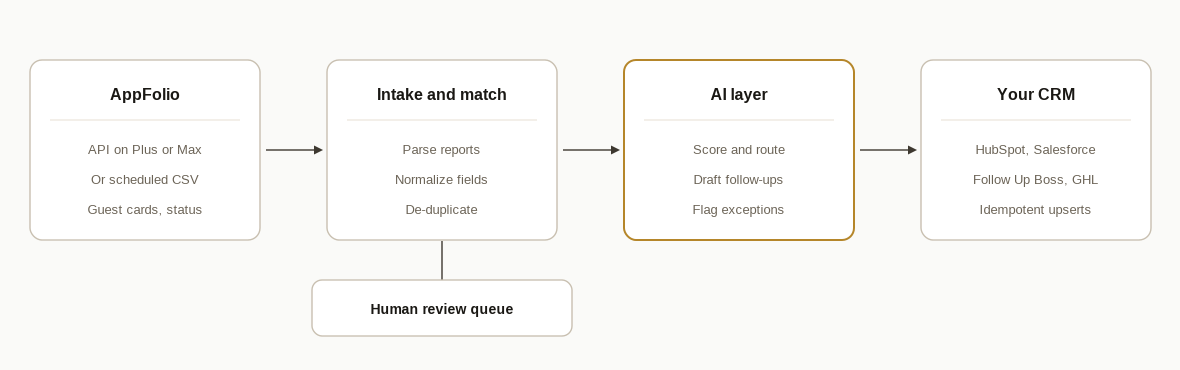
Our standard pattern has an intake layer, a matching layer, an AI layer and a CRM writer. The intake layer is either an API poller or a parser for scheduled report emails. The matching layer normalizes names, emails, phones and unit identifiers and decides whether a record is new or already exists. The AI layer scores and routes. The writer pushes clean records into the CRM and, where the plan allows, status back to AppFolio.
- Intake: pulls from the API on Plus or Max, or reads CSV attachments from scheduled report emails on any plan. Both feed the same downstream steps.
- Matching: builds a stable key from email first, normalized phone second, and name plus unit last. This is where most duplicate problems are prevented.
- AI layer: classifies intent, scores the lead, drafts the first reply and flags exceptions for a human.
- CRM writer: upserts contacts and deals with an idempotent key so a re-run never double-creates.
- Review queue: anything low confidence goes to a person rather than being guessed.
Which CRM do you use with AppFolio?
The CRM changes the intake and the writer, not the shape of the system. Two questions decide the work: does anything already connect your CRM to AppFolio, and do you need leasing status back in the CRM so follow-up stops when a unit is gone? Here is what we could confirm for each.
Follow Up Boss. Follow Up Boss documents its AppFolio connection as an email parsing integration: AppFolio lead notification emails go to a Follow Up Boss lead email address, so it does not use the API (see the Follow Up Boss help article on AppFolio). That covers new leads well. It does not carry leasing status back, which is the gap an added layer fills.
For the other three, we found no confirmed AppFolio connector, so the first move is to check the Stack marketplace and the second is to build. What differs is the object you write to and where the delay sits:
| CRM | Confirmed AppFolio connection | What our writer creates | Where the project slows down |
|---|---|---|---|
| HubSpot | None found | Contacts and deals | Mostly intake, meaning your plan and credentials |
| Salesforce | None found | Leads or Contacts | Field mapping for unit and application status needs sign-off from whoever owns the org, which usually takes longer than the code |
| GoHighLevel | None found; a Zapier community thread on this pairing reports no native AppFolio app | Contacts and opportunities | You need a bridge, so intake is the same parser or API poller as the others |
The practical rule: if your CRM is HubSpot or GoHighLevel, the schedule is set by AppFolio access. If it is Salesforce, start the field-mapping conversation on day one, in parallel with access, because it is the longer pole.
What syncs each way, in the build we recommend:
- AppFolio to CRM: new guest cards, unit status, application status, move-in dates.
- CRM to AppFolio: new leads captured outside AppFolio, as guest cards, only where write access exists.
Which AppFolio plan do you have: Core, Plus or Max?
Plan decides the route. AppFolio's Plus page lists a read-only API, and AppFolio's pricing and third-party integration documentation indicate read and write access on Max (see AppFolio pricing and Propexo's AppFolio integration notes). We could not confirm Core terms from AppFolio's own pages, so verify your plan with AppFolio before you scope anything. Also expect credentials to come through AppFolio's partner onboarding rather than a self-serve key screen.
- Core: assume no API. Use scheduled report emails or CSV exports, parsed and pushed to the CRM. Batch, not real time.
- Plus: read-only API. You can pull data on a schedule or near real time, but not write guest cards or status back.
- Max: read and write, so a true two-way sync is possible, subject to what AppFolio exposes to you.
The no-API route is less glamorous but works. Scheduled Reports can email CSV to recipients, and reports have an Email button for PDF or CSV. Our parser listens on a dedicated mailbox, reads the attachment and treats each row as an event. The limit is latency: you get daily or whatever cadence you schedule.
What should the AI actually do?
Matching and de-duplication stay rule-based. The model gets the text: the inquiry, the unit context and the thread so far. It returns one JSON object with five fields (intent, score, route_to, draft, needs_human), and nothing else is allowed to reach the CRM. That contract is what turns four jobs into something you can audit:
- Route and score: read the inquiry, infer bedroom count, move-in date and budget, then fill score and route_to.
- Draft follow-ups: write the first reply and the tour reminder against the actual unit. Auto-send only low-risk cases; the rest wait for approval.
- Update records: write a short summary note on the contact and set status fields from the latest AppFolio data.
- Flag exceptions: unit leased, application stalled, duplicate suspected, fair housing sensitive language. These set needs_human.
What it should not do: decide who gets approved, quote terms it has not been given, or overwrite AppFolio fields without a rule that says it may.
Should you check the AppFolio Stack marketplace first?
Yes, before any custom build. The sources we found describe Stack and database API access as partner-gated, with an application, a security questionnaire and terms of service. A partner has already cleared that bar, so a working connector saves you the access process as well as the code.
Use four questions to decide between buying and building:
- Does it cover your CRM? If the partner does not list your CRM, stop here and build.
- Which direction does it move data? A one-way connector fixes the lead-chased-after-lease failure only if unit status flows toward the CRM. If it only moves new leads in, the stale-sequence problem stays.
- How often does it run? Ask whether it is event-driven or scheduled, because that sets your speed-to-lead.
- Does it do anything with the lead? Partners that move records do not necessarily score, route or draft. If you want those, you are building the AI layer anyway, and it can sit on top of the partner's feed.
Buy when all four answers fit. Build when any of the first two fail. Add only the AI layer when the first three pass and the fourth is the gap. Any of these can be the honest answer, and we will say so on the scoping call.
Step-by-step: how to build it
Step 1: Confirm plan and access
Before any code, get four answers from AppFolio in writing and keep them in one record:
plan:              Core | Plus | Max
api_access:        none | read only | read and write
credentials_via:   partner onboarding | other (state which)
report_scope:      which user schedules reports, and which portfolios that user can see
The answers pick your route directly: no API means the scheduled CSV route in Step 2, read only means pull but never write back, read and write means Step 6 applies. The report_scope line matters on every route, because export options can be restricted by user role or portfolio.
Step 2: Set up intake
For the no-API route, create a dedicated mailbox and schedule the reports to it. Keep one report per purpose. The sketch below logs the row count of every file so a silently narrow report shows up. logRowCount and processRows are your own functions, and we have not run this against an AppFolio export in this post.
function ingestReportEmails() {
  const threads = GmailApp.search('label:appfolio-reports is:unread has:attachment');
  threads.forEach(t => t.getMessages().forEach(m => {
    if (!m.isUnread()) return;
    m.getAttachments().forEach(a => {
      if (!a.getName().endsWith('.csv')) return;
      const rows = Utilities.parseCsv(a.getDataAsString());
      const header = rows[0];
      const body = rows.slice(1);
      logRowCount(a.getName(), body.length, m.getDate());
      processRows(header, body, m.getId());
    });
    m.markRead();
  }));
}
Gotcha: export options can be limited by user role or portfolio, so schedule reports from a user with full scope.
Step 3: Normalize and match
function matchKey(r) {
  const email = (r.email || '').trim().toLowerCase();
  const phone = (r.phone || '').replace(/\D/g, '').slice(-10);
  return email || phone || (r.name + '|' + r.unit).toLowerCase();
}
Gotcha: shared emails (couples, property managers filling in for applicants) will merge two people. Keep a review path.
Step 4: Upsert into the CRM idempotently
Store the match key in a dedicated CRM field, and treat the lookup result as three cases rather than two. Zero hits creates, one hit updates, and more than one hit is a data problem that goes to a person instead of being guessed. The shared-email merge from Step 3 is exactly what produces the third case. The crm object is a placeholder for whichever CRM client you use, and this sketch is untested.
function upsert(row, fields) {
  const key = matchKey(row);
  const hits = crm.findAllByKey(key);

  if (hits.length === 0) {
    return crm.create({ ...fields, match_key: key, source_msg: row.sourceMsgId });
  }
  if (hits.length === 1) {
    // update only fields the feed owns; never overwrite notes a rep typed
    return crm.update(hits[0].id, fields);
  }
  return reviewQueue.add({ key, candidates: hits.map(h => h.id), reason: 'duplicate key' });
}
Two details make a re-run safe. Recording the source message id on each write lets you tell a replayed file from a new one, and limiting updates to feed-owned fields keeps your sync from erasing what a rep has typed.
Step 5: Add the AI layer
Send the inquiry text and unit context to the model, ask for strict JSON, and validate it.
const schema = { intent: 'string', score: 'number 0-100', route_to: 'string', draft: 'string', needs_human: 'boolean' };
// validate the model output against schema; if invalid or needs_human, send to review queue
Gotcha: never let a malformed response write to the CRM. Reject and queue.
Step 6: Write status back where allowed
On Max, push guest cards and status to AppFolio. On Core and Plus, keep the CRM as the working copy and surface mismatches in a daily exceptions digest.
Where it gets complicated
Batch latency and credentials. A lead who tours at 10am may not reach the CRM until the next scheduled run, so do not promise speed-to-lead from an export. Pick the layer that owns it: on Follow Up Boss, leads arrive as notification emails rather than on a report schedule, and elsewhere the phone or CRM auto-responder has to cover the gap. API routes trade latency for calendar time, because credentials come through AppFolio's partner onboarding, not a self-serve key. Start the access request before you start building.
Report scope and roles. Export and bulk options can be restricted by user role or portfolio. If the scheduled report comes from a narrow user, rows go missing silently. Reconcile row counts against the source.
Not every report is in the API. In our AppFolio reporting work for Iron Age Investments, the owner statement was not exposed through the REST data API and returned an error, so we dropped it from the automated set. Expect similar gaps and check each field you need.
Duplicates across channels. The same prospect can arrive from a listing site, a phone call and a website form. Matching rules plus a human review queue matter more than any model choice.
What this actually changes
We have no client result to report here, because this post describes our standard pattern rather than a specific deployment, and we will not put a number on it. What the build changes is structural. Unit status reaches the CRM, so a sequence stops when the unit leases. Guest cards stop being re-keyed by hand. Anything the matching rules cannot settle lands in one review queue instead of in someone's memory. Core terms are unconfirmed, so check your plan before you count on any of it.
Who builds this, and what does it cost?
We do not quote a flat price, because a Core CSV route and a Max read and write sync are different amounts of work. Scope has two inputs: your plan and CRM, which set intake and sync, and how many routing and drafting rules you want in the AI layer. For a fast read on your route, use /qualify. The scoping call is 45 minutes and ends with a route, a list of what syncs each way, and an honest note if a Stack partner already does it. See our CRM automation services for the broader pattern.
Frequently asked questions
Does AppFolio have an API I can connect to HubSpot or Salesforce?
Possibly, but the plan decides it. A read-only API is listed on Plus and read and write is reportedly on Max, with credentials issued through partner onboarding. Core is unconfirmed. Ask AppFolio for the four answers in Step 1 first, because a no-API answer sends you to scheduled reports instead.
Is there a native Zapier or Make connector for AppFolio?
A Zapier community reply states there is no native AppFolio app on Zapier, and we found no official Make app. The workaround is a generic webhook or HTTP module, but that still needs API credentials. If you do not have them, a Zapier scenario will not help and the report-email parser is the route.
Can I connect AppFolio to Follow Up Boss without an API?
Yes for new leads, through the documented email parsing integration. What you will still be missing is leasing status, so a lead can keep receiving follow-up after the unit leases. Closing that gap takes a status feed from a scheduled report or the API into Follow Up Boss.
Can the sync be real time?
Only on a plan with API access and only for data the API exposes, and we have not confirmed near real time behavior. Scheduled CSV runs on whatever cadence you set. In either case, decide who owns speed-to-lead, and give that job to the phone or CRM auto-responder rather than the sync.
Should I build custom or buy a Stack partner integration?
Run the four questions in the Stack section: CRM coverage, direction, frequency and what it does with the lead. Buy when all four fit. Build when the CRM is not covered or status does not flow toward it. If only the fourth fails, add the AI layer on top of the partner feed.
If you want to know which route fits your plan and CRM, book a 45 minute call and we will map it with you. For related reading, see our AppFolio guest cards to CRM post and the AppFolio API access guide.
Sources
- 1.Integration Typeshelp.followupboss.com
- 2.www.appfolio.comappfolio.com
- 3.www.appfolio.comappfolio.com
- 4.AppFolio Integration & Partner Programdocs.propexo.com
Who would build this
Rex Automaton is an AI implementation agency with 250+ projects shipped since 2018, rated 4.9 from 33 reviews. Clients include Soft Pull Solutions, Capcon Networks, Iron Age Investments, IT360. You work directly with the people who build it.


Talk to the engineer who builds this
Bring the systems you run and the step your team retypes by hand. In 15 minutes we tell you whether your AppFolio integration can be built, how we would build it, and what it would take.
Book a 15 minute fit checkWant this built around your systems?
Nine questions, about 90 seconds. You see the revenue it is costing you, then pick a time.
See your optionsRather talk to a person first? Meet the team or tell us which system you run.