
11:52. You're on 61, with 17 to go.
You type an answer and delete it. You have told this story before, in the last application and the one before that, just never in these words and never at this length. So you paste the question into a fresh ChatGPT chat, and what comes back sounds fine and says nothing, because that chat has not read your programs, your numbers, or this funder's guidelines.
That gap is the whole problem, and it is fixable. We built a grant drafter for a Canadian youth sports nonprofit that reads their own winning proposals, annual report and program documents first, then the funder's guidelines, and only then drafts. Each answer is drafted to fit its word limit, and a missing number gets flagged for a person to check instead of made up. On a real 78 question application, it drafted all 78 answers and had them ready for review in about 26 minutes.
This guide is for nonprofit directors and grant leads who write their own applications. It walks through every technical step so you, or your tech person, could build the same thing on Google Sheets and Apps Script.
Why does a fresh AI chat write weak grant answers?
A fresh chat writes weak grant answers because it starts with nothing. It does not know your programs, your outcomes, your partners, or what this funder has said it wants, so it fills the space with general nonprofit language. It also forgets every answer you already wrote, so question 61 repeats question 12.
A grant drafter is a pipeline that fixes both problems. It keeps a knowledge base built from your own files, pulls every question and its limit out of the funder's form, and drafts each answer with your material and all the earlier answers in front of it.
| What you need | A fresh chat, question by question | A drafter built on your own files |
|---|---|---|
| Your programs, numbers and partners | Not known unless you paste them every time | Read from your proposals, annual report and program docs |
| The funder's priorities | Not known unless you paste the guidelines | Summarized once, used for every answer |
| Word and character limits | You check each one by hand | Pulled from the form, written into every prompt |
| Repetition across 78 answers | Each chat starts blank, so points repeat | Outline assigns each point to one question; each answer sees the earlier ones |
| A number you do not have | Often invented to fill the sentence | Left as [NEEDS_VERIFICATION: ...] and listed for the reviewer |
| Your voice | Generic | Matched to your past winning proposals |
How does a grant drafter built on your own files work?
It has five parts, and all of them live in one Google Sheet with Apps Script attached:
- Knowledge base. A tab that holds the extracted text of every file in your Drive folders: past winning proposals, the annual report, program sheets, testimonials, board list.
- Question extractor. Reads the funder's web page, PDF or pasted form and returns every question in order, with its word or character limit.
- Three passes. A funder guideline summary, then outline bullets for every question at once, then a full answer for each question, one at a time.
- Answers tab. One row per answer, with the word count, so the draft is easy to read, edit and resume.
- Review and approval. A reviewer reads, edits or sends notes, then approves. Approval produces the final copy in a Google Doc with every open placeholder listed.
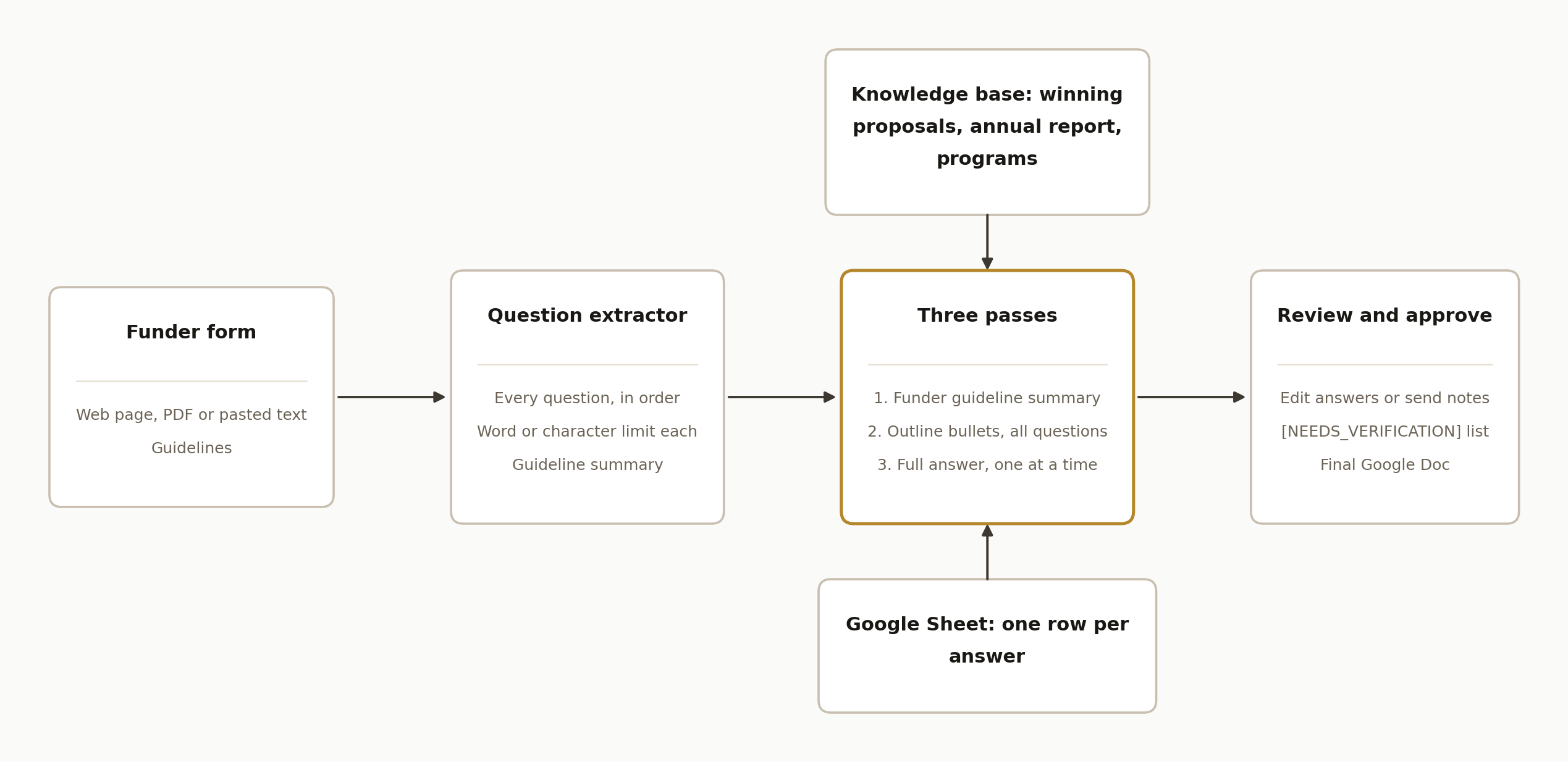
The drafter calls a language model through its API at each step. The model is the writer. Everything else, which files it reads, which question it is on, what it already said, is the pipeline's job.
Step by step: how to build the grant drafter
Step 1: Build the knowledge base from your own files
Put the files that already won you money into one or a few Drive folders. The build we run started from seven awarded grant applications, the annual report, program information sheets, a board list and a testimonials file. The organization chose not to include unsuccessful proposals, because the funder's guidelines mattered more to them than learning from rejections.
An indexer walks those folders and stores each file's text in a KB Cache tab: file id, file name, extracted text, last modified date. Google Docs are read directly. PDFs and Word files are converted by copying them into Google Docs format, which the Drive API supports with its convert and ocr options (Drive API docs). OCR means scanned PDFs work too.
function extractPdfText(fileId) {
  let tempId = null;
  try {
    const copy = Drive.Files.copy(
      { title: "TEMP_CONVERT_" + Date.now(), mimeType: "application/vnd.google-apps.document" },
      fileId,
      { convert: true, ocr: true, ocrLanguage: "en" }
    );
    tempId = copy.id;
    return DocumentApp.openById(tempId).getBody().getText();
  } finally {
    if (tempId) { try { Drive.Files.remove(tempId); } catch (e) {} }
  }
}
Two details save you pain. Skip any file whose last modified date matches the cached row, so a reindex only converts what changed. And plan for the clock: an Apps Script run stops at 6 minutes (Apps Script quotas). The indexer stops itself at 5 minutes, saves the list of folders still to read, and schedules a trigger to pick up a minute later.
Step 2: Pull every question and its limit out of the funder's form
This is the step most people skip, and it decides whether the rest works. A model reads the funder's text and returns strict JSON: funder name, deadline, eligibility, a short guideline summary, and an application_questions list where each item carries its own word_limit or char_limit.
These are the extractor rules from the real build, trimmed:
You return ONLY valid JSON matching this schema exactly:
{ "funder_name": string, "deadline": string, "funding_amount": string,
  "eligibility_criteria": string[],
  "application_questions": [
    { "number": number, "question": string, "word_limit": number|null, "char_limit": number|null }
  ],
  "guidelines_summary": string, "raw_guidelines": string }

- Use empty string "" when a field is unknown. Never invent values.
- A "question" is anything the applicant must answer with prose, a number, a checkbox,
  an upload, or a date. Form fields like "Organization name", "Project start date",
  "Budget amount" all count as questions. Include them all.
- Preserve original wording verbatim. If the source uses outline numbering like
  "5.1", "5.2", "1.1 1.2 1.3", list sub-questions as separate items.
- If the source contains headings like "Step 1", "Step 2", these are sections,
  not questions. Extract the questions inside each step.
- word_limit and char_limit must be integers when stated, otherwise null.
  Recognize phrases like "300 words max", "2000 character limit".
That is how a form becomes 78 questions. The real funder form behind the 78 question run was organized into steps with numbered fields, and it asked for the charity number, the postal code of the main service area, the leader's name, fiscal year dates and income alongside the narrative questions. Every one of those is an answer someone has to write.
The gotcha we hit: on the first run against that form, the extractor came back with valid JSON and an empty question list, because the prompt did not recognize run together numbering like "1.1 1.2 1.3". The outline numbering rule above is the fix. Also, if the extractor ever returns zero questions, stop the grant in a "needs questions" status and tell someone. Never let it carry on and draft nothing.
Step 3: Pass one, the funder guideline summary
Before any answer is written, a first pass reads the extracted guidelines next to the most relevant files from your knowledge base and writes a briefing, not an application. The prompt asks for a grant snapshot, what this funder actually funds, the one program of yours that fits best, the narrative angle, likely rejection triggers, the information still missing, and a map of every question with its limit.
To choose which knowledge base files go in, a simple keyword score works. The first version asked a model to rank every chunk of every file, and it took 5 to 7 minutes per grant. Counting keyword overlap, with file names weighted three times, brought it under a second, with the same output shape.
function retrieveRelevant(query, topN) {
  const rows = rowsToObjects_(getSheet("KB Cache"));
  const keywords = keywordsOf(query); // lowercase, drop stopwords and words under 3 letters
  return rows
    .map(r => {
      const text = String(r.extracted_text).toLowerCase();
      const name = String(r.file_name).toLowerCase();
      let score = 0;
      keywords.forEach(w => {
        score += countOccurrences(text, w);
        if (name.includes(w)) score += 3;
      });
      return { file_name: r.file_name, text: String(r.extracted_text).slice(0, 4000), score };
    })
    .sort((a, b) => b.score - a.score)
    .slice(0, topN || 8);
}
Step 4: Pass two, outline bullets for every question at once
The second pass writes bullets, not prose, and it does all the questions in one call. Seeing the whole application at once is what stops repetition: the model decides which question owns which point before any sentence exists. Each block looks like this:
Q[NUMBER]: [VERBATIM QUESTION TEXT]
Limit: [word or character limit, or "none stated"]
Owns: [the unique angle this question covers that no other question covers]
Bullets:
  - [a discrete idea, fact, statistic, partner name, or example]
Sources: [knowledge base documents these bullets pull from]
The prompt ends with a cross question check: which answer carries the impact numbers, which carries the partner list, which carries the budget rationale, and where each duplicate point was moved. It also tells the model to pull every statistic verbatim from the knowledge base and to write [NEEDS_VERIFICATION: ...] instead of guessing.
Step 5: Pass three, the full answer, one question at a time
The third pass writes the prose, one question per model call, in order. Each call gets the outline, the current question with its limit, a few excerpts from past winning proposals for voice, and every answer already written, under a heading that says "PRIOR ANSWERS (do not repeat)".
Doing this one by one is slow on purpose. On the 78 question run, this pass took about 21 of the 26 minutes, roughly 16 seconds per question. It is also what makes answer 61 build on answer 12 instead of retelling it.
Because a run can outlast the 6 minute cap, the loop saves its place after every answer and hands off to a trigger when it gets close:
const TIME_BUDGET_MS = 4.5 * 60 * 1000;

while (state.done < state.total) {
  if (Date.now() - startedAt > TIME_BUDGET_MS) {
    updateGrant(grantId, { chunking_state_json: JSON.stringify(state) });
    ScriptApp.newTrigger("resumeStep3FromTrigger").timeBased().after(60 * 1000).create();
    return; // the trigger calls this function again and it continues from state.done
  }
  const q = questions[state.done];
  const answer = askModel(systemPrompt, renderPrompt(step3Template, {
    step2_output: outline,
    application_questions: formatQuestion(q, priorAnswers),
    past_proposal_examples: pastExamples,
  }));
  appendNarrative(grantId, q.number, q.question, answer); // one row, with word count
  priorAnswers.push({ number: q.number, answer });
  state.done++;
  updateGrant(grantId, { chunking_state_json: JSON.stringify(state) });
}
Time driven triggers are standard Apps Script (installable triggers). The 78 question run went through several of these handoffs and finished without an error.
Store answers as rows, not in one cell. The first version kept every answer inside one cell of the grant's row, and a long application ran into Google Sheets' 50,000 character limit for a cell. One row per answer (grant id, question number, question, answer, word count, created at) has no such ceiling, and the saved state shrinks to a counter.
The limits themselves are prompt rules: the system prompt says "If a limit is given, your answer must fit within it," and the third pass says "If you go over, cut. Never go under by more than 10 percent unless the question is trivially short." The word count is stored next to every answer so the reviewer sees it. In a five question test, the answers landed at 184 of 200, 296 of 300, 398 of 400 and 199 of 200 words. Treat the limit as something the draft is written to fit, and still check it before you paste into the portal.
Step 6: The placeholder rule for missing facts
This is the rule that makes the drafter trustworthy, and it sits at the top of the system prompt:
Never fabricate statistics, outcomes, partners, dates, or facts. If a number or fact
is not in the provided knowledge base, leave a [NEEDS_VERIFICATION: ...] placeholder
and continue, then list every placeholder at the end of the response.
In the five question test, the budget question came back with [NEEDS_VERIFICATION: budget amount] in place of a number, because no budget figure was in the files. That is the behaviour you want: a gap you can see beats a confident number nobody can source.
The same pattern also works for facts that are in your files but out of date. Old documents at this nonprofit still mentioned regions they no longer serve, and the drafts picked them up. The fix was a hard rule in the system prompt listing the only regions to name, "even if a knowledge base excerpt or past proposal mentions one." Fix the source files when you can, and add a guard like this for anything you cannot.
Write your voice rules into the same system prompt. The ones that made the biggest difference: do not start sentence after sentence with "We", mix long and short sentences, connect ideas with because, so and while, say each slogan once, and drop filler like "furthermore", "robust" and "leverage".
Step 7: Review, revise and approve
When the last answer is written, the grant moves to a "review" status and the team gets an email with a link. The reviewer reads all 78 answers on one page, in question order, each with its limit and word count.
Give the reviewer two ways to change things:
- Edit in place. Inline editing on each answer, with a live word and character count that flags when it goes over the limit. Edits save straight to that answer's row, and only while the grant is in review, so a redraft can never overwrite someone's hand edits mid flight.
- Send notes. Free text notes like "Q1 is too long" or "use the 2024 attendance number". The notes are stored with a revision count, the outline and guideline summary are kept so they are not paid for twice, and the answers are redrafted. Feed the notes and the current draft to a revision prompt that sorts each note into factual correction, tone, structure, addition, removal or ambiguous, touches only the questions it affects, and lists unclear notes back as questions instead of guessing.
Step 8: Assemble the 78 answers into a final document
Approval runs one last pass over the approved answers. Its first instruction is that the approved wording is final: preserve hand edits verbatim and only change a sentence if it physically cannot fit a hard limit. The prompt also gets a list of every hard limit by question number.
The output is one block per question, ready to copy into the funder's portal:
## Q[NUMBER]: [VERBATIM QUESTION TEXT]
Limit: [word or character limit, or "none stated"]
Format: [plain text, bulleted, numeric, single line]
Word count: [actual]
Character count: [actual]

[FINAL ANSWER, COPY-PASTE READY]
After the last question come three sections: a submission checklist (uploads, charity number, fiscal dates), outstanding items (every [NEEDS_VERIFICATION: ...] placeholder, listed with its question number), and a short submission summary. The script saves it as a Google Doc in a Drive folder per funder and grant, shares that folder with the grants team, and emails them the link.
Where it gets complicated
Portal only forms. Some funders publish the questions only inside their portal. The drafter takes pasted text or a PDF as well as a URL for exactly this reason. The 78 question form came in as text copied out of a portal.
Drive sharing links. People paste a full "Get link" URL, not a file id. Parse the id out of /d/{ID}/ and ?id={ID} patterns at the door, or PDF intake fails with an error that looks unrelated.
Who owns the output folder. The script runs as one Google account, so generated Docs land in that account's Drive. If nobody shares that folder with the grants team, every link in every email opens to a permission error, and the team concludes the drafter is broken when it is not.
Test runs that email real people. A full test run reaches "review" and sends the real notification. Add a dev mode setting that mutes email, and switch it on before any test.
Your files decide the quality. The drafter can only be as specific as what you feed it. Seven winning proposals and a current annual report gave it plenty to work with. If your strongest numbers live in someone's head, write them into a doc in the folder first.
What it looks like running
On the real 78 question application, the run took 26 minutes and 30 seconds of wall clock time from submission to "review", with all 78 answers drafted and no errors. Extraction took about a minute and a half, the guideline summary about a minute, the outline about two minutes, and the one at a time answers about 21 minutes.
The point is not that a model can write paragraphs. It is that the answers come from the organization's own programs and in its own voice, the gaps are marked instead of filled, and the person who used to be on question 61 at 11:52 is now reviewing a full draft. For how the overall system fits together at a higher level, see our earlier piece on automating nonprofit grant writing.
Frequently asked questions
Can AI write a grant application from my own documents?
Yes, if it reads them first. A grant drafter indexes your past winning proposals, annual report and program documents, retrieves the relevant ones for each funder, and drafts every answer from that material. Without that knowledge base, an AI chat only has general nonprofit language to work with, which is why its answers read as generic.
How long does it take to draft a full application?
On a real 78 question application, all 78 answers were drafted and ready for review in 26 minutes and 30 seconds. Most of that time is the final pass, which writes one answer at a time, about 16 seconds each, so every answer can see the ones before it. Shorter forms finish sooner.
Will it stay within the funder's word limits?
It is built to. The extractor pulls each question's word or character limit, and the drafting prompts tell the model to fit it and to cut if it runs over. In testing, answers landed at 184 of 200, 296 of 300, 398 of 400 and 199 of 200 words. Each answer shows its word count, so the reviewer can still check before submitting.
What happens when the drafter does not have a number?
It leaves a placeholder such as [NEEDS_VERIFICATION: budget amount] instead of inventing one, and the final document lists every placeholder with its question number. The reviewer fills those in before submitting. This rule sits at the top of the system prompt and applies to every pass.
What do I need to build this?
A Google account with Drive, Sheets and Apps Script, an API key for a language model, and a Drive folder of your own grant material. Apps Script runs are capped at 6 minutes, so the long steps need to save their place and resume from a trigger, as shown above.
Can a grant lead set this up without a developer?
The file gathering, the voice rules and the review are grant lead work. The indexer, extractor, resume triggers and review page take someone who writes code. Once it runs, the prompts live in a Sheet tab, so a grant lead can adjust the wording rules without touching code.
If you would rather have this running on your own files than build it, we set it up for nonprofits, wired to your Drive and your grants inbox, with the review page included. Book a 15 minute call and we will tell you in the first five minutes whether your applications map to this pattern, or browse our services first.
Sources
- 1.Files: copy, Drive API v2 (Google Workspace docs)developers.google.com
- 2.Quotas for Google services (Google Apps Script docs)developers.google.com
- 3.Installable triggers (Google Apps Script docs)developers.google.com
Want us to build this for you?
Nine questions, about 90 seconds. You see the revenue it is costing you, then pick a time. No pitch.
See your options