
An Epicor Prophet 21 integration works by putting a small adapter service between your order sources (web store, EDI, email, customer portals) and the P21 Middleware that your own server hosts. The adapter writes orders through the Transaction API and reads pricing and inventory through OData on a polling schedule. This guide is for wholesale distributors that already know they want sales orders to stop being re-keyed, and it covers what the P21 integration surface allows, where it limits you, and the custom build we would scope.
P21 order import automation is a service that takes order data from outside systems, validates it against customer, item and pricing rules, and creates the sales order in Prophet 21 without a person typing it in.
The problem it solves
In most distributors we talk to, orders arrive in five shapes: EDI, a web store, a customer portal export, a PDF or email, and a phone call that someone types in. Inside the office, a counter or inside-sales person re-keys each one into P21, and a second person checks stock and price by hand against what the website shows. Mistakes show up later as wrong ship-to addresses, wrong unit of measure, and quoted prices that do not match the customer contract.
The obvious question is which integration route to use. Here is how the real options compare for P21, based on what we could verify.
| Option | What it actually gives you | Main limit | Setup effort |
|---|---|---|---|
| Native Zapier or Make app | No listing confirmed for either | You fall back to a generic HTTP module anyway | Low, but you still own the API calls |
| iPaaS platform (for example iPaaS.com) | Prebuilt P21 connector and mapped flows | Flows rely on polling and manual sync because P21 does not push live events | Medium, plus a subscription |
| Scheduled Tasks export | Reports delivered on a schedule from P21 (Crystal Reports, SSRS, Report Studio) | Read-only, report-shaped, no order creation | Low |
| Epicor SDK customization | Epicor describes an SDK for personalizing P21 without touching application source (Prophet 21 Technology) | Lives inside P21, needs P21 developer skills and upgrade testing | Medium to high |
| Custom adapter on the middleware API | Order writes via Transaction API, reads via OData, full control over validation | You own monitoring and version testing | Medium |
For order import specifically, only the Transaction API route and the SDK can create orders, and the adapter route keeps your logic outside the ERP, which makes upgrades less painful.
What keeping your systems in sync is worth
Move the sliders to your own numbers. The defaults are only an example business, not client data.
Revenue from deals that stop slipping each year
$100,800
80 a month × 12 × 5% × 70% × $3000
- Deals kept a year
- 34
- 80 × 12 × 5% × 70%
- Staff cost of doing it by hand each year
- $9,100
- 5 hrs a week × $35/hr × 52 weeks
- Hours handed to the system each month
- 22 hrs
- 5 hrs a week × 52 ÷ 12
How the automation works
The adapter is a small service with its own database. It does not replace P21. It normalizes incoming orders, checks them, and hands clean ones to P21.
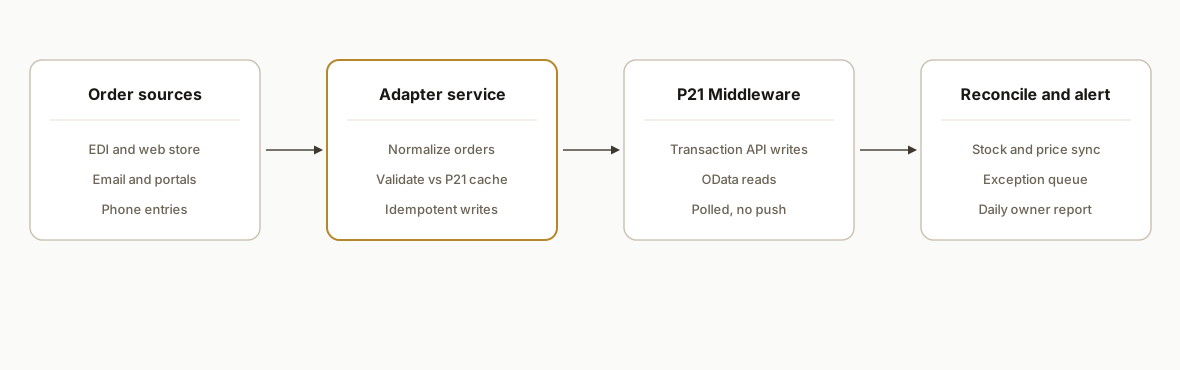
- Intake connectors: One small connector per source (EDI file drop, web store webhook, email parser). Each one converts to a single internal order shape and stores the raw payload for audit.
- Validation layer: Matches the customer, ship-to, item and unit of measure against data cached from P21, and flags anything it cannot match instead of guessing.
- P21 writer: Creates the sales order through the Transaction API using a service account, then records the P21 order number against the source order.
- Polling reader: Pulls item, price and availability data through OData on a schedule and pushes it to your web store or customer portal.
- Reconciliation and alerts: Compares what was received with what P21 holds and sends a short exception list to a named person each morning.
Step-by-step: how to build it
Step 1: Confirm the middleware is reachable
The P21 API lives on a P21 Middleware that your organization hosts. There is no public portal and no public sandbox, so the first task is working out with your IT contact where the middleware is exposed and whether the adapter can reach it over a VPN or a locked-down gateway. The base URL is specific to your instance.
# Replace with your own middleware host. Every instance differs.
export P21_BASE="https://p21-middleware.yourcompany.example"
curl -i "$P21_BASE/"
Gotcha: do not assume the API is exposed at all. In many installs it is internal only.
Step 2: Get a token and test it on your version
Auth is token based: you post a username and password to a security token endpoint and send the result as a Bearer header. Third-party sources disagree on the exact path (one shows a plain token path, another a v2 path), so we test both against your server and use whichever responds.
curl -s -X POST "$P21_BASE/api/security/token" \
  -H "Content-Type: application/json" \
  -d '{"username":"svc_integration","password":"REDACTED"}'
# If this fails, try the v2 path:
curl -s -X POST "$P21_BASE/api/security/token/v2" \
  -H "Content-Type: application/json" \
  -d '{"username":"svc_integration","password":"REDACTED"}'
Gotcha: create a dedicated service user with only the permissions the adapter needs, never a person's login.
Step 3: Build the read side with OData
Reads go through OData. We cache customers, ship-tos, items, units of measure and price data into the adapter database so validation does not hit P21 for every order line. The entity names and paths come from your instance, so we list them first rather than hardcoding.
import requests

def p21_get(path, token, params=None):
    r = requests.get(
        P21_BASE + path,
        headers={"Authorization": f"Bearer {token}"},
        params=params,
        timeout=60,
    )
    r.raise_for_status()
    return r.json()

# ODATA_ITEMS_PATH is discovered on your server during scoping
items = p21_get(ODATA_ITEMS_PATH, token, {"$top": 100})
Gotcha: rate limits are not documented in anything we could verify, so we page conservatively and add backoff.
Step 4: Write orders through the Transaction API
The Transaction API is the write path. Per the community documentation, it needs the UI server URL, which you obtain from a router endpoint, and it behaves more like a session than a simple POST. That documentation is unofficial, so we treat the first week as discovery on your version.
# Pseudocode shape of the write step. Field names are mapped to your P21 version.
order = normalize(source_order)
issues = validate(order, cache)
if issues:
    queue_for_review(order, issues)
else:
    ui_server = resolve_ui_server(P21_BASE, token)   # router lookup
    result = create_sales_order(ui_server, token, order)
    store_link(source_order.id, result.order_no)
Gotcha: make the write idempotent by storing the source order ID before the call and checking it first, so a retry never creates a second order.
Step 5: Poll pricing and inventory out to your channels
P21 does not push live events in anything we could confirm, so sync is polling. We run a short cycle for stock and a longer one for price lists, and only push changed rows to the web store.
changed = diff(previous_snapshot, p21_get(ODATA_STOCK_PATH, token))
for row in changed:
    webstore.update_stock(row.sku, row.available)
save_snapshot(current)
Gotcha: choose the interval from how fast stock really moves in your warehouse, not from what feels modern. Hourly is often enough for slow-moving catalogs.
Step 6: Add the exception queue and daily report
Anything that fails validation goes to a small review screen or a spreadsheet with the reason, the source document and a one-click retry. A scheduled message lists unmatched items, new customers and failed writes.
alerts:
  daily_exceptions:
    schedule: "07:00 weekdays"
    to: ["orders-lead@yourcompany.example"]
    include: [unmatched_items, unmatched_customers, failed_writes]
Gotcha: name an owner for the queue. An unattended exception list is just a new backlog.
Where it gets complicated
No sandbox. P21 has no public sandbox, so testing needs a test company or non-production environment on your side. If you only have production, we start read-only and keep order writes behind a manual approval switch until you are comfortable.
Unofficial documentation. The detailed API references we found are community maintained, and Epicor's own material sits behind its customer login. We build a discovery step into every scope and verify behavior on your exact version before promising a field mapping.
Middleware exposure. The API only works if you host and expose the middleware. That is a security conversation with your IT provider, not a coding task, and it can take longer than the build.
Polling, not events. Because there are no push events we could verify, sync is scheduled. Plan around short delays between a P21 change and your web store reflecting it, and show availability as a buffer, not a promise, if you oversell.
Pricing is the hard part. P21 pricing can depend on customer, contract, quantity break and unit of measure. Reproducing price logic outside P21 is risky, so where possible we read the price P21 returns rather than recomputing it.
Unit of measure and substitutions. Distributors sell by each, case and pallet, and customers use their own part numbers. The cross-reference table is usually the biggest cleanup item and it decides the match rate more than any code does.
What this actually changes
We have not run this specific build for a named client, so there are no results to quote. What we can say from the way these systems behave is structural: re-keying disappears for every order the adapter can match, your staff review only exceptions, and the website stops quoting stock that was true yesterday. The benefit scales with how many orders arrive in digital form and how clean your item cross-reference is. For background on how the SDK is positioned, see Epicor's own Prophet 21 Technology page. Cost and timeline depend on the number of order sources and how much pricing logic must be reproduced. A single-source order import is a matter of weeks, and each added source is incremental. We quote fixed scope after the discovery step, not before.
Frequently asked questions
Does Epicor Prophet 21 have an API?
Yes, but it is not a public cloud API. Prophet 21 exposes REST endpoints on a P21 Middleware that your own organization hosts, with v2, Entity, Interactive and OData surfaces described in third-party sources. The URL is specific to your instance, and there is no public developer portal or sandbox.
Can you create sales orders in P21 automatically?
The Transaction API is the route used for writes such as orders, while OData handles reads. The community documentation says it needs the UI server URL from a router endpoint. Because that documentation is unofficial, we confirm the exact behavior on your version before committing to a field mapping.
Does P21 work with Zapier or Make?
We could not confirm a native listing for either. You can still call the API from an HTTP module, but you own the token handling and error logic. An iPaaS platform with a P21 connector is another option, although those flows depend on polling.
Can P21 send webhooks when stock or price changes?
We could not confirm webhooks, and one iPaaS vendor states that Prophet 21 does not push live events. We design pricing and inventory sync as scheduled polling with change detection, which is reliable as long as the interval matches how fast your stock moves.
What are the API rate limits?
We could not verify any published rate limits, so we do not state one. In practice we page requests, cache reference data in the adapter, and add backoff, then measure the real ceiling on your server during discovery.
How long does a P21 integration take, and can my team maintain it?
A single order source usually fits in a few weeks once the middleware is reachable, and network access is often the slowest part. Your team can maintain it if we hand over documentation, logs and an exception queue, though most clients keep a small support arrangement for version upgrades.
If you run Prophet 21 and your team still re-keys orders or checks stock by hand, our custom AI integration work covers exactly this adapter pattern. We apply the same approach to other ERPs, as in our guide to Sage 100 order entry automation. Book a 20 minute call and we will tell you whether your middleware setup and order sources fit this pattern.
Sources
- 1.Prophet 21 Technologyepicor.com
Want us to build this for you?
Nine questions, about 90 seconds. You see the revenue it is costing you, then pick a time. No pitch.
See your options