
We built a production pipeline that keeps a Google Sheet live with Jackrabbit Class enrollments and attendance. It ran off the official Zapier triggers for new enrollments and a light Apps Script importer for attendance CSVs, so operations got a single Sheet coaches could trust without manual exports.
Jackrabbit Class to Google Sheets automation is: a Zapier powered enrollment log plus a scheduled CSV importer for attendance that continuously updates a deduped reporting Sheet.
The problem it solves
A kids activity studio asked for one live Sheet that always showed current enrollments and attendance, without staff exporting reports or copying grids. The Jackrabbit site highlights Zapier for automation and many reports can export to CSV, but there is no public REST documentation to wire direct calls. Zapier polling also adds a delay between an event and a row appearing.
| Process | Manual exports | Automated to Sheets |
|---|---|---|
| Enrollment log | Staff runs a report, downloads CSV, uploads to Drive, then copy-pastes into a Sheet. | Zapier Student Enrolled trigger appends rows to a Sheet within minutes. |
| Attendance | Staff runs Attendance report, exports to CSV, uploads to Drive, then merges into a tracker. | A time-driven Apps Script imports a fresh CSV and writes normalized rows. |
| Deduping | Ad hoc filters and occasional errors. | Deterministic dedup key: studentId + classId + enrolledAt. |
| Timeliness | Only up to date when someone remembers. | Near live feed for enrollments, scheduled import for attendance. |
Sources: Zapier lists official Jackrabbit Class triggers such as Student Enrolled and Absence Created and notes they poll on an interval, with Free plans checking about every 15 minutes zapier.com. Jackrabbit help docs confirm many reports and grids can be exported to Excel or CSV, and they describe the Attendance report surface help.jackrabbitclass.com.
How the automation works
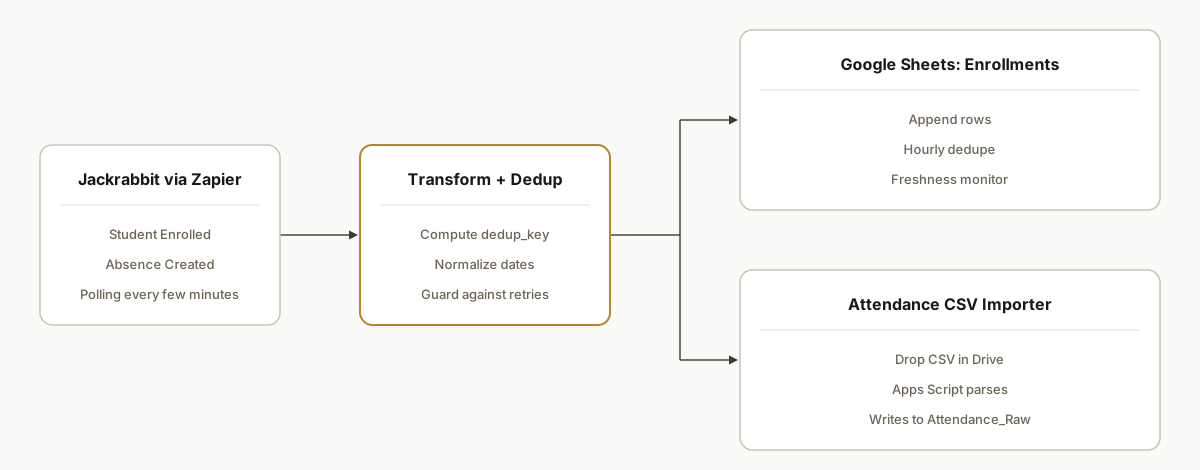
We split the data paths: enrollments flow in via Zapier triggers into a Sheet. Attendance uses either the Absence Created trigger or a scheduled CSV importer when a full rollup is needed.
- Zapier: Jackrabbit Class triggers: We use Student Enrolled to append rows to the Enrollments tab in Google Sheets. Absence Created can write to Attendance Raw when needed. Zapier polls on an interval, so expect a short delay rather than instant webhooks zapier.com.
- Transform and dedup: A Code by Zap step computes a stable dedup_key combining student, class, and timestamp. In Sheets, a small Apps Script keeps only the latest copy per key.
- Google Sheets as the source of truth: One workbook with Enrollments, Attendance Raw, and a Reporting tab. Google Sheets supports up to 10 million cells per spreadsheet, which is ample for a season of class data if you archive yearly support.google.com.
- Attendance CSV importer: Where the trigger coverage is limited or a full range is required, staff exports the Attendance report to CSV and drops it in a Drive folder. A scheduled Apps Script parses and appends normalized rows.
Step-by-step: how to build it
1) Create the Google Sheet structure
Set up tabs: Enrollments, Attendance_Raw, and Reporting. Add a header row in Enrollments with the fields you want visible to staff, including a dedup_key column.
Enrollments headers
student_id,class_id,class_name,student_name,enrolled_at,location,tuition,dedup_key
Key detail: keep headers stable. Downstream formulas and code reference these names.
2) Build the Zapier enrollment sync
In Zapier, create a Zap: Jackrabbit Class: Student Enrolled trigger, then Code by Zap to compute the dedup key, then Google Sheets: Create Row.
// Code by Zap: inputData fields come from the trigger mapping
const studentId = inputData.student_id;
const classId = inputData.class_id;
const enrolledAt = new Date(inputData.enrolled_at).toISOString();
return {
  student_id: studentId,
  class_id: classId,
  enrolled_at_iso: enrolledAt,
  dedup_key: `${studentId}:${classId}:${enrolledAt}`
};
Gotcha: Zapier uses polling. On Free plans the Jackrabbit app checks roughly every 15 minutes, so rows appear with a delay zapier.com.
3) Enforce deduplication in Google Sheets
Add a lightweight Apps Script bound to the Sheet that retains the latest row per dedup_key and removes older duplicates.
function dedupeEnrollments() {
  const ss = SpreadsheetApp.getActive();
  const sh = ss.getSheetByName('Enrollments');
  const values = sh.getDataRange().getValues();
  const header = values.shift();
  const idx = header.indexOf('dedup_key');
  const map = new Map();
  values.forEach((row, i) => {
    const key = row[idx];
    map.set(key, i + 2); // store last seen row number
  });
  const rowsToDelete = [];
  const seen = new Set();
  values.forEach((row, i) => {
    const key = row[idx];
    const rowNum = i + 2;
    if (rowNum !== map.get(key) && !seen.has(rowNum)) rowsToDelete.push(rowNum);
  });
  rowsToDelete.reverse().forEach(r => sh.deleteRow(r));
}
Schedule this on a time-driven trigger to run hourly. Apps Script simple triggers have a 6 minute execution window, so process one sheet per run to stay within limits developers.google.com.
4) Capture attendance via trigger or CSV
If you only need absences as they are recorded, add a second Zap: Jackrabbit Class: Absence Created to Google Sheets: Append Row in Attendance_Raw.
For a full attendance rollup or periods beyond trigger coverage, export the Attendance report to CSV from Jackrabbit and place it in a Drive folder your script watches.
function importAttendanceCsv() {
  const folder = DriveApp.getFolderById(PropertiesService.getScriptProperties().getProperty('ATTENDANCE_FOLDER_ID'));
  const files = folder.getFilesByType(MimeType.CSV);
  const ss = SpreadsheetApp.getActive();
  const sh = ss.getSheetByName('Attendance_Raw');
  while (files.hasNext()) {
    const f = files.next();
    const csv = Utilities.parseCsv(f.getBlob().getDataAsString());
    // assume first row is headers straight from Jackrabbit report
    csv.slice(1).forEach(r => sh.appendRow(r));
    f.setTrashed(true); // archive after import
  }
}
Reference: Jackrabbit documents the Attendance report and report export behavior in help articles help.jackrabbitclass.com.
5) Build the Reporting tab
Use QUERY to aggregate enrollments and attendance into a simple class roster view staff can filter by date.
=QUERY(
  {Enrollments!A2:H, Attendance_Raw!A2:Z},
  "select Col3, count(Col1) where Col5 >= date '2026-01-01' group by Col3 label count(Col1) 'Enrollments'",
  0
)
Keep the Reporting tab read-only for staff. If you need a pivot by week, wrap the source with a helper that normalizes dates to week starts.
6) Add a freshness monitor
We add a tiny Apps Script to alert if no new enrollment rows appear for a period, which usually means a Zap credential has expired.
function checkFreshness() {
  const sh = SpreadsheetApp.getActive().getSheetByName('Enrollments');
  const lastRow = sh.getLastRow();
  if (lastRow < 2) return;
  const enrolledAtCol = sh.getRange(1, 5).getValue() === 'enrolled_at' ? 5 : 3; // adjust if needed
  const lastVal = sh.getRange(lastRow, enrolledAtCol).getValue();
  const hours = (Date.now() - new Date(lastVal).getTime()) / 36e5;
  if (hours > 24) MailApp.sendEmail(Session.getActiveUser().getEmail(), 'Jackrabbit Sheet stale', `Last enrollment ${hours.toFixed(1)}h ago.`);
}
Schedule it daily. This catches silent Zap disconnections before coaches notice missing names.
Where it gets complicated
No public REST docs. We did not rely on a direct API. We used the official Zapier app for real-time events and CSV exports for batch. If you need fields Zapier does not expose, plan a CSV path.
Polling not push. Zapier checks on an interval. On Free plans that is about every 15 minutes, so expect a several minute delay before rows appear zapier.com.
Field coverage is scoped. Zapier's Student Updated trigger only watches specific fields. Some updates do not fire. Build your Sheet around create events and batch fixes, not perfect change streams zapier.com.
Report export variability. Not every Jackrabbit report has an Export button and formats vary between Table and Grid. Confirm the Attendance report and any other report you plan to ingest includes a usable CSV help.jackrabbitclass.com.
Sheet scale and archiving. A single Google Sheet supports up to 10 million cells. Archive to a new file each season to keep performance snappy as rows grow support.google.com.
What this actually changes
In production this let a kids activity studio stop exporting enrollments and attendance by hand. Coaches used one Sheet that updated itself throughout the day. The value was structural: enrollments flowed in continuously through Zapier and attendance either appended by trigger or imported in one click via CSV. The Sheet stayed healthy by design with dedup keys, a freshness check, and seasonal archives. Zapier's polling interval on Free is about 15 minutes, which set expectations for when rows appear zapier.com.
Frequently asked questions
Does Jackrabbit Class have an API I can call directly?
Jackrabbit highlights Zapier for automation and publishes embeddable class listings. We did not find public REST documentation, so we did not rely on a direct API. We bridge using the official Zapier triggers plus CSV exports for batch loads.
Can this sync in real time?
It is near real time for enrollments. Zapier uses polling, not webhooks. On Free plans the Jackrabbit app checks roughly every 15 minutes. In practice rows appear within several minutes. For attendance, either use the Absence Created trigger or a scheduled CSV importer for full rollups.
How do you prevent duplicate rows?
We compute a stable dedup_key from student_id, class_id, and enrolled_at and enforce it in Sheets with a small Apps Script. If a Zap retries or a CSV contains repeat rows, the deduper keeps the newest copy and removes older duplicates safely.
What does this cost monthly?
Google Sheets is free within generous limits. You pay Zapier for the triggers and tasks plus a one-time build. There is no additional runtime infrastructure. If you add a CSV importer, Apps Script runs inside your Google account at no extra vendor cost.
Can a non-technical owner set this up?
Many owners can build the basic Zap into Google Sheets. The dedup, attendance CSV importer, and freshness monitor require Apps Script. We normally ship the full setup in a short engagement and hand off with a simple runbook so your team can operate it.
If you want this running for your classes with a Sheet your staff trusts, we have shipped this exact setup. See our related piece on broader Jackrabbit automations and CRM flows in Jackrabbit Class API, CRM, Waitlist Automation. Or browse our workflow automation services and book a quick call.
Want us to build this for you?
Nine questions, about 90 seconds. You see the hours it is costing you, then pick a time. No pitch.
Get your free assessment