
We bridge Jackrabbit Class revenue into QuickBooks Online with item-level detail by combining scheduled CSV exports or Zapier events with a deduping ledger and a mapper that posts the correct sales documents. It eliminated manual re-entry and fixed month-end mismatches for a kids activity studio on Jackrabbit and QuickBooks Online.
Definition: Jackrabbit to QuickBooks revenue sync is an automation that transforms Jackrabbit tuition and payment data into detailed, deduplicated accounting entries in QuickBooks Online without relying on Jackrabbit's summary-only export.
The problem it solves
The native Jackrabbit QuickBooks export is summary-only by Category 1. It does not send individual transactions or family names, which blocks reconciliation and forces bookkeepers to re-enter tuition and payments in QuickBooks for proper AR detail.
| Workflow | Manual process | Automated bridge |
|---|---|---|
| Data pull | Run Revenue or Payments reports. Export CSV. Hand-sort by class or family. | Scheduled CSV export or Zapier feed captures rows continuously. |
| Mapping | Decide accounts and products per row each time. | One-time map: Category 1 to income items, classes, and locations. |
| Entry in QBO | Create invoices or sales receipts by hand. Apply payments manually. | Post cleaned entries to QuickBooks Online with idempotent keys. |
| Reconciliation | Chase down duplicates and date mismatches. | Ledger prevents duplicates and aligns dates and memos. |
| Month-end | Rebuild detail to explain the summary batch. | Drillable entries already exist with family context. |
What automatic invoicing is worth
Move the sliders to your own numbers. The defaults are only an example business, not client data.
Your own estimate. A job that creates its own invoice cannot be forgotten, but a wrong rate can still slip through.
Revenue billed each year that slips through today
$40,320
400 a month × $350 × 3% leaked × 80% closed × 12 months
- Staff cost of doing it by hand each year
- $10,920
- 6 hrs a week × $35/hr × 52 weeks
- Hours handed to the system each month
- 26 hrs
- 6 hrs a week × 52 ÷ 12
How the automation works
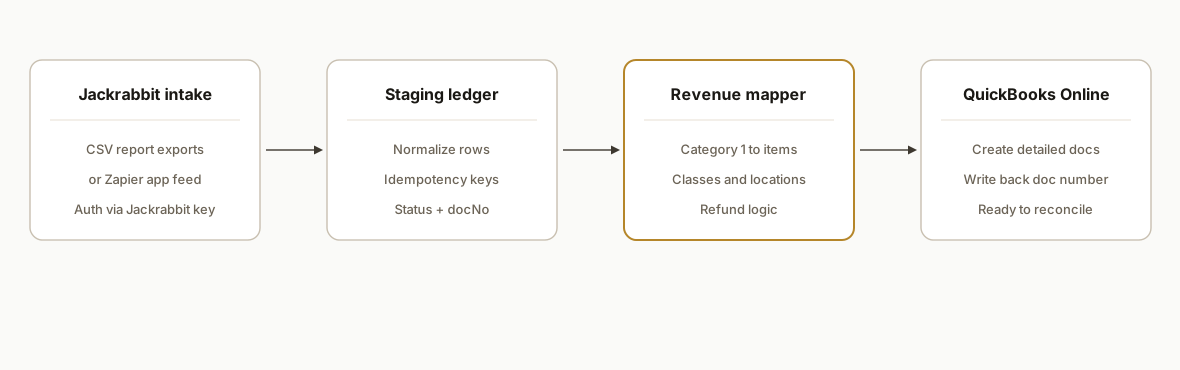
We use Jackrabbit's real integration surfaces and exports to collect revenue data, normalize it into a staging ledger, map Category 1 to QuickBooks items and classes, then post detailed entries to QuickBooks Online. Zapier is supported for near-real-time capture; Make.com requires HTTP modules since it has no native Jackrabbit app.
- Jackrabbit intake: Two sources: table-style report exports to CSV or the official Zapier app authenticated with an API key from Settings. Both provide the revenue facts we need when the native QuickBooks export falls short.
- Staging ledger: A Google Sheet or database stores normalized rows and a composite idempotency key. This prevents duplicate postings and enables backfills safely.
- Revenue mapper: A small service translates Category 1 and memo fields into QuickBooks products, classes, and locations. Refunds and partials route to the correct document type.
- QuickBooks output: Entries are created via the official QuickBooks Online connector or API according to client accounting policy. We record the posted doc number back on the ledger.
Step-by-step: how to build it
1) Define scope and the chart-of-accounts map
Decide what you will post: invoices vs sales receipts, how to handle discounts, and which income items correspond to Jackrabbit Category 1. Jackrabbit's native QuickBooks export is summary-only by Category 1 and omits per-transaction detail and names, so capture detail here.
// mapping.js
export const CATEGORY_TO_ITEM = {
  "Recreational": { itemName: "Tuition: Recreational", class: "Rec" },
  "Competitive":  { itemName: "Tuition: Competitive", class: "Team" },
  "Registration": { itemName: "Fees: Registration", class: "Admin" }
};
Key gotcha: lock this map before backfills so historical postings match reports.
2) Ingest CSV exports or enable Zapier capture
From Jackrabbit, run table-style reports and export to CSV or authenticate the official Zapier app using the API key in Settings. Make.com has no native Jackrabbit app, so use its HTTP module only when you already have an accessible source.
// Apps Script: parse an uploaded CSV and normalize
function ingestCsv_(blob, sheetName) {
  const csv = Utilities.parseCsv(blob.getDataAsString());
  const [header, ...rows] = csv;
  const idx = Object.fromEntries(header.map((h,i)=>[h.trim(), i]));
  const norm = rows.map(r => ({
    txn_date: r[idx["Date"]],
    family: r[idx["Family"]],
    amount: parseFloat(r[idx["Amount"]] || 0),
    category1: r[idx["Category 1"]] || "",
    memo: r[idx["Memo"]] || "",
  }));
  const sh = SpreadsheetApp.getActive().getSheetByName(sheetName);
  const out = norm.map(n => [n.txn_date, n.family, n.amount, n.category1, n.memo, makeKey_(n), "PENDING", ""]);
  sh.getRange(sh.getLastRow()+1,1,out.length, out[0].length).setValues(out);
}
function makeKey_(n){
  return [n.txn_date, n.family, n.amount.toFixed(2), n.category1, n.memo].join("|");
}
Key gotcha: keep column headers stable. Jackrabbit report exports support CSV, Excel, and PDF.
3) Build a deduping ledger with status columns
Add columns for idempotency key, status, and posted doc number. Only rows with unique keys proceed to posting.
// Apps Script: pick unposted rows
function getPending_() {
  const sh = SpreadsheetApp.getActive().getSheetByName("Ledger");
  const values = sh.getDataRange().getValues();
  const hdr = values.shift();
  const idx = Object.fromEntries(hdr.map((h,i)=>[h,i]));
  return values.filter(v => v[idx.Status] === "PENDING").map(v => ({
    row: values.indexOf(v)+2,
    txn_date: v[idx.Date],
    family: v[idx.Family],
    amount: v[idx.Amount],
    category1: v[idx["Category 1"]],
    memo: v[idx.Memo],
    key: v[idx.Key]
  }));
}
Key gotcha: keys must be stable across backfills. Do not include volatile values.
4) Map Jackrabbit rows to accounting payloads
Translate Category 1 to the correct item and class. Decide document type based on amount sign or business rules.
import { CATEGORY_TO_ITEM } from './mapping.js';

function toAccountingPayload_(row){
  const map = CATEGORY_TO_ITEM[row.category1] || CATEGORY_TO_ITEM["Recreational"];
  const isRefund = row.amount < 0;
  return {
    docType: isRefund ? "refund" : "sales_receipt",
    txnDate: row.txn_date,
    customer: row.family,
    line: [{
      itemName: map.itemName,
      class: map.class,
      amount: Math.abs(row.amount),
      description: row.memo
    }],
    memo: row.memo,
    key: row.key
  };
}
Key gotcha: refunds and partials must post to the correct document type to reconcile.
5) Post to QuickBooks Online, then write back the doc number
Use the official QuickBooks Online connector or API to create documents, then stamp the posted doc number on the ledger row.
// Apps Script: generic poster (implementation uses your connector)
function postAndStamp_(payload, row){
  const resp = UrlFetchApp.fetch(PropertiesService.getScriptProperties().getProperty('POST_URL'), {
    method: 'post',
    contentType: 'application/json',
    payload: JSON.stringify(payload),
    muteHttpExceptions: true
  });
  const ok = resp.getResponseCode() >= 200 && resp.getResponseCode() < 300;
  const docNo = ok ? JSON.parse(resp.getContentText()).docNo : '';
  const sh = SpreadsheetApp.getActive().getSheetByName("Ledger");
  sh.getRange(row, 7).setValue(ok ? "POSTED" : "ERROR");
  sh.getRange(row, 8).setValue(docNo);
}
Key gotcha: never post without first checking the ledger for an existing doc number.
6) Schedule it and add a safe backfill mode
Create a time-based trigger in Apps Script to process new rows hourly. Add a DRY_RUN flag for backfills so you can verify counts before posting.
function schedule_(){
  ScriptApp.newTrigger('runOnce')
    .timeBased().everyHours(1).create();
}
function runOnce(){
  const DRY_RUN = PropertiesService.getScriptProperties().getProperty('DRY_RUN') === 'true';
  getPending_().forEach(r => {
    const payload = toAccountingPayload_(r);
    if (DRY_RUN) return; // skip posting in dry-run
    postAndStamp_(payload, r.row);
  });
}
Key gotcha: triggers run as the installer. Document who owns the automation.
Where it gets complicated
- Jackrabbit's native QuickBooks export is summary-only: It groups by Category 1 and does not include individual transactions or names. Our bridge exists to restore drillable detail in QuickBooks.
- No public events API: Jackrabbit does not offer a public web service for events. If you need programmatic event data, plan on exports or Zapier where available.
- Make.com has no native Jackrabbit app: When teams prefer Make, use its HTTP module only if you already have a reachable source. Otherwise use Zapier's official app.
- Embeds are not data feeds: The basic Class Listings Table has a fixed column order and is meant for websites, not accounting. Do not scrape it for revenue.
- Duplicates and corrections: Late voids, refunds, and partials need deterministic keys and reversal logic to avoid double-posting. We key on date, family, amount, category, and memo.
- Dates and cutoffs: Align report export cutoffs with QuickBooks close dates to avoid off-by-one day postings in different time zones.
What this actually changes
For a kids activity studio on Jackrabbit Class and QuickBooks Online, this bridge replaced end-of-day re-entry with a continuous, idempotent sync. The bookkeeper reviewed exceptions instead of rebuilding detail from a summary batch, and month-end close stopped slipping.
One context point: Intuit reports that QuickBooks Online has more than 8 million subscribers, making it a high-leverage destination for automation across small businesses. Source: Intuit investor communications, 2024.
Frequently asked questions
Does Jackrabbit have an API I can post payments from?
Jackrabbit does not offer a public API or web service. For automations, we use supported surfaces: table-style report exports and the official Zapier app, which authenticates with an API key in Settings.
Can Jackrabbit connect directly to QuickBooks Online?
Jackrabbit's native QuickBooks export sends summary totals by Category 1 and does not include individual transactions or names. Our bridge posts detailed entries to QuickBooks Online so you can reconcile without manual re-entry.
Do I need Zapier or can this run on exports only?
Both work. Zapier gives near-real-time capture. Scheduled CSV exports are reliable for daily or hourly posting. Make.com has no native Jackrabbit app; use its HTTP module only when you already have a source.
How do you prevent duplicates?
We use a staging ledger with a composite idempotency key and write back the posted QuickBooks document number. The poster checks for an existing doc before creating anything new.
Can this run daily without a developer watching it?
Yes. A time-based trigger processes new rows, and a DRY_RUN flag supports safe backfills. We expose health checks and a small dashboard so non-technical staff can see counts and errors.
What does this cost monthly?
Infrastructure is light. Costs are typically Zapier task usage plus hosting for the poster. Build effort is the primary cost, especially the mapping and reconciliation rules.
If you run Jackrabbit and need drillable revenue in QuickBooks without re-entering data, we built and shipped this bridge in production and can adapt it to your chart, classes, and refund rules. See our related guide on Jackrabbit to Google Sheets automation, our broader workflow automation services, and book a short call to scope your exact setup.
Want us to build this for you?
Nine questions, about 90 seconds. You see the revenue it is costing you, then pick a time. No pitch.
See your options