
A MASterMind integration is a read-mostly adapter that pulls account, zone and contract data out of the central station platform on a schedule, normalizes it, and writes it into your CRM and billing system without anyone re-keying it. This guide is for central station operators and alarm dealers who already know they need the sync and want to know what the platform will let them reach, what stays locked, and what a custom build looks like. We cover the verifiable facts, the adapter pattern we use, the steps, the gotchas, and honest cost and timeline ranges.
One correction before anything else. The query often shows up as "Bold MASterMind," but MASterMind is made by MAS, a Honeywell brand. Bold Group makes Manitou, Stages and Managely. We found no source saying the two are one product or integrate with each other, so everything below is about MASterMind on its own.
What is MASterMind integration?
MASterMind integration means moving data between the MAS central station and dealer suite and the other systems you run, typically a CRM, an accounting or billing package, and a ticketing or field service tool. MAS describes MASterMind as an enterprise suite that automates billing, service, job management and monitoring. That bundling is the first thing to understand, because it means some of what you want to sync may live inside MASterMind rather than beside it.
The problem it solves
In a typical dealer or central station, the monitored account is the source of truth. The salesperson works in a CRM that has never heard of the panel, the accountant works in a billing or accounting tool that only sees invoices, and a dispatcher or service coordinator sees zones and contacts only inside the monitoring platform. Someone ends up copying account changes, new contacts, cancellations and RMR (recurring monthly revenue) figures between screens, usually at month end.
The failure mode is quiet. A cancelled account keeps billing, a new emergency contact never reaches the CRM, or a sales team pitches an upgrade to a customer whose zones show a chronic trouble condition. The question is which path into the data you can actually use.
| Option | What it gives you | Limits we can verify | Typical effort |
|---|---|---|---|
| Vendor partner integrations | Certified links such as video retrieval through a partner | MAS keeps a partner and integrations list; for anything not on it, expect to contact MAS or Honeywell | Weeks of vendor coordination, not engineering |
| MASXML protocol | Machine messaging used by central station and device platform partners | We found no evidence it is a general CRM or billing sync API | Only relevant if your use case is signal or device traffic |
| Zapier or Make | Quick no-code triggers | We found no MASterMind listing for either | Not available as a starting point |
| Scheduled reports or exports | Flat files you can ingest | Whether your install can schedule or email exports is unconfirmed; ask your MAS contact | Days if available |
| Custom adapter (our pattern) | Normalized sync into CRM and billing with review and audit | Depends on which input path MAS confirms for your install | Roughly 3 to 6 weeks, see below |
The honest summary: the integration surface that is documented publicly is partner-oriented. We found no public MASterMind API documentation, base URL, auth type, CRM connector or zone-data field reference, so treat the exposed-versus-locked line as something to confirm in writing with MAS before you commit to a design.
What automatic invoicing is worth
Move the sliders to your own numbers. The defaults are only an example business, not client data.
Your own estimate. A job that creates its own invoice cannot be forgotten, but a wrong rate can still slip through.
Revenue billed each year that slips through today
$40,320
400 a month × $350 × 3% leaked × 80% closed × 12 months
- Staff cost of doing it by hand each year
- $10,920
- 6 hrs a week × $35/hr × 52 weeks
- Hours handed to the system each month
- 26 hrs
- 6 hrs a week × 52 ÷ 12
How the automation works
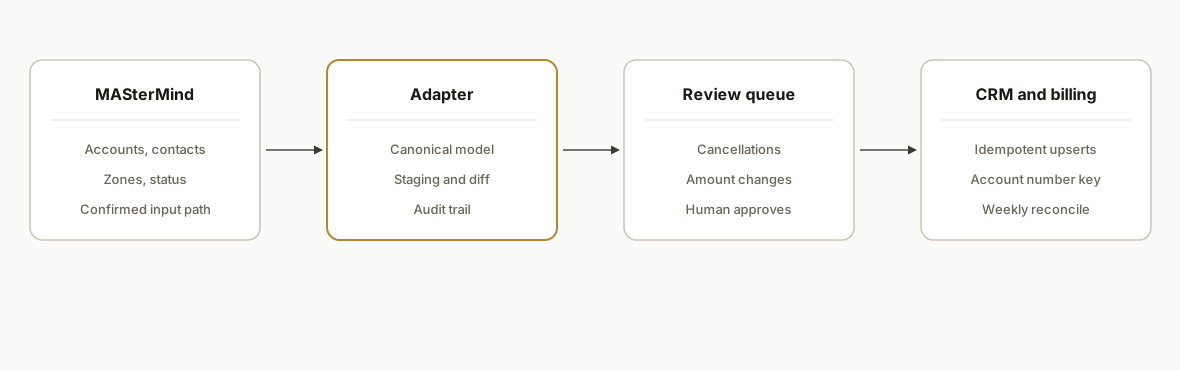
Our standard pattern for a platform like this puts a thin adapter between the monitoring system and everything else, so that the input path can change without touching the CRM or billing logic. The adapter reads, normalizes into a canonical account model, stages the result, and only then writes downstream.
- Input connector: Whatever path MAS confirms for your install: a sanctioned export, a partner-style feed, or, as a last resort, assisted browser automation against the dealer interface. It is the only part that knows MASterMind exists.
- Canonical account model: A small schema holding account number, site address, contacts, zone list, plan or contract, and status. Every downstream system maps from this, never from raw MASterMind fields.
- Staging and diff: A Postgres table keeps the last known state per account. Each run compares new input to staged state and emits only changes.
- Review queue: Cancellations, billing amount changes and anything touching RMR route to a human before posting. Contact edits and notes flow straight through.
- Downstream writers: One writer for the CRM, one for the billing or accounting tool, each idempotent so a rerun never duplicates a record.
Step-by-step: how to build it
Step 1: Confirm the input path in writing
Before any code, ask MAS or Honeywell for three things: API or export documentation for your version, whether your dealer account can schedule exports, and whether the release you run includes anything affecting access. Recent releases are dealer-facing; for example, version 6.54.01 lists Dealer Multi-Factor Authentication and Contact Management Enhancements. Multi-factor authentication matters here, because it can break any unattended login approach, so ask for a service credential path instead of assuming one exists.
Step 2: Define the canonical model
Write the schema before connecting anything. Keep it small and boring.
CREATE TABLE account_state (
  account_key    text PRIMARY KEY,   -- MASterMind account number, stored as text
  site_name      text NOT NULL,
  site_address   text,
  status         text NOT NULL,      -- active, on_test, cancelled
  monthly_amount numeric(10,2),
  contacts       jsonb NOT NULL DEFAULT '[]',
  zones          jsonb NOT NULL DEFAULT '[]',
  source_hash    text NOT NULL,      -- hash of normalized payload
  last_seen_at   timestamptz NOT NULL
);
Store the account number as text. Leading zeros and mixed formats are common in alarm account numbering, and numeric columns silently destroy them.
Step 3: Build the input connector behind an interface
The connector implements one function: return normalized account records. Everything else depends on that contract, so swapping an export for a partner feed later is a one-file change.
connector:
  type: scheduled_export      # or partner_feed, or assisted_browser
  schedule: "0 2 * * *"       # nightly, off-peak
  on_failure: alert_and_hold  # never write partial data downstream
  credentials: secrets_manager
Step 4: Diff against staged state
Hash each normalized record and compare to the stored hash. Only changed accounts proceed. This keeps downstream API usage low and gives you a natural audit trail of exactly what changed and when.
Step 5: Route changes by risk
routing:
  auto_apply: [contact_added, contact_edited, note_added, zone_label_changed]
  require_review: [status_cancelled, monthly_amount_changed, account_created]
  never_auto: [account_deleted]
Billing-affecting changes wait for approval. Everything else applies automatically.
Step 6: Write downstream idempotently
Use the account number as the external key in both the CRM and the billing tool. Upsert on that key, never insert. Record the downstream record ID in the staging table so a rerun after a partial failure resumes cleanly.
Step 7: Reconcile weekly
Run a report listing accounts present in MASterMind but missing downstream, and the reverse. Drift always appears eventually, and the reconciliation report is how you catch it before month end.
Where it gets complicated
The input path is the whole project. Everything above is routine engineering except the first connector. If MAS offers a documented export or feed for your install, the build is straightforward. If it does not, the fallback is assisted browser automation, which is slower, more fragile and needs your explicit sign-off.
Billing may already live inside MASterMind. Because the suite bundles billing, service and job management, you may be syncing to a second billing system that overlaps with the first. Decide up front which system owns invoicing, or you will build a sync that fights itself.
Integrations are partner programs, not self-serve. The partner list shows what is certified. OpenEye documents its video link as retrieving video through OpenEye Web Services and viewing it natively in MASvideo, which is a good example of a scoped, vendor-configured integration. It does not imply a general data API.
Accounting connectors may be dated. Older coverage of Bold products mentions QuickBooks tie-ins through a third-party package, and SedonaOffice came up in accounting sync work. None of that is a MASterMind confirmation, so do not assume a native accounting bridge exists.
Alarm data is sensitive. Zone lists, access codes and contact call trees can create real physical security risk if leaked. Store only the fields downstream systems need, keep passcodes out of the CRM entirely, and log every write.
What this actually changes
We do not have measured results to report for this specific platform, and we will not invent them. What the pattern changes is structural: account changes made in the monitoring system stop depending on someone remembering to copy them, billing-affecting changes get a human check instead of a month-end surprise, and the weekly reconciliation report turns silent drift into a short list. The value is fewer billing errors and cleaner customer records, and it scales with your account count rather than with headcount.
Cost and timeline
These are our scoping ranges for planning, not measured outcomes. If MAS confirms a documented export or feed, expect roughly 3 to 4 weeks for a one-direction sync into one CRM and one billing tool. If the connector must be built around the dealer interface, plan for 5 to 6 weeks and a maintenance retainer, because interface changes will occasionally break it. Third-party running costs are usually small compared with the build. Vendor coordination with MAS is the main schedule risk, so start that conversation first.
Frequently asked questions
Does MASterMind have a public API?
We could not confirm one. We found no public documentation, base URL or auth details. MASterMind does support the MASXML protocol used by certain central station and device partners, but we saw no evidence it is a general CRM or billing sync API. Ask MAS or Honeywell for documentation for your version.
Is MASterMind the same as Bold Manitou?
No. MASterMind is from MAS, a Honeywell brand. Manitou, Stages and Managely come from Bold Group. We found no source saying they are one product or integrate with each other, so plan any integration separately for each platform.
Can I connect MASterMind with Zapier or Make?
We found no MASterMind listing for either tool, so do not plan around a ready-made connector. A custom adapter that stages and normalizes data first is more reliable for account, zone and billing data than a chain of simple triggers.
Can MASterMind sync to QuickBooks or another billing system?
Unconfirmed. MASterMind bundles billing, service and job management, so billing may live inside it, and whether it syncs externally is something to verify with MAS. Older coverage of Bold products referenced QuickBooks through a third party, which does not confirm anything for MASterMind.
How long does a MASterMind to CRM sync take to build?
Our planning range is about 3 to 4 weeks if a documented export or feed is available, and 5 to 6 weeks if the connector has to work through the dealer interface. Confirming the input path with MAS is the step that moves the schedule most.
Can a non-developer set this up?
The design and review rules are something an operations manager can own, but the connector, staging database and idempotent writers need an engineer. After handoff, day-to-day work is mostly approving flagged changes and reading the weekly reconciliation report.
If you run MASterMind and your CRM and billing still depend on copy and paste, we can scope the adapter around whatever input path MAS confirms. See our custom AI integration services, the related walkthrough on SedonaOffice to QuickBooks, or book a 20 minute call and bring your MASterMind version and the systems you need it to feed.
Sources
- 1.buildings.honeywell.combuildings.honeywell.com
- 2.mas vendor partners integrationsbuildings.honeywell.com
- 3.MAS announces release of MASterMind v. 6.54.01honeywell.com
- 4.answers.openeye.netanswers.openeye.net
Want us to build this for you?
Nine questions, about 90 seconds. You see the revenue it is costing you, then pick a time. No pitch.
See your options