
An MRI Software API integration is a scheduled, partner-keyed connection that reads lease, charge and owner-reporting data out of MRI and writes it into your CRM, accounting tool or reporting layer, so nobody retypes records between systems. Rex Automaton builds these syncs for commercial and multifamily operators who run MRI as the system of record and everything else around it. This guide covers how MRI access actually works, what is confirmed and what is not, and the architecture we use when we build it.
It is written for a director or VP at a mid-sized operator who already knows the sync has to exist and wants to know what MRI will and will not let them do.
The problem it solves
The decision is not whether to automate, it is which path can reach lease and charge data at all. Three questions narrow it quickly: does the destination need lease terms or charge schedules, or only accounting-model data; can it tolerate a polled refresh, since webhooks are unconfirmed; and do you already hold MRI partner credentials. The facts below come from MRI's published materials and third-party documentation, and anything we could not confirm is marked.
| Option | Pick it when | What stops it |
|---|---|---|
| MRI native reports and exports | A person reads the output and a lag is fine | CSV and scheduled-email export options are unconfirmed for your modules, and custom reports may not be real-time, per third-party documentation |
| Zapier or Make | Never, for core MRI | We found no native connector for core MRI commercial or multifamily products. The Zapier app we found is for MRI Vault (VaultRE), a different agency product, and the Make app is community-built for that same product |
| Unified API vendors | You only need accounting-model data in another tool | Apideck's coverage is accounting models only, and it still needs your MRI partner credentials |
| Custom build on the MRI partner API | You need leases or charges anywhere outside MRI | Needs an MRI agreement and partner key, a role-scoped user, and rate-limit discipline |
If the answer to the first question is lease terms or charge schedules, the table leaves one row standing, the custom build.
What keeping your systems in sync is worth
Move the sliders to your own numbers. The defaults are only an example business, not client data.
Revenue from deals that stop slipping each year
$100,800
80 a month × 12 × 5% × 70% × $3000
- Deals kept a year
- 34
- 80 × 12 × 5% × 70%
- Staff cost of doing it by hand each year
- $9,100
- 5 hrs a week × $35/hr × 52 weeks
- Hours handed to the system each month
- 22 hrs
- 5 hrs a week × 52 ÷ 12
How the automation works
MRI describes its MRI Information Exchange (MIX) as an open and connected ecosystem of secure REST APIs built by MRI and its partners. In practice, partner access is gated: you work through MRI's Partner Connect program and receive a partner key. Third-party documentation from Apideck describes HTTP Basic authentication with a username assembled from client ID, database, web-services user and partner key, and says there is no OAuth, no scopes and no token expiry. Metro2's integration notes describe a single POST endpoint with the API name in the query string and XML responses. The base URL is client-specific, so we do not assume one.
Each part of our pattern exists because of one of those constraints:
- Raw snapshot store: responses are XML from a single endpoint, so we save the body untouched with a run timestamp before parsing. A parser bug then costs a re-parse, not a re-pull against a rate limit.
- Diff layer: because webhooks are unconfirmed, we cannot be told what changed. The diff against the previous snapshot is our change detection.
- Writers: each downstream write is keyed so a rerun updates rather than duplicates, with failures parked in an error queue.
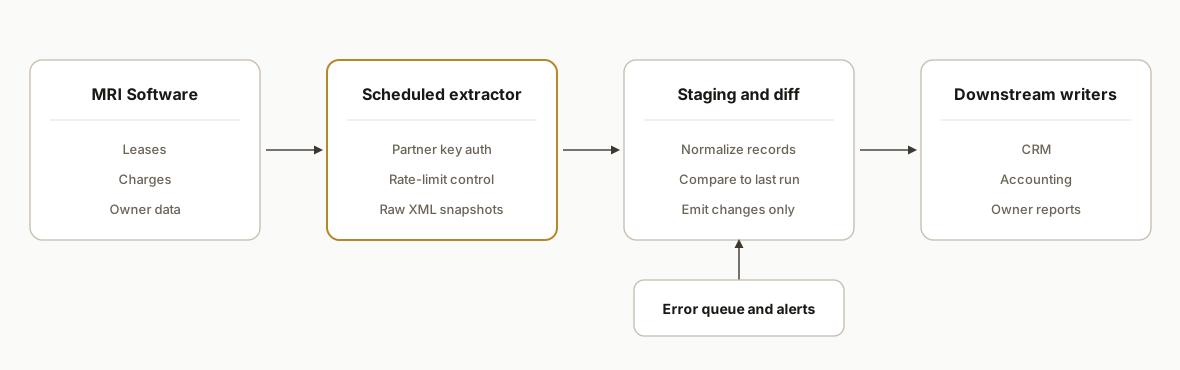
Apideck's documentation says polling only, while other pages claim webhooks, so we design for polling and treat any webhook support as a later optimization.
Step-by-step: how to build it
Step 1: Get partner access, a service user and the auth header
MRI's own API Design Guide covers Partner and Developer API Authentication Keys. Start the agreement and key request first, because it is the longest lead item. Then have the MRI administrator create a dedicated Web Services user whose role grants rights to each API you plan to call. Apideck describes Basic auth built from four parts, and we hold each part as its own secret so the delimiter and order, which we have not been able to confirm, are a one-line change once MRI answers.
access_checklist:
  mri_partner_key: requested_via_partner_connect
  web_services_user: dedicated_service_account
  role_rights: one_entry_per_api_called
  base_url: client_specific_confirm_with_mri
  basic_auth_username_parts: [client_id, database, ws_user, partner_key]
  username_order_and_delimiter: confirm_with_mri
  sandbox: assume_none_use_read_only_first
Gotcha: Apideck reports no general sandbox, so plan the first runs as read-only against production. With no token expiry, a leaked credential stays valid until someone rotates it, so rotation goes on the calendar.
Step 2: Pull raw snapshots before anything parses them
Post to the endpoint with the API name in the query string, write the XML exactly as returned together with the run time, and parse in a separate step. Parameter names for each API come from the partner documentation MRI gives you, which is why we do not publish endpoint names here.
def pull(base_url, api_name, body_xml, auth_header):
    r = requests.post(base_url, params={'api': api_name}, data=body_xml,
                      headers={'Authorization': auth_header,
                               'Content-Type': 'text/xml'}, timeout=60)
    r.raise_for_status()
    save_raw(api_name, utc_now_iso(), r.text)  # raw write first, parse later
    return r.text
Step 3: Respect the rate limit
MRI's 2016 guide reportedly sets partner keys at 1,000 calls per 5 minutes. That guide is old, so treat the figure as unverified and ask MRI for the current number. The same guide indicates developer keys are throttled harder and that non-manifest APIs only run on developer keys. Keep the ceiling as a parameter so the confirmed number is a one-line change.
import time
from collections import deque

class WindowLimiter:
    # defaults are the unverified 2016 figure: 1,000 calls per 300 seconds
    def __init__(self, calls=1000, window=300):
        self.calls, self.window, self.stamps = calls, window, deque()

    def wait(self):
        now = time.monotonic()
        while self.stamps and now - self.stamps[0] >= self.window:
            self.stamps.popleft()
        if len(self.stamps) >= self.calls:
            time.sleep(self.window - (now - self.stamps[0]))
        self.stamps.append(time.monotonic())
Call limiter.wait() before every pull. The arithmetic matters for design: at the reported ceiling, a full re-pull that costs one call per record needs one 5 minute window per 1,000 records. If your portfolio is several thousand records, a nightly full pull is fine, but an every-15-minute full pull is not.
Step 4: Diff leases and charges
Compare the new snapshot to the last successful one, keyed on the identifier MRI returns for each lease or charge. Emit only creates, changes and ends. A charge schedule that changed mid-month should produce one change record, not a rewrite of the whole ledger.
-- changed charges since last successful run
select cur.charge_key, cur.amount, prev.amount as prev_amount
from charges_current cur
left join charges_previous prev using (charge_key)
where prev.charge_key is null or cur.amount is distinct from prev.amount;
Decision point: diff on parsed fields, not on the raw XML text. Whitespace or element-order differences in the response would otherwise register as changes and flood the writers.
Step 5: Write downstream, keyed so reruns are safe
Every write carries a key built from the MRI record identifier and a hash of the changed fields. A failed write goes to an error queue with an alert, and the run is not marked successful until the queue is empty or acknowledged. That last rule is what keeps the next diff honest.
writer:
  target: crm_or_accounting
  idempotency_key: mri_record_id + change_hash
  on_failure: error_queue_with_alert
  advance_last_good_snapshot: only_when_queue_clear
Step 6: Schedule and reconcile
Pick the cadence from two numbers: how stale the destination can be, and how many windows a full pull costs from Step 3. Then log four counts every run so silence is distinguishable from zero changes.
run_report:
  records_pulled: n
  records_changed: n
  records_written: n
  records_failed: n
  alert_if: pulled_is_zero_or_failed_above_zero
A pull count of zero is almost always a role-rights problem, not an empty portfolio.
Where it gets complicated
Access is a contract, not a signup. There is no self-service developer portal. You need an MRI agreement and a partner key, and Supergood notes API access may require extra licensing. Budget calendar time for this before anyone writes code.
Role rights decide what you can see. The Web Services user needs rights to each API called. The usual failure is a call that works for the admin who tested it and returns nothing for the service account.
Several facts are unconfirmed, so settle them in the first MRI conversation. The public references we found are the API Integrations Guide and the 2016 design guide, and both may not match current behavior. Ask MRI to confirm, in writing:
- the client-specific base URL
- the order and delimiter of the Basic auth username parts
- the current partner key call limit
- whether webhooks exist for your account, given the conflicting claims
- whether a sandbox is available, since Apideck reports none
- whether your licence covers API access, since Supergood notes extra licensing may apply
If an answer changes the design, it is better to learn that before the build is scoped.
Data may not be real-time. Third-party documentation notes exports and custom reports can lag. If a stakeholder expects a live ledger in the CRM, agree a refresh interval before launch.
MRI is a family of products, so confirm which one holds your data. OnLocation, for example, is separate and uses OAuth 2.0, so a note about one product often does not apply to another. We confirm the product and version on day one and scope each data flow separately rather than promising a generic mirror.
What this actually changes
MRI stays the system of record and everything else becomes a derived view. The CRM shows charges and lease dates that came from the ledger instead of from a person's paste, and month-end reporting stops depending on one export routine.
We have no client results to cite for MRI, and we will not invent any. To size the work, list every recurring export and manual paste step in your shop, note how often each one is wrong or late, and start with the single flow where a wrong number costs the most. One flow, such as charges to accounting, is also the right first build because it exercises access, auth, rate limits and diffing end to end.
Frequently asked questions
Does MRI Software have a public API?
Not a self-service one. Access goes through MRI's Partner Connect program, which issues a partner key. Third-party documentation describes Basic auth and XML responses from a single POST endpoint. The base URL is client-specific, so confirm it with MRI.
Can I connect MRI to Zapier or Make?
We found no native connector for core MRI commercial or multifamily products. The Zapier app we found belongs to MRI Vault, a real-estate agency product, and the Make app is community-built for the same product. For leases and charges you need a custom integration.
Does MRI support webhooks for real-time updates?
Unconfirmed. Apideck's documentation says polling only, while other pages claim webhooks. We design for scheduled polling with a diff layer, which works either way, and add event triggers only if MRI confirms them for your account.
What will it cost and how long will it take?
We have no verified figure for either, and we will not guess. MRI controls the agreement, partner key and any extra licensing Supergood mentions, so the start date is theirs. Build effort scales with the number of data flows, so we quote a fixed scope per flow after a discovery call.
What does my MRI administrator need to do?
Create a dedicated Web Services user with a role granting rights to each API we will call, and supply your client ID and database name for the auth username. Everything after that, the extractor, diff layer, writers and monitoring, is engineering work we handle.
If MRI is your system of record and your team is retyping leases, charges or owner numbers elsewhere, our custom AI integration work is built for exactly this. For a comparable property-software pattern, read our guide to the RentManager API integration. When you want to pick the first flow, book a 20 minute call and we will tell you what MRI has to confirm before anything is scoped.
Sources
- 1.www.mrisoftware.commrisoftware.com
- 2.MRI API Design Guide 2016mrisoftware.com
- 3.MRI API Integrations Guide 5mrisoftware.com
Who would build this
Rex Automaton is an AI implementation agency with 250+ projects shipped since 2018, rated 4.9 from 33 reviews. Clients include Soft Pull Solutions, Capcon Networks, Iron Age Investments, IT360. You work directly with the people who build it.


Want this built around your systems?
Nine questions, about 90 seconds. You see the revenue it is costing you, then pick a time. No pitch.
See your optionsRather talk to a person first? Meet the team or tell us which system you run.