
A PestPac API integration is a small service between your lead sources and PestPac that parks leads missing required fields, writes the rest once, and records every attempt. Public sources confirm the access gate and several partner-tool constraints. They say nothing about service order, route or renewal endpoints, so this guide builds the lead sync in full and treats those three as unconfirmed until the portal docs for your account say otherwise.
The problem it solves
The packaged tools below each move leads into PestPac, but none of them keeps a log of every attempt, and two of them filter leads before PestPac ever sees them.
Here is how the real options compare for this system. Where the research could not confirm a fact, the cell says so.
| Option | What it does | Limits we can verify | Setup and cost drivers |
|---|---|---|---|
| ClickPoint SalesExec lead integration | Pushes leads into PestPac | One way into PestPac only (its inbound data from PestPac is listed as None). Pushes only when chosen dispositions fire, such as Sold or Schedule Service. Location mapping requires Division, Source and Type | Needs PestPac API credentials from WorkWave plus a ClickPoint subscription |
| SalesRabbit PestPac setup | Door-to-door lead push | Needs PestPac to enable your six-digit Company Key. Requires name, phone, city and state | Depends on WorkWave enabling access |
| Native Zapier or Make connector | Would allow no-code flows | UNCONFIRMED. We found no native connector for either | Do not plan around it |
| Third-party REST wrapper (for example MindCloud) | Wraps PestPac calls as actions | Not WorkWave documentation, so you inherit a middleman | Per-platform subscription |
| Custom sync service | Any source to PestPac, with validation, dedupe and a log | Bound by whatever the WorkWave portal permits for your account | WorkWave fees plus build time |
The access gate comes first for every option. WorkWave's developer documentation states that you must be a PestPac customer or an approved developer working on behalf of one or more PestPac customers. Per the research, there is a one-time setup fee plus costs that depend on data access and daily API calls, and a 30-day trial can be requested through WorkWave.
How to choose between them:
- Your only lead source is door-to-door and you can supply name, phone, city and state: the SalesRabbit setup is enough. The only dependency is PestPac enabling your Company Key.
- Your leads come through ClickPoint and you only care about sold or scheduled jobs: the ClickPoint integration fits. If you also want to count leads that never reach those dispositions, it cannot, because it does not push them.
- You want anything to flow back out of PestPac, such as job status or renewal outcomes: no packaged option here does it. ClickPoint lists inbound data as None, so this is custom work and depends on the read access your account is granted.
- You have more than one lead source, or you need a record of every attempt: a custom service, because it is the only option that owns the log.
What instant follow up on every lead is worth
Move the sliders to your own numbers. The defaults are only an example business, not client data.
Your own estimate. Replies in the first few minutes convert far better than replies the next day.
Revenue from leads you stop losing each year
$144,000
150 a month × 12 × 40% × 10% × $2000
- Extra customers a year
- 72
- 150 × 12 × 40% × 10%
How the automation works
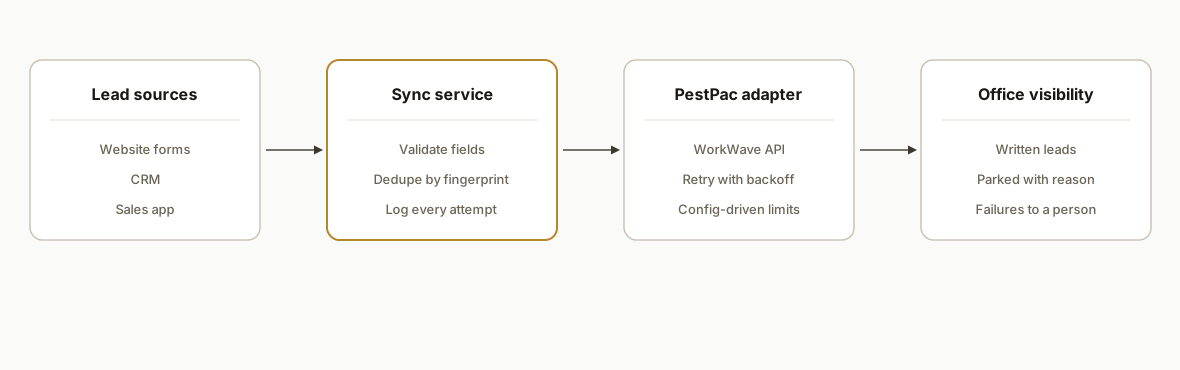
Every lead source feeds one normalizer, the normalizer feeds a validator that knows PestPac's required fields, and a single adapter does the write. Dedupe, retries and logs live in our service, not in PestPac and not in the sources. The ordering that matters: the ledger row is written before any PestPac call, so an outage or a rejected write leaves a record instead of a hole.
- Intake endpoints: Sources never call PestPac. Each one (website form, CRM, sales app) writes a normalized row into the ledger with status received.
- Validator: Checks each lead against two required-field sets taken from partner docs: name, phone, city and state (SalesRabbit's rule), plus Division, Source and Type (ClickPoint's Location mapping rule). A lead that fails is parked with the missing field names before any API call is made.
- Ledger: A table keyed by a lead fingerprint, a hash of normalized phone plus address. It makes re-runs safe and answers whether a lead made it in.
- PestPac adapter: The only code that talks to PestPac, with host, path and auth supplied as config because none of the three is documented publicly.
- Alerting: One digest of parked and failed rows, grouped by reason, so a person fixes a mapping rule once instead of chasing individual leads.
Step-by-step: how to build it
Step 1: Request access and read the terms first
Nothing works until WorkWave issues credentials, so start in week one. The research found a 30-day trial route through APISales@workwave.com; use it so the portal docs are readable before you commit to scope. ClickPoint's setup asks for an API key, tenant ID, client ID and secret, and a host URL. We take that as the shape of the credential set, not as documentation of the auth scheme.
# .env (never commit). Names are ours; values come from WorkWave.
PESTPAC_API_KEY=
PESTPAC_TENANT_ID=
PESTPAC_CLIENT_ID=
PESTPAC_CLIENT_SECRET=
PESTPAC_HOST_URL=
The gotcha: the API terms say WorkWave obtains no right, title or interest in applications you build, but an application that interoperates with the API is subject to WorkWave approval. Read them before you sign a build scope.
Step 2: Write the contract down from the portal docs
Service order, route and renewal endpoints are UNCONFIRMED in our research, so the first deliverable is a one-page map of what the portal exposes for your account: which objects can be created, which can only be read, and what the limits are. If renewals or service orders turn out to be readable, a nightly pull into a reporting table is the low-risk first step, and writes come after that. The quote follows from that page, not the other way around.
Step 3: Define one internal lead shape and validate it
// lead.js: required fields mirror what partner docs say gets rejected
const REQUIRED = {
  contact: ['name', 'phone', 'city', 'state'],   // SalesRabbit's rule
  location: ['division', 'source', 'type'],      // ClickPoint Location mapping
};

export function validate(lead) {
  const missing = Object.values(REQUIRED).flat().filter((k) => !lead[k]);
  return missing.length
    ? { ok: false, status: 'parked', reason: 'missing: ' + missing.join(', ') }
    : { ok: true };
}
Division, Source and Type are derived by a rules table you own, not left to chance. The values stay empty until you fill them from your own PestPac setup.
// mapping.js: one row per lead origin. Values are yours to fill in.
export const MAP = {
  'web-form-quote': { division: '', source: '', type: '' },
  'crm-referral':   { division: '', source: '', type: '' },
};
An origin with no row in the table is parked with the reason, never silently dropped.
Step 4: Add the ledger for idempotency
CREATE TABLE lead_ledger (
  fingerprint   text PRIMARY KEY,   -- hash of normalized phone + address
  source        text NOT NULL,
  status        text NOT NULL,      -- received | parked | written | failed
  pestpac_ref   text,               -- whatever ID the API returns
  last_error    text,
  updated_at    timestamptz DEFAULT now()
);
The fingerprint is what stops a double form submit or a CRM re-send from creating two records. Check it before every write.
Step 5: Write the PestPac adapter behind an interface
// pestpac-adapter.js
// Endpoint path and auth are placeholders on purpose: both come from the
// WorkWave portal docs for your account. Host URL is config, never a literal.
export async function createLead(lead, cfg) {
  const res = await fetch(cfg.hostUrl + cfg.leadPath, {
    method: 'POST',
    headers: { 'Content-Type': 'application/json', ...cfg.authHeaders() },
    body: JSON.stringify(cfg.mapToPestPac(lead)),
  });
  if (res.status >= 500) return { retry: true };
  if (!res.ok) return { retry: false, error: 'pestpac ' + res.status };
  return { retry: false, ref: await res.json() };
}
A single worker drains ledger rows with status received, one at a time. Because rate limits are UNCONFIRMED, one-at-a-time is the default, and raising it is a config change once the portal docs state a limit. Server errors leave the row as received for the next pass. Client errors mark it failed with the status code in last_error.
Step 6: Point the sources at the ledger
Repoint each form and CRM webhook to write a ledger row instead of calling anything else. During the parallel period, the front office keeps entering leads by hand. Match ledger rows to those manual entries by phone number, and the gaps in either direction show you which side drops leads before you retire the manual step.
Where it gets complicated
Access is gated and paid. Credentials come from WorkWave before any integration works, and partner tools such as SalesRabbit need PestPac to enable your Company Key on their side. Budget calendar time for that, not just build time.
One-way leads are not a sync. ClickPoint's integration pushes into PestPac and lists inbound data from PestPac as None. If you want job status or renewal outcomes to flow back to your CRM, that is custom work, and what is possible depends on the read access your account gets.
Required fields silently block writes. A lead without a Division, Source or Type can fail the sync. Validate before you call the API and decide up front who owns the mapping rules.
Disposition-gated pushes drop leads. ClickPoint pushes only when dispositions like Sold or Schedule Service fire. Leads that never reach those states never appear in PestPac, so reporting on lead volume from PestPac alone undercounts. The ledger is the source of truth for lead volume.
Base URL, auth scheme and rate limits are all unconfirmed. That is why the adapter takes all three as config and why the worker runs one write at a time until the portal docs say otherwise.
What this actually changes
We have no client result to cite for this build, so we will not invent one. What the design changes is structural: every lead has one entry path, one validation step and one ledger row, so the question of whether a lead reached PestPac has an answer. Duplicates stop at the fingerprint check, bad data is parked before it blocks a write, and failures reach a person with a reason attached.
We have no figures for the WorkWave side, which is a one-time setup fee plus charges tied to data access and daily API calls. The build side scales with three things: the number of lead sources, the size of your Division, Source and Type mapping table, and whether the portal docs confirm any renewal or service order access. We quote after reading those docs, with lead sync as the first deliverable and renewals priced separately.
Frequently asked questions
Does PestPac have an API?
Yes, through WorkWave's developer portal, but access is gated to PestPac customers and approved developers, with a one-time setup fee plus costs tied to data access and daily calls. A 30-day trial can be requested at APISales@workwave.com. Auth type and rate limits are not stated in public sources we found.
Can I connect PestPac with Zapier or Make?
We found no native connector for either. If you only need a prototype, a third-party wrapper such as MindCloud's, which lists 38 actions, is an option, but it is not WorkWave documentation and you would depend on its owner. For a long-lived flow, a small service with its own validation and ledger is safer.
Why do my PestPac lead counts look lower than my sales app's?
If you use ClickPoint, it pushes a lead only when a chosen disposition such as Sold or Schedule Service fires. Leads that stall earlier never reach PestPac. Count leads in the sync ledger, not in PestPac, and treat PestPac as the record of leads that progressed.
Can renewals and routes be synced through the API?
We cannot confirm that. Public sources we found say nothing on service order, route or renewal endpoints. We would start with a read-only pull if the portal allows it, and quote only after reading the documentation for your account.
Do I own what gets built?
The API terms say WorkWave takes no ownership of applications or source code you create, though applications that interoperate with the API are subject to WorkWave approval. We scope the service, the ledger and the mapping rules to be yours.
If your front office re-keys leads into PestPac, the first step is access and a one-page map of what your account's API allows. Our workflow automation work covers exactly this kind of bridge, and the related read on pest control software API integration shows how the wider field-service landscape compares. Book a 20 minute call and we will tell you whether your setup is a lead-sync job or needs more.
Sources
- 1.</Developer Portal>developer.workwave.com
- 2.API Terms and Conditions of Useworkwave.com
- 3.Department of Labor Logo United States Department of Laborbls.gov
Want us to build this for you?
Nine questions, about 90 seconds. You see the revenue it is costing you, then pick a time. No pitch.
See your options