
Propertyware has a REST Open API (v1) with work orders, prospects, leases, vendors and accounting resource groups, but access is gated through sales, and the vendor syncs most operators reach for are narrow: LeadSimple's is read-only and hourly, Aptly's is nightly, and Property Meld sends only work orders and expenses. If you need write-back, minutes-level latency or a system those vendors do not cover, you are building against the API. This guide is for a director or operations lead at a mid-sized SFR operator who already knows they need a build. It covers what the API allows, which facts we could not confirm, the architecture we would use, and where these projects get complicated.
Rex Automaton is an AI implementation agency that builds and runs this kind of system for mid market operators.
Propertyware integration, defined: scheduled jobs that move prospects, work orders and accounting data between Propertyware's REST Open API and your other systems, using a ledger of source and target IDs so reruns never duplicate records. The legacy SOAP API is a separate surface, so a vendor saying it integrates with Propertyware tells you nothing until you know which one it uses.
The problem it solves
Three questions decide whether you buy a vendor sync or commission a build: how fast must a record move, in which direction, and which record types. Vendor syncs answer those questions for you, and the answers are narrow. Here is what we found when checking the real paths.
| Option | What it does | Limits | Setup effort |
|---|---|---|---|
| Propertyware Open API (custom build) | Two-way connection to third-party systems (Propertyware Open API page); resource groups include work orders, prospects, leases, vendors, accounting | Access is gated and goes through sales; rate limits and owner statement endpoints are unconfirmed | Custom build, scoped per workflow |
| Vendor sync (for example LeadSimple, Aptly) | Prebuilt connection into that vendor's own product | LeadSimple's sync is read-only and hourly; Aptly's sync from Propertyware is nightly, so data lags | Fast, but only for that vendor's use case |
| Native Zapier or Make app | No-code triggers if a listing existed | We found no official listing on either; the only Propertyware connections we found run through vendors such as LeadSimple and Aptly | Only custom HTTP calls to the Open API, which is a build anyway |
| Manual custom reports | Reports menu output, for example the Tenant Contacts report that a PetScreening guide pulls this way | CSV export, scheduled email and webhooks are all unconfirmed, so we cannot promise an unattended export | No build, a person runs and re-keys every time |
The decision rule we use: if hourly, read-only data inside that vendor's product is enough, buy the vendor sync. If you need records written back into Propertyware, need data in minutes rather than hours, or need it in a system the vendor does not cover, you are building against the API with custom HTTP calls.
What keeping your systems in sync is worth
Move the sliders to your own numbers. The defaults are only an example business, not client data.
Revenue from deals that stop slipping each year
$100,800
80 a month × 12 × 5% × 70% × $3000
- Deals kept a year
- 34
- 80 × 12 × 5% × 70%
- Staff cost of doing it by hand each year
- $9,100
- 5 hrs a week × $35/hr × 52 weeks
- Hours handed to the system each month
- 22 hrs
- 5 hrs a week × 52 ÷ 12
How the automation works
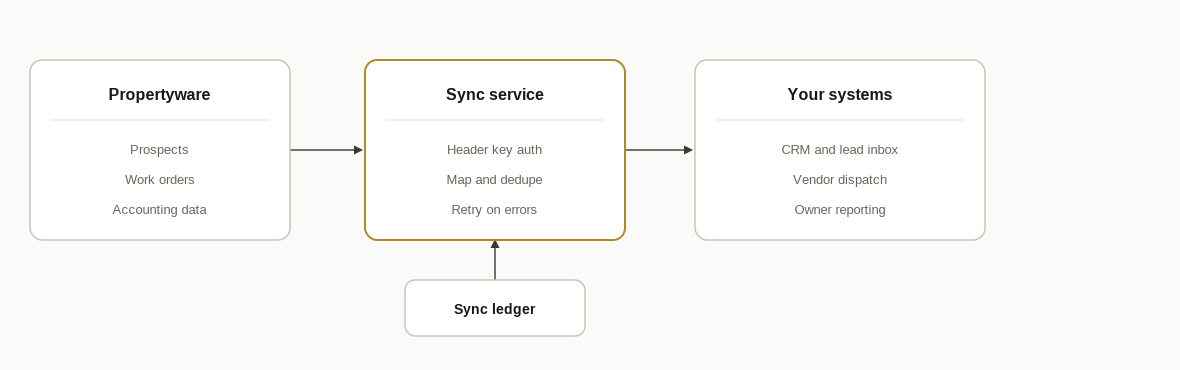
The integration is one small service between Propertyware and your other systems. On a schedule it reads changed records from each resource group (prospects, work orders, accounting) with the three header keys, checks each against a ledger keyed on the Propertyware ID and the downstream ID, and writes only the differences. Records that fail mapping go to a dead-letter list instead of being dropped, and each run reports its counts so a silent failure cannot hide.
Step-by-step: how to build it
Step 1: Get API access enabled and the unknowns answered in writing
An admin creates keys under Administration Setup > API Keys after the Open API is enabled, and the Open API page directs interested customers to contact sales. Third-party reports mention no self-serve signup and per-unit pricing, which we could not confirm. So the first task is a written reply from your account contact on the items we could not verify.
Ask your Propertyware contact, in writing
- Is the Open API enabled on the account, and what does access cost
- Which base URL is correct for REST v1
- Documented rate limits, if any
- Are there owner statement endpoints beyond the accounting group
- Can the secret be re-issued if it is lost (a third-party source says it may be shown once)
Gotcha: keys can carry full account access, so store the secret in a secrets manager the moment it appears.
Step 2: Authenticate with header keys and settle the base URL
The Propertyware API documentation describes three headers over https: client ID, client secret and the organization ID sent as system ID.
const BASE_URL = process.env.PW_BASE_URL; // copy from the downloaded OpenAPI spec
const headers = {
  "x-propertyware-client-id": process.env.PW_CLIENT_ID,
  "x-propertyware-client-secret": process.env.PW_CLIENT_SECRET,
  "x-propertyware-system-id": process.env.PW_SYSTEM_ID,
  "Accept": "application/json"
};
// smoke test: one read-only list call from the spec, expect 200
const res = await fetch(`${BASE_URL}/<read-only list path from spec>`, { headers });
Gotcha: mirrors show two base path patterns, api.propertyware.com/pw/api/rest/v1 and a path ending in /pw/api/v1/rest, and we could not confirm which is canonical. Keep the base URL in configuration, take it from the spec you download, and let the smoke test fail loudly on a 404 rather than guessing.
Step 3: Measure the API before you set a schedule
Paging parameters, page size limits and rate limits are not something we could confirm, so we do not hard-code them. We take paging from the downloaded specification and then probe your account before choosing an interval.
Probe plan (run against your account, read-only)
1. Read one resource group at the largest page size the spec allows
2. Raise request rate in steps until the first 429 response
3. Note whether any rate-limit headers come back
4. Set the sync interval and page size below the measured ceiling
5. Record the last successful run time per resource group
Gotcha: the reader treats any 429 as a signal to back off, and the interval comes from what step 2 measured, not from a guess.
Step 4: Write through the ledger
Before creating anything downstream, look up the Propertyware ID in the ledger. If it exists, update. If not, create and record both IDs.
create table sync_ledger (
  source_system text,
  source_id text,
  target_system text,
  target_id text,
  last_hash text,
  synced_at timestamptz,
  primary key (source_system, source_id, target_system)
);
Gotcha: store a hash of the mapped payload so unchanged records are skipped. Otherwise every run rewrites everything and burns downstream API quota.
Step 5: Map statuses from your data, not from memory
We do not know your account's status values in advance, and we will not guess them. Pull a day of records, list the distinct status values that actually occur, and build the map from that list. Keep the map as an editable file, and make an unmapped value a failure instead of a silent default.
{
  "work_order_status": {
    "<value seen in your data>": "<destination stage>"
  },
  "on_unmapped": "dead_letter"
}
Gotcha: when staff add a new status in Propertyware, the record lands in the dead-letter list with the unmapped value named, and one line added to the map fixes it and replays the record.
Step 6: Run in shadow mode first, with run counts
For the first two weeks, write to a sandbox or a log only, and compare against what your team did by hand. Every run logs counts for read, created, updated, skipped and failed, and a weekday run with zero reads pages a human. Switch to live writes once the counts reconcile.
Where it gets complicated
Owner statements are untested, so we treat them as a discovery question. We found an accounting resource group in the API but could not confirm dedicated owner statement endpoints. Owners see statements through the Owner Portal. The test has two outcomes. If the accounting data returns what the owner sees in the portal, we build the summary from it. If not, the fallback is a saved custom report from the Reports menu, but scheduled email, CSV export and webhooks are all unconfirmed, so if the report cannot leave Propertyware without a person clicking, that piece stays manual and we say so before you sign.
Two APIs exist. A Propexo guide describes a legacy SOAP API alongside the REST Open API. When a vendor says they integrate with Propertyware, ask which one, because the auth and data shapes differ.
Vendor syncs lag by design. LeadSimple's sync is read-only and hourly, and Aptly's sync from Propertyware is nightly. If your leasing team expects a lead or a work order to appear within minutes, a vendor sync alone will disappoint them. Also note that a vendor integration may send only narrow data. Property Meld, for example, states that only work orders and expenses flow from Property Meld to Propertyware.
Write-back is where the conflicts start. The vendor syncs we found are read-only or one-directional, so the first time you write a prospect field back into Propertyware, two systems can edit it. Name one owning system per field before building, or records will flip back and forth.
What this actually changes
We have not shipped this specific Propertyware build, so there is no Propertyware result to quote.
The change is structural. Retyping at the seams goes away, lead lag moves from a nightly or hourly batch to an interval you choose after measuring the API, and failures show up as a dead-letter list instead of an owner complaint.
We do not publish a price or a timeline for this build, because four things we could not confirm decide the scope: what Propertyware charges for API access, the rate limits, whether owner statement endpoints exist, and how many workflows and which direction of writes you need. We quote after a discovery call and a read-only test against your account.
Frequently asked questions
Does Propertyware have an API?
Yes, a REST Open API (v1) with docs on its API docs site, authenticated by client ID, client secret and system ID headers. An admin generates the keys after the Open API is enabled, and access goes through sales. A legacy SOAP API also exists, so confirm which one any contractor means.
Does Propertyware work with Zapier or Make?
We found no official listing on either, so do not plan around one. The connections we found run through vendors such as LeadSimple and Aptly. Otherwise you would use custom HTTP calls to the Open API, which is the same work as a build.
Can I sync Propertyware owner statements automatically?
Unconfirmed. The API has an accounting resource group, but we could not confirm dedicated owner statement endpoints. We test whether accounting data reproduces what owners see in the portal, and fall back to a saved custom report only if it can be exported without manual steps.
Is a vendor sync enough, or do I need a build?
A vendor sync is enough if hourly, read-only data inside that vendor's product covers your need. Build if you need write-back into Propertyware, minutes-level latency, or a system the vendor does not cover. Aptly from Propertyware is nightly and Property Meld carries only work orders and expenses.
How much does a Propertyware integration cost and how long does it take?
We do not quote either without testing your account. Propertyware's API pricing is unconfirmed, so ask your account contact in writing. Our scope depends on rate limits, owner statement access, and the number of workflows, and we settle those in a discovery call.
If your team is retyping leads, work orders or owner reports around Propertyware, our custom AI integration work is built for this. For a comparable pattern on another property platform, read our guide to AppFolio API access and integration. When you are ready to scope it, book a 45 minute call and we will test what your account's API exposes before quoting anything.
Sources
- 1.open apipropertyware.com
- 2.Download OpenAPI specification:Downloadapp.propertyware.com
- 3.New Owner Portal User Guidepropertyware.com
- 4.How Information Flows With a Propertyware Integration How Information Flows With a Propertyware Integrationhelp.propertymeld.com
Who would build this
Rex Automaton is an AI implementation agency with 250+ projects shipped since 2018, rated 4.9 from 33 reviews. Clients include Soft Pull Solutions, Capcon Networks, Iron Age Investments, IT360. You work directly with the people who build it.


Talk to the engineer who builds this
Bring the systems you run and the step your team retypes by hand. In 15 minutes we tell you whether your Propertyware integration can be built, how we would build it, and what it would take.
Book a 15 minute fit checkWant this built around your systems?
Nine questions, about 90 seconds. You see the revenue it is costing you, then pick a time.
See your optionsRather talk to a person first? Meet the team or tell us which system you run.