
During Black October, the wave of breaches that hit developer platforms in late October 2026, Railway told every customer to replace the secrets stored in their environment variables, because an attacker had reached the system that holds them and decrypted some. Two days later Railway emailed us again: our workspace matched the pattern the attacker used to hunt for AI and cloud keys. We ran the whole response through Claude Code and rotated about 40 secrets, with every old key verified dead and every new key verified working, in one overnight session while the owner of the business slept.
This guide is for founders, operators and small engineering teams who host on a platform like Railway, Vercel, Render or Fly and woke up to a "rotate your credentials" email. It walks through the exact method we used, with the real commands, so you can run the same sweep with Claude Code or by hand.
What is Black October?
Black October is the name the tech press gave to a cluster of breaches and emergency fixes that landed around October 19 to 22, 2026. Latent Space grouped them as AI accelerated disclosures overwhelming defenders. The incidents that matter for API keys were supply chain and platform breaches: LiteLLM 1.107.0 shipped with a credential stealer, Zeabur attackers read environment variables from its platform database, and Railway disclosed decrypted customer secrets.
Secucenter's Black October list also includes poisoned OVHcloud CLI release archives that stole secrets, critical PHP and GitLab vulnerabilities, and a ConnectWise backup compromise. The common thread is stolen credentials. Whichever of these touched your stack, the fix is the same: find every secret that could have been read, issue a new one, and revoke the old one. The rest of this guide is how we did that for the Railway breach.
What happened in the Railway breach, and who needs to rotate?
Railway's preliminary report says an attacker escalated access inside its build infrastructure between October 20 and October 22, 2026, queried encrypted customer environment variables and decrypted a subset. Railway put the potentially affected share at up to 1.85 percent of workspaces, about 100,000, and asked AI providers to revoke keys it had seen. Anyone who stored secrets on Railway before October 21 should rotate them.
The attacker's stated goal, per Railway's preliminary report, was AI provider API keys. That matters for prioritizing: an exposed OpenAI or Anthropic key gets resold and burned within hours, while a stale webhook token is a much smaller risk. The Hacker News also reported crypto wallet keys stored on Railway being drained the same day.
Key rotation is the process of issuing a new credential, moving every system that uses the old one onto the new one, and then revoking the old one so a stolen copy stops working.
The problem it solves
Rotating one key is easy. Rotating every key is hard, because each one lives in places nobody wrote down: the hosting platform, two other platforms, a dozen local .env files, a GitHub Actions secret and a script someone pasted it into in July. Miss one copy and you either break production when you revoke, or you leave the old key alive.
Here is what our inventory actually found before we changed anything.
| Where secrets lived | What we found | Why it is easy to miss |
|---|---|---|
| Railway | 15 projects, 251 variables, 105 secrets (92 distinct values) | One Resend key was shared by 6 services, one OpenAI key by 3 |
| Vercel | 84 projects, 330 env vars, some marked sensitive (unreadable) | The list endpoint does not return values; each one has to be fetched |
| Local disk | 67,925 text files scanned, secrets in .env, credentials.local.txt, scripts and docs | Search tools that respect .gitignore skip exactly these files |
| GitHub Actions | Secrets in 4 repos | Not visible anywhere except gh secret list per repo |
| Provider dashboards | About 20 different vendors, each with its own rotate flow | Some need a password re prompt, an emailed code or a typed confirmation |
Done by hand, each secret means finding every copy, creating the replacement, updating three or four systems, redeploying and testing. Our estimate is 15 to 30 minutes per secret for a careful person, which is 10 to 20 hours for 40 secrets, and that assumes you already know where every copy is.
How the automation works
The sweep is a loop that Claude Code runs for each secret: inventory, create, swap, redeploy, verify, revoke, record. Claude Code works in a terminal with the CLIs and API tokens you already have, writes small scripts as it goes, and drives a browser for the vendors that only offer a dashboard.
- Inventory scripts. One script pulls every Railway variable through the Railway GraphQL API, one pulls every Vercel env value, and one walks the local disk. Together they print a dependency map: for each secret, which services share it and which files hold it.
- A private working vault. Old and new values live in a scratch folder as files, never printed to the terminal. Every change is appended to a log so a crashed run can resume.
- An apply step. Given an old value and a new one, it replaces the exact string in Railway, Vercel and every local file, and queues each touched service for redeploy.
- Provider rotation. APIs where they exist (Google Cloud, Supabase, Resend, Twilio, Neon, Instantly, GitHub revocation) and the browser where they do not (OpenAI, Gemini, Perplexity, PostHog, Notion, Apify, Meta).
- A verify step. A script calls each provider with the old key and the new key. The rotation is only done when every old key returns 401 and every new key returns 200.
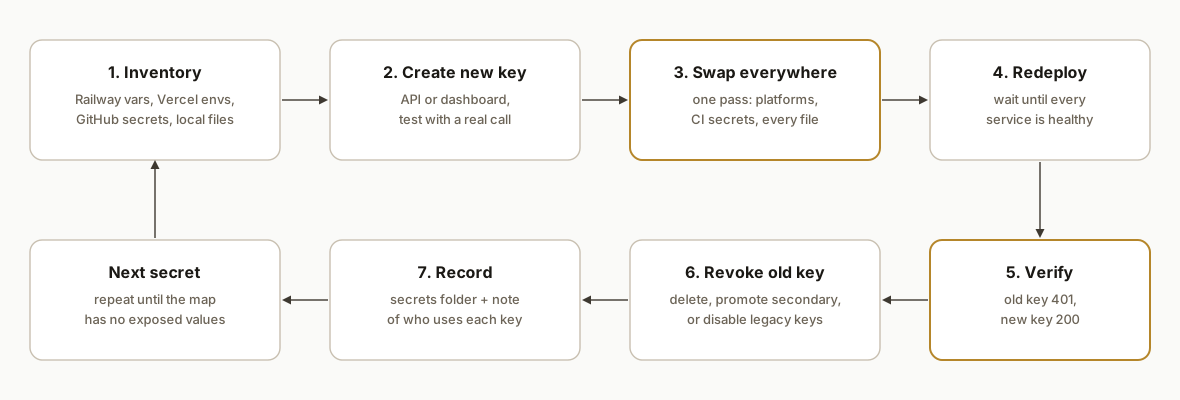
Step-by-step: how to rotate every key after a breach
Step 1: Inventory every secret on the breached platform
Start by exporting every variable, not by remembering which keys you have. On Railway that is one GraphQL query per service. Keep the output in a private scratch folder and never echo values to the screen.
// dump.mjs: every Railway variable, every service, rendered values
const q = (query, variables = {}) => fetch('https://backboard.railway.com/graphql/v2', {
  method: 'POST',
  headers: { Authorization: `Bearer ${process.env.RAILWAY_API_TOKEN}`, 'Content-Type': 'application/json' },
  body: JSON.stringify({ query, variables }),
}).then(r => r.json());

const p = await q(`{ projects { edges { node { id name
  environments { edges { node { id name } } }
  services { edges { node { id name } } } } } } }`);
// then, per service: variables(projectId, environmentId, serviceId)
The gotcha: an account level Railway token returns "Not Authorized" on the me query and on railway whoami, but works fine for project queries. Test it with a projects query before deciding the token is broken.
Step 2: Map every other place each secret lives
A key on Railway is almost never only on Railway. We fetched every Vercel env value and walked the local disk, then matched each Railway secret against both. Shared keys are the dangerous ones: our scan showed one OpenAI key used by 3 Railway services and 14 Vercel apps.
// Vercel: the list endpoint hides values, so fetch each encrypted env by id
const envs = await fetch(`https://api.vercel.com/v9/projects/${id}/env?teamId=${team}`, { headers: H }).then(r => r.json());
for (const e of envs.envs) {
  if (e.type === 'sensitive') continue;            // unreadable by design, match by name instead
  const one = await fetch(`https://api.vercel.com/v1/projects/${id}/env/${e.id}?teamId=${team}`, { headers: H }).then(r => r.json());
  // compare one.value against the Railway secrets
}
For local files, walk the disk with plain file reads. Ripgrep and most editor searches respect .gitignore, and every .env and credentials file is gitignored, so they report a clean result while skipping exactly the files that hold keys.
Step 3: Create the new credential before touching the old one
Never revoke first. Create the replacement, test it with a real call, then swap it in. Several providers support two live credentials at once, which is the cleanest path.
# Google Cloud service account: add a key, keep the old one until the swap is verified
gcloud iam service-accounts keys create new-key.json \
  --iam-account=bot@my-project.iam.gserviceaccount.com

# Supabase: create a new secret API key through the Management API
curl -X POST "https://api.supabase.com/v1/projects/$REF/api-keys?reveal=true" \
  -H "Authorization: Bearer $SUPABASE_ACCESS_TOKEN" -H "Content-Type: application/json" \
  -d '{"type":"secret","name":"rotated_2026_10_23"}'
Test with real work, not just authentication. An OpenAI key on an account with no balance still returns 200 on the models endpoint, then fails every real request.
Step 4: Swap the value everywhere in one pass
Replace the exact old string with the new one in every location the map found, and queue each touched service for a redeploy. Doing it as one scripted pass is what removes the "we missed a copy" outage.
// apply.mjs <old> <new>: Railway vars, Vercel envs, local files
for (const r of railwayRows.filter(r => r.value.includes(OLD))) {
  await q(`mutation($i: VariableUpsertInput!) { variableUpsert(input: $i) }`, { i: {
    projectId: r.projectId, environmentId: r.envId, serviceId: r.serviceId,
    name: r.key, value: r.value.split(OLD).join(NEW), skipDeploys: true } });
}
for (const e of vercelEnvs.filter(e => e.value?.includes(OLD))) {
  await fetch(`https://api.vercel.com/v9/projects/${e.projectId}/env/${e.envId}?teamId=${team}`,
    { method: 'PATCH', headers: H, body: JSON.stringify({ value: e.value.split(OLD).join(NEW) }) });
}
// then every local file that contains OLD gets the same replacement
Do not forget GitHub Actions: gh secret set NAME -R owner/repo < new-value.txt for each repo that held the key.
Step 5: Redeploy and wait for every service to be healthy
Environment changes do nothing until the service restarts. We redeployed every touched Railway service and Vercel project, then polled until each one was READY or SUCCESS before revoking anything.
// Vercel: redeploy the latest production deployment with the new env
await fetch(`https://api.vercel.com/v13/deployments?teamId=${team}&forceNew=1`, {
  method: 'POST', headers: H,
  body: JSON.stringify({ name: last.name, deploymentId: last.uid, target: 'production' }),
});
// Railway: serviceInstanceRedeploy(environmentId, serviceId)
The gotcha: Railway services deployed with railway up from a laptop have no source to rebuild after the incident. The redeploy call fails with "source is no longer available", so run railway up again from the linked folder.
Step 6: Revoke the old key and prove it is dead
Only now revoke. Then run a verification script that calls each provider with both keys.
# Twilio: the new token was created as secondary, promoting it kills the old primary
curl -X POST https://accounts.twilio.com/v1/AuthTokens/Promote -u "$ACCOUNT_SID:$OLD_TOKEN"

# GitHub: revoke leaked tokens through the public credentials API
curl -X POST https://api.github.com/credentials/revoke \
  -H "Accept: application/vnd.github+json" -d '{"credentials":["ghp_old_token_here"]}'
Our final check printed one line per provider. Nineteen of the twenty checks showed the old key returning 401 or 400 and the new key returning 200. One did not, and we left it on the open list instead of calling the job done.
Step 7: Record the new keys where everything else reads them
Put every new key in the one secrets folder your other tools and assistants read from, with a note saying which services use it, and write a rotation log of what changed. The next person, or the next Claude Code session, should never have to rediscover the map.
supabase - command center keys.txt
  line 1: secret key (server only)    line 2: publishable key
  Used by: 3 Railway services, 3 Vercel projects, 1 GitHub secret, local automations
  Rotated 2026-10-23 after the Railway breach; legacy JWT keys disabled.
Where it gets complicated
Some keys cannot be swapped by string replace. A Google service account key appears as compact JSON in one place, pretty printed JSON in another and an escaped string inside a .env file. We matched on the private_key_id and the escaped private key instead of the whole blob, then parsed every copy afterward to confirm it was still valid JSON.
Encryption keys should not be rotated in a hurry. An app that encrypts stored tokens with a key will lose that data if the key changes. We left those keys alone and rotated the database passwords that guard the encrypted data instead.
Dashboards fight automation. OpenAI's revoke button only works on a real mouse click after the row is scrolled into view. Google Cloud's "disable secret" needs a typed confirmation and then a separate Save. Apify asks you to type "delete my token". Meta asks for your password twice. Claude Code drove these in the browser, but each one cost a few retries to learn.
Supabase legacy keys need a migration, not a reroll. The old anon and service_role keys are JWTs signed with one project secret, so the only way to kill an exposed service_role key is to move every consumer to the new sb_secret and publishable keys, then disable the legacy keys. It took about five minutes after disabling before the old keys returned 401.
The assistant itself is a place secrets can leak. Twice during our sweep a debugging command echoed a freshly created key into the session log. We treated those keys as exposed and rotated them a second time, then made every later command mask values before printing.
Not every key is yours to rotate. One integration we run holds logins to a client's own CRM and document system. We cannot reset those, so we sent the client plain step by step instructions for each reset and a secure way to send us the new values.
What this actually changes
The core sweep, covering about 40 secrets for a small automation agency running 15 Railway projects and 84 Vercel projects, ran in about two and a half hours overnight, against our estimate of 10 to 20 hours by hand. The bigger change was what the inventory exposed. One OpenAI key had been revoked back in July, and 17 apps that depended on it, including a client's booking widget, had been failing quietly for three months. The sweep fixed them as a side effect.
It also left us with a written map of every secret and a reusable set of scripts. The next breach notice, or a routine quarterly rotation, starts from the inventory instead of from memory. Railway's own guidance is to revoke and reissue every variable and review logs, and that is only practical when the reissue step is a script rather than an afternoon of tabs.
Frequently asked questions
What is Black October 2026?
Black October is the nickname for a cluster of cyber incidents disclosed around October 19 to 22, 2026, during Cybersecurity Awareness Month. It covers the Railway environment variable breach, the LiteLLM 1.107.0 credential stealer, the Zeabur platform breach, poisoned OVHcloud CLI releases and several critical PHP, GitLab and Node.js vulnerabilities. It describes a wave of incidents, not one coordinated attack.
Do I need to rotate my keys after the Railway breach?
Yes, if you stored secrets in Railway environment variables before October 21, 2026. Railway says a subset of encrypted variables was decrypted and recommends that every customer revoke and reissue them, even if you were not notified as high risk. Prioritize AI provider keys, database passwords and anything that can send email, SMS or spend money.
How long does it take to rotate every API key?
It depends on how many copies of each key exist. With a scripted inventory and swap, our sweep of about 40 secrets took about two and a half hours. By hand we estimate 15 to 30 minutes per secret, so a team with 40 secrets should plan a full day or two, and longer if nobody has a map of where keys live.
Can Claude Code rotate API keys safely?
Yes, if you set rules first. Keep old and new values in files, never print them, create the new key before revoking the old one, and verify both with real API calls. Claude Code can use your CLIs, call provider APIs and drive dashboards in a browser, but you should review anything that revokes access or touches a client account.
What should I rotate first after a credential leak?
Start with keys that spend money or open data: cloud and service account keys, database admin keys, AI provider keys, payment and messaging tokens, then source control tokens. Free tier tools with no balance and internal webhook tokens can wait. Never rotate an encryption key that protects stored data without a migration plan.
How do I find every place an API key is used?
Export every variable from each hosting platform through its API, fetch every env value from your frontend host, list GitHub Actions secrets per repo, and walk your local disk with plain file reads, not gitignore aware search. Match values across all of them. Keys shared by several services are the ones that cause outages when revoked.
What does it cost to have a team do this for you?
For most small businesses it is a one day engagement: the inventory, the rotation, the verification and a written map of where every secret lives. The bigger value is ongoing, because the same scripts turn future rotations from a day of work into a routine task.
If your systems run on a mix of hosting platforms and SaaS tools and you want this kind of map and a safe rotation process in place, it falls under our workflow automation work. For a related look at keeping automations honest when credentials change, see how we compare Make, n8n and Google Apps Script. When you are ready, book a 20 minute call and bring the breach notice and a rough list of your tools.
Sources
- 1.Black October (Latent Space AINews)latent.space
- 2.Black October 2026: Cyberattacks Cast a Shadow Over Cybersecurity Awareness Month (Secucenter)secucenter.com
- 3.Preliminary Report: October Security Incident (Railway)blog.railway.com
- 4.Railway Says Intruder May Have Accessed Customer Secrets (The Hacker News)thehackernews.com
- 5.Security Disclosure: Wednesday October 21st (Railway)blog.railway.com
- 6.Revoke a list of credentials (GitHub REST API docs)docs.github.com
- 7.Auth Token resource, secondary token and promote (Twilio docs)twilio.com
- 8.Understanding API keys (Supabase docs)supabase.com
Want us to build this for you?
Nine questions, about 90 seconds. You see the revenue it is costing you, then pick a time. No pitch.
See your options