
Order to billing automation for a medical alert (PERS) company means a web or phone order is captured once in Salesforce, and a small integration layer creates the billing account, holds the recurring charge until the device ships, and starts the subscription on the right date without anyone retyping the order. This guide is for operators whose staff currently key each order into a separate billing system, and it covers what Salesforce lets you build on, the limits you will hit, the stack we would use, and the points where these projects go wrong.
In the systems we ship, the pattern is the same regardless of the billing platform: Salesforce is the system of record for the order, the billing system is the system of record for money, and a thin integration owns the handoff between them. We have not built this for a PERS company, and we will not pretend otherwise. This is how we would build it and where we expect it to break.
The problem it solves
A PERS company usually takes orders from two places: a web checkout and a phone line where an agent talks to an adult child buying for a parent. Both end up as a record that someone then retypes into billing: subscriber name, service address, device type, plan, monitoring tier, payment method, and often a second contact who pays. Every retype is a chance for a wrong plan code, a missing card, or a subscription that starts the day the order was entered instead of the day the pendant arrived.
The start date is the expensive error. Monitoring revenue should begin when the device ships or activates, not when the order is typed. If billing starts early, you get disputes and chargebacks from families. If it starts late, you give away service.
Here is how the real options compare for this system.
| Option | What it does | Limits | Setup time | Cost profile |
|---|---|---|---|---|
| Native Salesforce Billing (Revenue Cloud) | Automates billing, credit application, and invoice generation and can generate billing schedules | Extra licensing, configuration-heavy, you still need device shipping logic | Weeks to months | Highest licence cost |
| Zapier with the Salesforce app | Native Salesforce app, authorize by signing in | One trigger per zap, weak retry and audit, task-based pricing, no clean shipping-gated logic | Days | Low, rises with volume |
| Make | Unconfirmed from our research; verify the Salesforce module before planning around it | Unknown | Unknown | Unknown |
| Weekly CSV export from Salesforce | Data Export Service produces CSV in ZIPs of about 512 MB, weekly on Enterprise, Performance and Unlimited, every 29 days on others | One schedule per org, no completion SLA, excludes formula fields and Recycle Bin records. Not a billing feed | Hours | Free, but unusable for billing |
| Custom integration service | Event-driven handoff between Salesforce, shipping, and your billing platform | You own it and maintain it | 3 to 6 weeks typical for one billing target | Build fee plus a small hosting and care cost |
The CSV export is the one operators reach for first, and it is the wrong tool. A weekly dump with no completion guarantee cannot start a subscription on a ship date.
What automatic invoicing is worth
Move the sliders to your own numbers. The defaults are only an example business, not client data.
Your own estimate. A job that creates its own invoice cannot be forgotten, but a wrong rate can still slip through.
Revenue billed each year that slips through today
$40,320
400 a month × $350 × 3% leaked × 80% closed × 12 months
- Staff cost of doing it by hand each year
- $10,920
- 6 hrs a week × $35/hr × 52 weeks
- Hours handed to the system each month
- 26 hrs
- 6 hrs a week × 52 ÷ 12
How the automation works
The architecture is event-driven. An order reaches Salesforce, an integration service reacts to changes, and the billing platform is called only when the order is complete and valid. A second event, the shipment, releases the recurring charge.
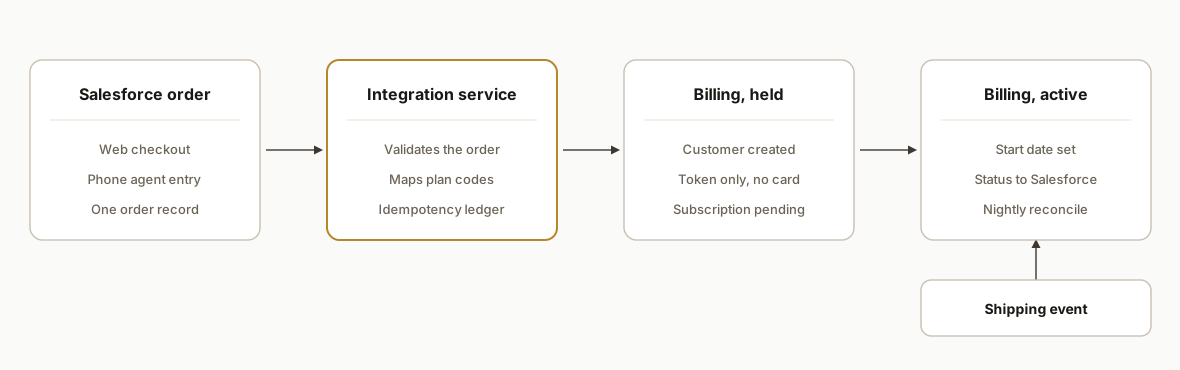
Order intake. Web checkout and phone agents both write to the same Salesforce order object. One schema means one integration path, not two.
Change events. Salesforce documents Change Data Capture and platform events; their usage counts against the MonthlyPlatformEvents limit. We would use them to learn about new and updated orders instead of polling. Outbound messages and webhooks were not confirmed in our research, so we do not design around them.
Integration service. A small service authenticates through a Connected App using OAuth 2.0, validates the order, maps plan codes, and writes to billing. It also keeps an idempotency ledger so a replayed event never creates a second subscription.
Tokenization boundary. Card numbers should never touch Salesforce or the integration service. The payment gateway returns a token, and only the token travels.
Shipping release. The recurring charge is created in a held state. A shipment confirmation from the fulfillment or carrier system flips it to active with the start date set from the ship or activation date.
Step-by-step: how to build it
Step 1: Authenticate with a Connected App
Create a Connected App in Salesforce and use an OAuth 2.0 flow suited to server-to-server work. Third-party guides list the Web Server, User-Agent, and JWT Bearer flows, and the JWT flow suits an unattended service. Confirm the exact API base URL and version against your org rather than copying one from a guide.
{
  "grant_type": "urn:ietf:params:oauth:grant-type:jwt-bearer",
  "assertion": "<signed JWT from the integration service>"
}
Gotcha: use a dedicated integration user with narrow permissions, not a staff login.
Step 2: Subscribe to order changes
Enable Change Data Capture on the order object and subscribe from the service. Fall back to a short-interval query only if your edition cannot support it.
subscription:
  channel: order_change_events
  replay: stored_last_replay_id
  on_event: validate_then_enqueue
Gotcha: platform event usage is metered, so subscribe to the fields and objects you need, not everything.
Step 3: Validate before touching billing
Reject incomplete orders and send them to a review queue rather than creating half an account.
REQUIRED = ["subscriber_name", "service_address", "plan_code", "device_sku", "payment_token"]

def validate(order):
    missing = [f for f in REQUIRED if not order.get(f)]
    return missing  # non-empty -> review queue, no billing call
Gotcha: phone orders are where missing fields come from, so make agents fix them in Salesforce, not in billing.
Step 4: Tokenize payment outside Salesforce
Collect the card through your gateway's hosted fields so the token is created at capture. Salesforce Billing documentation notes that if a custom gateway does not send the paymentGatewayToken, the Billing payment gateway API makes an extra tokenization call, which creates a new payment method. We read that as a duplicate-payment-method risk if you are not careful. Whether other billing platforms behave similarly is something we would test in sandbox.
{
  "customer_ref": "SF-ORDER-0001",
  "payment_token": "tok_from_gateway",
  "plan_code": "PERS-MONITOR-STD"
}
Gotcha: pass the existing token every time, and store only the token and last four digits.
Step 5: Create the held subscription
Create the billing customer and the subscription in a pending state, with the idempotency key set to the Salesforce order ID.
key = f"sf-order-{order['id']}"
if not ledger.seen(key):
    billing.create_subscription(customer, plan, status="pending", idempotency_key=key)
    ledger.record(key)
Gotcha: write the billing ID back to Salesforce so staff can see state without opening a second system.
Step 6: Release on shipment
When the fulfillment system reports a shipment or the device reports activation, set the start date and activate. We have no primary source on how any specific billing platform handles future-dated starts, so the start-date field name and behavior come from your platform's documentation.
def on_shipment(order_id, ship_date):
    sub = ledger.lookup(order_id)
    billing.activate(sub, start_date=ship_date + grace_days)
    salesforce.update(order_id, billing_status="Active")
Gotcha: decide in writing whether the clock starts at ship, delivery, or first test signal, and whether a free trial month applies.
Step 7: Monitor and reconcile
Run a nightly reconciliation comparing active Salesforce orders with active billing subscriptions, and alert on any mismatch.
SELECT o.id FROM sf_orders o
LEFT JOIN billing_subs b ON b.order_ref = o.id
WHERE o.status = 'Shipped' AND b.id IS NULL;
Where it gets complicated
API quotas. Salesforce caps daily API calls per edition. Developer Edition gets 15,000 per 24 hours, and Enterprise and Professional editions get a per-licence allowance (for example 1,000 per licence). Composite requests cost one call per subrequest, per a vendor article. A mid-size PERS company is unlikely to hit this on orders alone, but write-backs and reconciliation add up, so budget calls.
HIPAA scope. Coverage applies only to services listed in a signed BAA, and you must encrypt PHI in transit and, where within your control, at rest. Salesforce documents that Platform Encryption natively encrypts sensitive data at rest to address HIPAA requirements. Whether Shield is covered by your BAA is something we could not confirm, so check your agreement before storing health details such as medical conditions or fall history. Your billing platform and integration host need their own BAAs or must be kept free of PHI.
Export is not a billing feed. Data Export has one active schedule per org, no completion SLA, and omits formula fields. If someone proposes it as the integration, push back.
Ship date versus order date. Orders get edited, split into multiple shipments, or returned. Model shipment as its own event keyed to the order line, not a flag on the order.
Duplicate and orphan accounts. Family members often place and pay for the same subscriber. Match on subscriber plus service address, and decide up front who the billing contact is.
Edition and licensing. Features like Change Data Capture and platform events depend on your edition and limits, so confirm availability before design is locked.
What this actually changes
We are not reporting client results here because we have not delivered this build. What we can say structurally: each order is entered once, the billing start date is driven by a shipping event instead of staff memory, and a nightly reconciliation catches the cases that used to surface as customer complaints weeks later. The saving is the retyping time plus the avoided cost of early or late starts. Salesforce's own Billing documentation frames the same goal, automating billing, credit application, and invoice generation, and the integration approach gets you there without committing to a full Revenue Cloud rollout.
For scope, a single billing target with web and phone intake, shipment release, and reconciliation is typically a three to six week build for us, with a modest monthly care fee afterward. Anything involving multiple billing systems, legacy device portals, or HIPAA review runs longer.
Frequently asked questions
Does Salesforce have an API for syncing orders to billing?
Yes. Salesforce provides a REST API that supports OAuth 2.0, with setup starting from a Connected App. Change Data Capture and platform events are also available. Confirm the exact base URL and API version for your org, since we could not verify one against current official docs.
Can Zapier or Make handle PERS order to billing?
Zapier has a native Salesforce app and can move simple records. It is weak for held subscriptions, retries, and shipping-gated starts. We could not confirm a Make Salesforce connector, so verify that before planning around it. Neither gives you an audit trail suited to billing.
How do you start recurring billing on the ship date?
Create the subscription in a pending state when the order is validated, then activate it when a shipment event arrives, setting the start date from the ship or activation date. The field names depend on your billing platform, so check its documentation.
Is it safe to keep card data in Salesforce?
We would not. Use the payment gateway's hosted fields to produce a token and store only the token and last four digits. Reusing the existing token also avoids the extra tokenization call that Salesforce Billing's gateway API makes when no token is sent.
Is Salesforce HIPAA compliant for a medical alert company?
Only for services listed in a signed BAA, and you must encrypt PHI in transit and, where you control it, at rest. Whether Shield is covered depends on your agreement, which we could not confirm. Have counsel review the BAA before storing health data.
How long and how much?
For one billing target, expect roughly three to six weeks of build and a small ongoing care fee, plus your Salesforce edition costs. Multiple billing systems or a HIPAA review extend that.
If your team is retyping PERS orders into billing, our workflow automation work is built for exactly this handoff, and a similar shipping-to-invoice pattern is covered in ITS Dispatch load to invoice automation. Book a 20 minute call and we will tell you whether your Salesforce setup supports this pattern as is.
Sources
- 1.Revenue Cloud Developer Guidedeveloper.salesforce.com
- 2.Configure Payment Gateways in Salesforcedeveloper.salesforce.com
- 3.Protect Your Health Data with Salesforce Shielddeveloper.salesforce.com
Want us to build this for you?
Nine questions, about 90 seconds. You see the revenue it is costing you, then pick a time. No pitch.
See your options