
There is no documented, ready-made connector between SedonaOffice and HubSpot, Microsoft Dynamics or Zoho. The verifiable choices are WeSuite (quote import), a D-Tools report, or a custom sync against SedonaAPI, a gated REST API whose 2.0 Limited version is described as connecting add-on modules only. That makes step one a request to Bold Group for access and licensing terms, before anyone writes code.
Rex Automaton is an AI implementation agency that builds and runs this kind of system for mid market operators.
SedonaOffice CRM integration is a data flow between SedonaOffice, the billing and back-office system for alarm and security dealers, and your CRM, so that a closed deal becomes a customer, site and job without re-keying.
We have not shipped a SedonaOffice integration to date, so this post is written as our standard pattern and the failure points we design around, not a deployment story. If you are on Salesforce, read the SedonaOffice and Salesforce order-to-billing post instead. This one covers everyone else.
The problem it solves
When a deal closes, someone retypes the customer, service address, contacts and recurring monitoring line into SedonaOffice. The cost of that step is not the typing. It is that a billing system is the one place where a wrong address, a missing site or a second copy of the same customer keeps producing bad invoices until somebody notices. So the goal of any bridge is to make the CRM record and the billing customer provably the same entity.
The real options are not "manual versus automated". They are these:
| Option | What it does | Documented limits | Best when |
|---|---|---|---|
| WeSuite bridge | Reads existing customers, sites, billing locations, contacts, parts and recurring services from SedonaOffice. Winning deals are exported for job creation | Documented as one-directional in what we found. Quotes import as jobs and new customers, or new jobs for existing customers | You sell through quotes and want a vendor-supported path |
| D-Tools report | A custom report that pushes project data from D-Tools into SedonaOffice, per D-Tools support | Access by emailing D-Tools support. Confirm current terms and Bold Group support status before relying on it | Your proposals and design work already live in D-Tools |
| Custom bridge on SedonaAPI | A sync between HubSpot, Dynamics or Zoho and SedonaOffice you control | API is gated. OAuth 2.0, base URL is installation-specific, no public reference. Licensing terms unconfirmed | Your CRM is entrenched and your process does not fit a quote tool |
| Zapier or Make | Would connect through a listed connector | We found no SedonaOffice connector, so treat it as unavailable until Sedona confirms one | Not a starting point |
Official SedonaOffice documentation for HubSpot, Dynamics or Zoho is something we did not find. That suggests a custom or middleware sync, but that is our inference, not a vendor statement.
What keeping your systems in sync is worth
Move the sliders to your own numbers. The defaults are only an example business, not client data.
Revenue from deals that stop slipping each year
$100,800
80 a month × 12 × 5% × 70% × $3000
- Deals kept a year
- 34
- 80 × 12 × 5% × 70%
- Staff cost of doing it by hand each year
- $9,100
- 5 hrs a week × $35/hr × 52 weeks
- Hours handed to the system each month
- 22 hrs
- 5 hrs a week × 52 ÷ 12
First, ask Bold Group for SedonaAPI access
Step one costs nothing: ask Bold Group, which makes SedonaOffice, for SedonaAPI access and the terms attached to it. The SedonaAPI is described as RESTful web services for bidirectional communication, with a legacy 1.0 (SedonaWeb) and a version called 2.0 Limited that connects add-on modules only.
That last detail matters. Because the API is positioned for Sedona add-on modules, a custom HubSpot, Dynamics or Zoho sync may need Sedona approval or licensing. The licensing terms are unconfirmed in what we found, so get them in writing before you scope a build. Credentials are provisioned per company database. Hosted customers need Sedona to supply the cloud client ID and secret and server access, and version minimums apply (SedonaOffice 6.2 or later and SedonaCloud 1.47 or later, per the integration documentation we reviewed, much of it from a customer knowledge base rather than official developer docs).
Ask these five questions in one email:
- Is a custom CRM sync permitted on our license, and what does it cost
- Which API version and which objects (customers, sites, jobs, recurring services) are exposed to us
- What is our base URL, and how are the client ID and secret issued
- Are there rate limits we need to design around
- Is there a sandbox or test company database
Which CRM are you on: HubSpot, Dynamics or Zoho?
The CRM decides two things: what fires the trigger (a deal reaching closed won, or the equivalent opportunity stage) and where the write-back lands. Everything hard sits on the SedonaOffice side and is identical for all three, because access, licensing and object exposure are decided by Bold Group.
Before we quoted a build, we would ask your CRM admin three questions. We have not verified edition-level limits for HubSpot, Dynamics or Zoho here, so these are checks, not claims:
- Can you add a custom field to the company record to hold the SedonaOffice customer number? Everything in the idempotency design depends on it.
- Can a stage change call out to a service, or must we poll for closed-won deals on a schedule?
- Can a dedicated integration user write the returned IDs back to the deal and company?
When does WeSuite or D-Tools beat a custom sync?
They win more often than a custom shop will admit. WeSuite is configured inside SedonaOffice under Tools, then WeSuite Setup, and it reads its connection details from the Sedona SQL Server. What it does with them is documented in Bold Group's integration spotlight and the SedonaOffice help center: quotes import as jobs plus new customers, or as new jobs for existing customers. Nothing we found describes billing data flowing back out, which is the line that separates it from a custom build.
Switch to a pre-built platform when:
- Your sales process is already quote driven and you would be rebuilding what WeSuite does
- You have no one to maintain a custom integration after the build
- You want a vendor to own the breakage when SedonaOffice updates
D-Tools is the same logic for design-heavy shops. D-Tools support describes a custom report that pushes project data into SedonaOffice so nothing is entered twice, at no extra cost. We could not confirm from official sources whether that report is supported by Bold Group, so verify before you commit.
Build custom when you are deeply committed to HubSpot, Dynamics or Zoho, your deal flow does not run through quotes, or you need data to flow back from billing into the CRM. For a side-by-side look at the back-office systems themselves, see our SedonaOffice versus Mastermind comparison.
How the automation works
Our standard pattern is a small middleware service between the CRM and SedonaOffice. It takes a closed-won event, finds or creates the customer, then the site and job, and writes the resulting SedonaOffice IDs back to the CRM.
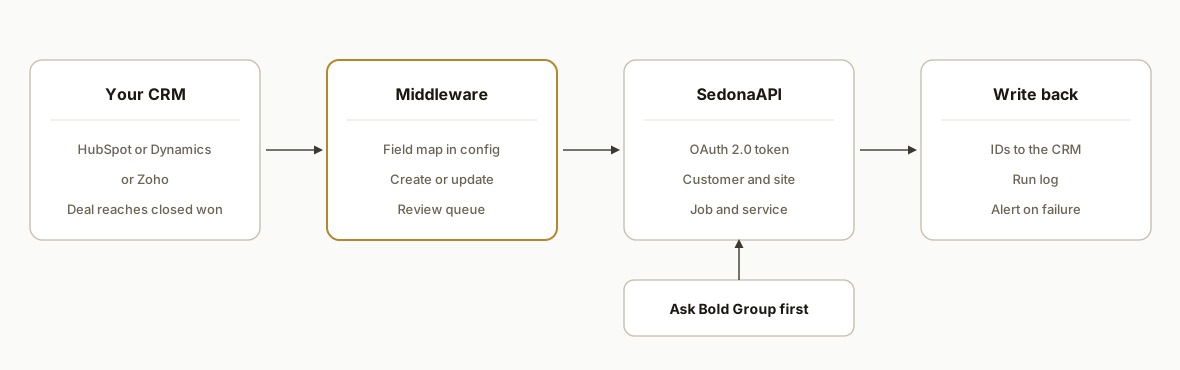
- Trigger: The closed-won stage change, with a scheduled poll as a safety net if the CRM cannot call out.
- Middleware: The only place that holds credentials and the only place that decides create versus update.
- SedonaAPI call: An OAuth 2.0 bearer token, then calls to whichever objects Bold Group exposes to you. We do not list paths or payloads because Sedona has not published them.
- Write-back and log: IDs return to the CRM, and each step is logged so a retry resumes rather than repeats.
Step-by-step: how to build it
Step 1: Get access and terms in writing
Send the five questions above to Bold Group. Do not write mapping code until you know the license position and which objects you can write to.
Step 2: Define the field map
Keep the map in config, not code, so the back office can review it. The left side is your CRM. The right side stays blank until Bold Group tells you which objects and fields you can write to. This is our design, not a Sedona schema.
trigger_stage: closed_won
identity:
  crm_field: sedona_customer_no   # stored on the CRM company record
map:
  company_name: TO_FILL_FROM_SEDONA_OBJECT_LIST
  service_address: TO_FILL_FROM_SEDONA_OBJECT_LIST
  primary_contact: TO_FILL_FROM_SEDONA_OBJECT_LIST
  monitoring_plan: TO_FILL_FROM_SEDONA_OBJECT_LIST
  monthly_rate: TO_FILL_FROM_SEDONA_OBJECT_LIST
Gotcha: a map with guessed Sedona field names looks finished and fails on the first call, so we leave them visibly unfilled.
Step 3: Authenticate to SedonaAPI
The documented grant is an OAuth 2.0 password grant, returning a bearer token. The reason this step stalls is ownership, not code: each input comes from a different party.
| Input | Where it comes from |
|---|---|
| SedonaURL (base URL) | Installation specific, supplied by Sedona |
| Client ID and secret | Supplied by Sedona. Hosted customers get a cloud ID and secret plus server access |
| User login | A company user in your own database, since credentials are provisioned per company database |
| Version | SedonaOffice 6.2 or later, or SedonaCloud 1.47 or later |
The token endpoint path is not in anything we could find, so take it from the documentation Sedona gives you. Check the version row first, because it is the one that can quietly rule out the whole build.
Step 4: Build the idempotent create-or-update
The order of lookups is the design. We fix it in config so nobody changes it casually.
match_order:
  - stored_customer_no        # exact, from the CRM company record
  - normalized_name_and_address
on_exact_match: update
on_fuzzy_match: route_to_review_queue
on_no_match: create
Gotcha: duplicate customers are the most expensive error, so a fuzzy match goes to a human review queue instead of auto-creating.
Step 5: Create children in order and log each ID
Create the site, job and recurring service only after the customer ID is confirmed, and record each returned ID the moment it comes back.
sequence: [customer, site, job, recurring_service, crm_write_back]
on_retry: resume_from_first_incomplete_step
Gotcha: if the job step fails, the customer and site already exist, so the log must hold partial state or a retry creates duplicates.
Step 6: Add the hold-and-notify path
A deal missing a required field stops instead of guessing. We hold on company name, service address, monitoring plan and monthly rate, notify billing, and set a visible status on the CRM deal.
Step 7: Run in shadow mode
For two weeks, write to a test company database if Sedona provides one, or produce a dry-run report against production, and have billing compare it to what they would have entered by hand. Use this window to learn the rate limits too, since we found none published.
Where it gets complicated
Some integrations are customer built. SedonaOffice's knowledge base notes that some integrations were built by customers and are not supported by Bold Group. A custom bridge may land in the same category, so name who supports it before launch.
Credentials follow the database, not the company. Because they are provisioned per company database and hosted customers depend on Sedona for cloud credentials and server access, a second database or a hosting change means a new round of requests.
Partial runs are the common failure. The customer is created, the job is not, and the next run creates the customer again unless the stored customer number and step log exist.
One-way tools create blind spots. WeSuite is documented as one-directional for quote import. If your CRM needs billing status, payment state or cancellation data back, a pre-built tool may not carry it.
What this actually changes
We have no client results to report, because we have not shipped this integration, and we will not estimate savings for your shop. What we can say is what to measure, so the pilot produces your own numbers instead of ours.
During the two-week shadow run, count four things against what billing would have keyed by hand: deals that matched exactly, deals sent to the review queue as possible duplicates, deals held for missing required fields, and fields that differ between the dry run and the manual entry. If the review queue and the hold list are small and the mismatches trace to a mapping fix, go live. If they are large, the problem is your CRM data, and a bridge would only have moved it faster.
Frequently asked questions
Does SedonaOffice have an API?
Yes, gated rather than public. There is a legacy 1.0 called SedonaWeb and a 2.0 Limited sold as the REST API that connects add-on modules only. Auth is OAuth 2.0 and the base URL is specific to each installation. Request access from Bold Group.
Can I connect SedonaOffice to HubSpot with Zapier?
We found no SedonaOffice connector for Zapier or Make, and could not confirm CSV exports, scheduled emails or webhooks out of SedonaOffice. The only related item is SedonaSync with Enterprise Webcaster for alerts and actions, whose capabilities are not detailed publicly.
Should I switch to WeSuite instead of building?
Switch if you sell through quotes and nobody will maintain code. Build if billing data must flow back into the CRM, since the documented WeSuite flow is quote import only. That one requirement decides it.
Does D-Tools integrate with SedonaOffice?
D-Tools support describes a custom report that pushes project data in, but no Bold Group source we found mentions a D-Tools integration. Ask both vendors in writing who supports it when SedonaOffice updates.
What should I have ready before emailing Bold Group?
Your SedonaOffice version, whether you are hosted or self-hosted, and which objects you need to write. Those map directly to the version minimums, the credential path and the exposed-objects question.
Not sure whether you fit a pre-built bridge or need a custom one? Start at our qualify page, see how we approach CRM automation, or read the Salesforce version of this build. You can also book a 20 minute call and we will tell you which of WeSuite, D-Tools or a custom bridge is the better buy.
Sources
- 1.SedonaOffice & Managely Integration Spotlight: WeSuiteboldgroup.com
- 2.How to Set Up the Integration between SedonaOffice and WeSuitesedonaoffice.knowledgeowl.com
Who would build this
Rex Automaton is an AI implementation agency with 250+ projects shipped since 2018, rated 4.9 from 33 reviews. Clients include Soft Pull Solutions, Capcon Networks, Iron Age Investments, IT360. You work directly with the people who build it.


Want this built around your systems?
Nine questions, about 90 seconds. You see the revenue it is costing you, then pick a time. No pitch.
See your optionsRather talk to a person first? Meet the team or tell us which system you run.