
SYSPRO order entry automation means a CRM, quoting tool or web storefront creates the sales order in SYSPRO through its e.net business objects, so nobody keys the same order twice. Rex Automaton builds this kind of adapter for distributors and manufacturers whose ERP is the system of record but whose orders are born somewhere else. This guide is for the operations or IT director at a mid-sized operator who already knows a build is needed and wants to know what the SYSPRO integration surface actually allows, where it bites, and what the project looks like.
In short: SYSPRO exposes XML business objects (SORTOI handles sales order import) behind a logon that returns a session UserId, plus a separate OData service for reads. There is no native Zapier or Make app that we could find, so the realistic paths are a custom adapter or a third-party integration platform. We cover both below.
The problem it solves
The order desk retypes the customer, lines, quantities and ship-to from the CRM or storefront into SYSPRO. The choice that matters is which SYSPRO door each direction goes through, and the table below sorts the doors by what we confirmed and what we could not.
| Door | Direction | Confirmed constraint | Not confirmed | Verdict |
|---|---|---|---|---|
| e.net business objects (XML) | Write | Authenticates as a SYSPRO operator; needs an e.net licence per functional area; SORTOI takes add, change and cancel requests | Public base URL (endpoints are self-hosted per install), REST auth flow, rate limits | The only door we would write orders through |
| OData service | Read | Basic authentication over HTTPS; IIS hosted, OData 4.0 | Which customer and inventory entities your install exposes | Lookups for the CRM or storefront |
| SRS / Open Reporting API | Read | Provides read access | Fit for per-order lookups | Reporting and bulk reads |
| Zapier or Make | Either | We found no native SYSPRO app | Any SYSPRO-specific module | Trigger side only; the XML call stays hand-built |
| Flowgear, iPaaS.com, Stacksync, Versori partnership | Either | SYSPRO connectors exist | Whether a connector covers sales order import on your version | Worth testing only if you already own one |
| Direct SQL | Read | Bypasses business logic | n/a | Never for writing orders |
The working split we use: business objects to write, OData to read, and a thin adapter in between that owns retries, mapping and error handling.
What keeping your systems in sync is worth
Move the sliders to your own numbers. The defaults are only an example business, not client data.
Revenue from deals that stop slipping each year
$100,800
80 a month × 12 × 5% × 70% × $3000
- Deals kept a year
- 34
- 80 × 12 × 5% × 70%
- Staff cost of doing it by hand each year
- $9,100
- 5 hrs a week × $35/hr × 52 weeks
- Hours handed to the system each month
- 22 hrs
- 5 hrs a week × 52 ÷ 12
How the automation works
The adapter takes an event from the source system (a CRM deal moving to Closed Won, or a storefront order paid), logs on to SYSPRO, calls the sales order import object, and records the result. Orders that fail validation go to a human queue instead of disappearing.
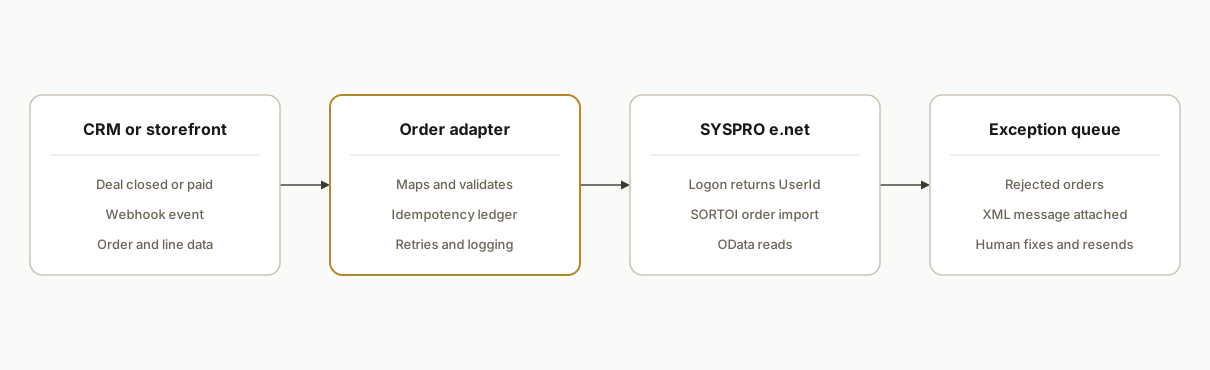
The main decision is whether the adapter is custom code or sits on a platform you already own. The deciding facts come from what we could confirm about SYSPRO:
| Choice | Choose it when | Tradeoff |
|---|---|---|
| Custom adapter calling business objects | You need control over retries, the ledger and exception routing, and your IT team can expose the e.net endpoint | You own the XML parsing, including the casing differences between request and response |
| Adapter on an existing iPaaS (Flowgear, iPaaS.com, Stacksync) | You already pay for one and its SYSPRO connector covers sales order import | A vendor sits in the middle; Flowgear, for example, ships a CorrectXmlCase workaround for the casing problem rather than removing it |
| Zapier or Make | Only for the trigger side | No native SYSPRO app found, so the SYSPRO call is still hand-built |
Whichever you pick, three things have to be settled before any code: which binding your install exposes, which dedicated operator the adapter logs on as (per the SYSPRO run time documentation, the logon returns a unique UserId that must be used in all later e.net calls), and where the ledger of sent orders lives. Everything else, including OData lookups and the exception queue holding the XML message for each rejection, hangs off those three.
Step-by-step: how to build it
Step 1: Confirm licences and operator security
Each functional area you touch needs an e.net licence, and operator security is split into Query, Setup, Transaction and Utility. Create a dedicated integration operator and grant it only what the order flow needs.
integration_operator:
  name: INT_ORDERS        # dedicated, never a human login
  needs:
    - e.net licence for sales order area
    - Transaction: sales order import
    - Query: customers, stock codes, warehouses
  note: restricted operators can receive XML with fields silently omitted
The gotcha: a restricted operator does not always error. It can return data with costs or warehouses simply left out, which looks like a mapping bug.
Step 2: Decide how the adapter reaches the endpoint
Business objects are called through the e.net service on your own server, and we could not confirm any public base URL. Three facts drive the choice: some connectors need a reachable net.tcp endpoint, third-party sources describe a REST binding with a port set in E.Net Service Details, and we could not confirm the REST auth flow for business objects. Confirm the binding on your install before designing around it.
// Our abstraction, not a SYSPRO API. Wraps whichever binding your install supports.
async function withSession(fn) {
  const userId = await logon(cfg.operator, cfg.password, cfg.company);
  try {
    return await fn(userId);
  } finally {
    await logoff(userId);
  }
}
The gotcha: sessions hold state and operator licences. Always log off, and cap concurrent sessions so a burst of orders does not exhaust them.
Step 3: Map source fields to the order payload
SORTOI takes header information and detail lines, and can handle multiple orders in one call with any mix of add, change and cancel requests. We do not list SORTOI element names here, because we could only confirm them from the schema on your install, and guessing them is how a mapping file ends up wrong. What you can decide up front is which source field feeds each concept and which action each source event produces.
# Our config format, not SYSPRO's. Element names come from your SORTOI schema.
mapping:
  action_on:
    deal_closed_won: add
    deal_edited_after_send: change
    deal_cancelled: cancel
  customer: crm.account.erp_customer_code   # must already exist in SYSPRO
  customer_po: crm.deal.po_number           # also our reconcile key in Step 6
  lines:
    stock_code: crm.line.sku
    quantity: crm.line.qty
The gotcha: the CRM account needs a stable SYSPRO customer code. Matching by name is how duplicates and wrong bill-tos happen.
Step 4: Pre-validate before you post
Look up the customer and stock codes through the read path and reject obvious problems at the source. Because lookups run under the integration operator too, an empty result has two possible meanings: the record does not exist, or the operator is not allowed to see it. Treat those differently.
// customerExists returns 'found', 'absent' or 'unknown' (our abstraction)
const state = await customerExists(order.customerCode);
if (state === 'absent') return routeToQueue(order, ['unknown customer']);
if (state === 'unknown') return routeToQueue(order, ['lookup inconclusive: check operator permissions']);
The gotcha: confirm which customer and inventory entities your OData service actually exposes. We found no official page covering them specifically, so treat that as a discovery task, not an assumption.
Step 5: Post the order and parse both kinds of failure
Send the XML to the sales order import object and inspect the response. Errors can arrive as exceptions or as XML messages inside an otherwise normal response, and node casing can differ between request and response, so parse defensively.
const raw = await callBusinessObject(userId, 'SORTOI', paramsXml, orderXml);
const parsed = parseXml(raw, { caseInsensitive: true });
const msgs = extractMessages(parsed);           // XML-level warnings and errors
if (msgs.some(m => m.severity === 'error')) return routeToQueue(order, msgs);
await ledger.markSent(order.sourceId, extractOrderNumber(parsed));
The gotcha: an HTTP success is not an order. Only a parsed order number written to your ledger counts.
Step 6: Make it idempotent
Key every send on the source order ID and check the ledger first. Because SORTOI accepts add, change and cancel requests, the key is the source ID plus the action, so a legitimate change after an add is not mistaken for a repeat.
CREATE TABLE order_ledger (
  source_id    text,
  action       text,   -- add | change | cancel
  customer_po  text,
  syspro_order text,
  status       text,
  last_error   text,
  updated_at   timestamptz DEFAULT now(),
  PRIMARY KEY (source_id, action)
);
The gotcha: if SYSPRO accepted the order but your adapter crashed before writing the ledger, a retry creates a duplicate. Reconcile by reading back recent orders by customer PO before any retry.
Step 7: Run in shadow mode, then cut over
For the first stretch, have the adapter build and validate payloads while the order desk keeps keying orders. Compare the two. Switch to live only when the differences are explainable.
mode: shadow        # shadow | live
compare_against: order_desk_entries
alert_on_mismatch: ops-integration@yourcompany.example
Where it gets complicated
Silent permission gaps. Because restricted operators can receive XML with data omitted, a missing cost or warehouse may be a security setting, not a bug. Test with the real integration operator, not an administrator.
Inconsistent error shapes. Failures can be exceptions or XML messages, and element casing may not match between request and response. Our parser treats both as first-class and never trusts a 200 response alone.
Self-hosted endpoints. There is no public SYSPRO API URL we could confirm. Every install has its own service and port, and some connectors need a reachable net.tcp endpoint, so connectivity is a project task for your IT team.
Real-time versus bulk. One vendor source (with its own services to sell) says business objects suit real-time integration, not bulk extraction. If you also want the full item master mirrored, plan a separate read job over OData or the reporting API rather than thousands of object calls.
What this actually changes
We have no client result to cite for this pattern, and we are not claiming a deployment. The design changes one thing: the order desk reviews only the orders SYSPRO rejected, and every SYSPRO order traces back to its source record through the ledger. Whether reps can also see live stock and credit status in the CRM depends on which OData entities your install exposes.
What does a SYSPRO integration cost and how long does it take?
We do not publish a number, because none of the inputs are knowable before discovery: how many order types you have, how many source systems feed the adapter, whether your e.net licences already cover the functional areas, and how much network work is needed to reach the endpoint. We scope a fixed fee against a written scope after a short discovery pass, and you own the adapter, mapping config and credentials.
Frequently asked questions
Is there a Zapier or Make connector for SYSPRO?
We found no native Zapier or Make app for SYSPRO. Flowgear, iPaaS.com and Stacksync have SYSPRO connectors, and SYSPRO has a partnership with Versori. With Zapier or Make you would still need your own endpoint that accepts and translates SYSPRO XML, so they only cover the trigger side.
Does SYSPRO support webhooks to tell us when an order changes?
We could not confirm native webhooks. The safe design is to reconcile from the adapter side, reading recent order status through OData or a business object query on a schedule, and to treat any webhook-like behaviour on your install as a bonus to verify.
What should we check on our install before scoping?
Four things we could not confirm from public sources: the endpoint address and binding (net.tcp or REST port), the REST auth flow for business objects if you want REST, any rate limits, and which customer and inventory entities OData exposes. Bring your IT contact and an operator with the relevant e.net licences.
Why do some fields come back empty from SYSPRO?
Operator security is split into Query, Setup, Transaction and Utility, and a restricted operator can receive XML with data such as costs or warehouses omitted without a loud error. If a field is missing, check the integration operator's permissions and e.net licensing before debugging the mapping.
Can we skip the adapter and just have the CRM call SYSPRO directly?
You can, but then the CRM owns session logon and logoff, XML casing differences, XML-level errors inside normal responses, and the duplicate-after-crash problem. That is the adapter's whole job, so putting it in a separate thin layer keeps the CRM free of SYSPRO specifics.
If your order desk is retyping CRM or storefront orders into SYSPRO, this is a well-understood build, and our custom AI integration services cover it end to end. For the same pattern on a different ERP, see our write-up on Sage 100 order entry automation. When you want to check whether your setup maps cleanly, book a 20 minute call and we will walk through your order flow, licences and endpoint access.
Sources
- 1.SORTOI: SO Sales Order Importhelp.syspro.com
- 2.syspro 8 odata reference guidehelp.syspro.com
- 3.Syspro Run Time Productshelp.syspro.com
Who would build this
Rex Automaton is an AI implementation agency with 250+ projects shipped since 2018, rated 4.9 from 33 reviews. Clients include Soft Pull Solutions, Capcon Networks, Iron Age Investments, IT360. You work directly with the people who build it.


Want this built around your systems?
Nine questions, about 90 seconds. You see the revenue it is costing you, then pick a time. No pitch.
See your optionsRather talk to a person first? Meet the team or tell us which system you run.