
Here is how we build a Towbook to BigQuery pipeline that powers a real-time Looker Studio dispatch dashboard without Zapier. It bulk-syncs Towbook operational data, joins live GPS from your telematics partner, and models KPIs that matter to dispatch: active calls, ETAs, driver load, and invoice flow.
Towbook dashboard automation is: a bulk sync of Towbook data into BigQuery, a live locations stream from your telematics vendor, and a Looker Studio report pinned to modeled tables so dispatch sees the operation live.
The problem it solves
Towing teams want a single pane of glass for active calls, driver status, and receivables. The manual way is export an Excel or PDF from Towbook, paste into a sheet, text a driver for location, then rebuild charts. It is stale the moment you hit save and it breaks whenever columns change.
| Manual process | Automated pipeline |
|---|---|
| Export Excel or PDF from Towbook and paste into Sheets each morning | Bulk-sync Towbook into BigQuery on a schedule with no Zapier |
| Ask drivers for locations or eyeball an in-app map | Pull live GPS from a telematics partner API and join in SQL |
| Rebuild charts in Excel. Slides by end of day | Looker Studio reads modeled BigQuery tables and auto-refreshes |
| Errors when headers change. No audit trail | Typed schemas, idempotent loads, and freshness checks |
What closing the dispatch to billing gap is worth
Move the sliders to your own numbers. The defaults are only an example business, not client data.
Your own estimate. A job that creates its own invoice cannot be forgotten, but a wrong rate can still slip through.
Revenue billed each year that slips through today
$28,800
300 a month × $250 × 4% leaked × 80% closed × 12 months
- Staff cost of doing it by hand each year
- $10,920
- 6 hrs a week × $35/hr × 52 weeks
- Hours handed to the system each month
- 26 hrs
- 6 hrs a week × 52 ÷ 12
How the automation works
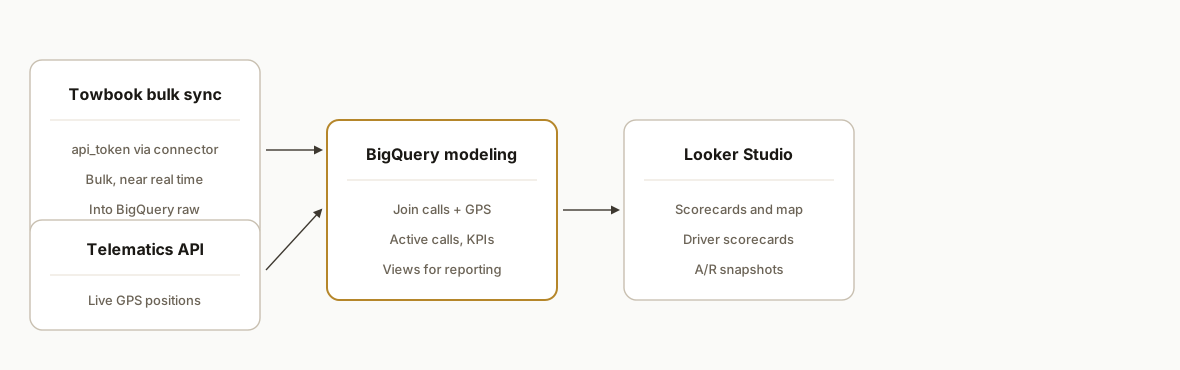
At a high level: use a third-party connector that supports Towbook bulk sync into BigQuery, fetch live vehicle locations from a telematics partner integration, model both in SQL, then point Looker Studio at the result. There are no Towbook public API docs we can cite, and Towbook is not listed in Zapier or Make directories we could confirm, so the reliable path uses a bulk-sync connector and partner APIs rather than event webhooks.
- Towbook bulk sync to BigQuery: Polytomic exposes a Towbook source that authenticates with an api_token and positions Towbook as a bulk report style source rather than real-time events. We use it to land core operational tables in BigQuery. Source: apidocs.polytomic.com and polytomic.com.
- Telematics for live GPS: Towbook's GPS is supplied by telematics partners. For live location in the dashboard, pull directly from the partner API such as Samsara, then land that in BigQuery. Source: samsara.com marketplace listing for Towbook.
- BigQuery modeling layer: SQL models stitch Towbook bulk tables with the latest vehicle positions to compute dispatch KPIs, driver load, and ETAs. Views or materialized views keep Looker Studio light.
- Looker Studio: A BigQuery data source powers cards and charts: Active Calls, Completed Today, A/R aging, driver scorecards, and heatmaps. Looker Studio controls refresh while BigQuery handles freshness and joins.
Step-by-step: how to build it
1) Land Towbook data in BigQuery with a bulk-sync connector
Use Polytomic's Towbook source with an api_token to replicate Towbook entities into a BigQuery dataset. Treat the landing tables as raw and never query them directly from your dashboard.
-- BigQuery: create a raw dataset and simple access boundary
CREATE SCHEMA IF NOT EXISTS `towing.raw` OPTIONS(location="US");
CREATE SCHEMA IF NOT EXISTS `towing.stg` OPTIONS(location="US");
CREATE SCHEMA IF NOT EXISTS `towing.marts` OPTIONS(location="US");

-- Example helper view that normalizes timestamps in the raw sync
CREATE OR REPLACE VIEW `towing.stg.calls_raw_norm` AS
SELECT
  SAFE_CAST(call_id AS STRING) AS call_id,
  PARSE_TIMESTAMP('%Y-%m-%d %H:%M:%E*S', created_at) AS created_ts,
  PARSE_TIMESTAMP('%Y-%m-%d %H:%M:%E*S', updated_at) AS updated_ts,
  status,
  driver_id,
  customer_name,
  pickup_address,
  dropoff_address
FROM `towing.raw.towbook_calls`;
Gotcha: Towbook public API docs are not available. Treat the connector as authoritative for what you can sync and expect bulk cadence, not events. Source: apidocs.polytomic.com.
2) Ingest telematics GPS directly from the partner API
Towbook surfaces GPS from partners. For live dots on the map and ETAs, hit the telematics API such as Samsara and write current positions into a compact table keyed by vehicle.
# Cloud Function: poll telematics API and upsert positions to BigQuery
import os, time, json
import requests
from google.cloud import bigquery

BQ_TABLE = os.environ["BQ_TABLE"]  # e.g., towing.raw.vehicle_positions
API_TOKEN = os.environ["TELEMATICS_API_TOKEN"]

def fetch_positions():
    # Use your telematics vendor's documented endpoint
    headers = {"Authorization": f"Bearer {API_TOKEN}"}
    # Placeholder URL, consult your vendor docs before deploying
    url = "https://api.vendor.example/fleet/positions"
    r = requests.get(url, headers=headers, timeout=20)
    r.raise_for_status()
    return r.json()

def upsert_rows(rows):
    bq = bigquery.Client()
    errors = bq.insert_rows_json(BQ_TABLE, rows)
    if errors:
        raise RuntimeError(errors)

def main(request):
    data = fetch_positions()
    rows = []
    now = int(time.time())
    for v in data.get("vehicles", []):
        rows.append({
            "vehicle_id": v["id"],
            "lat": v["lat"],
            "lng": v["lng"],
            "heading": v.get("heading"),
            "speed_kph": v.get("speed_kph"),
            "position_ts": v.get("ts"),
            "ingested_ts": now
        })
    if rows:
        upsert_rows(rows)
    return ("ok", 200)
Gotcha: do not proxy GPS through Towbook. Pull it from the partner. Source: samsara.com marketplace page for Towbook.
3) Model dispatch status and driver load in SQL
Create a narrow mart that holds one row per active call with the last known position of the assigned vehicle. Keep this view small and fast for Looker Studio.
-- One active row per call with last-known vehicle position
CREATE OR REPLACE VIEW `towing.marts.active_calls` AS
WITH last_pos AS (
  SELECT *, ROW_NUMBER() OVER (PARTITION BY vehicle_id ORDER BY position_ts DESC) AS rn
  FROM `towing.raw.vehicle_positions`
)
SELECT
  c.call_id,
  c.created_ts,
  c.updated_ts,
  c.status,
  c.driver_id,
  v.vehicle_id,
  v.lat,
  v.lng,
  v.heading,
  v.speed_kph
FROM `towing.stg.calls_raw_norm` c
LEFT JOIN last_pos v
  ON v.vehicle_id = c.driver_id AND v.rn = 1
WHERE c.status IN ('Assigned','En Route','On Scene');
4) Build KPIs and an A/R snapshot for finance
Towbook exports some outputs as Excel or PDF. For dashboards, rely on structured syncs where possible. If you must ingest spreadsheets, land them in towing.raw and reshape in SQL.
-- Example KPI view
CREATE OR REPLACE VIEW `towing.marts.kpis` AS
SELECT
  CURRENT_TIMESTAMP() AS as_of,
  COUNTIF(status IN ('Assigned','En Route','On Scene')) AS active_calls,
  COUNTIF(DATE(created_ts) = CURRENT_DATE()) AS created_today,
  COUNTIF(status = 'Completed' AND DATE(updated_ts) = CURRENT_DATE()) AS completed_today
FROM `towing.stg.calls_raw_norm`;
5) Wire Looker Studio to BigQuery and tune refresh
Create a Looker Studio data source for towing.marts.active_calls and towing.marts.kpis. Build scorecards for active calls and completed today, a table for driver scorecards, and a map using the lat and lng fields. Use BigQuery views so Looker Studio only reads modeled columns.
Key tip: let BigQuery handle freshness with scheduled SQL that keeps marts current. Looker Studio will then pick up new rows on its connector refresh.
6) Add a freshness monitor and alerting
We add a lightweight monitor that checks the max updated timestamp and raises an alert when data stales out.
// Apps Script: ping BigQuery and email if stale
function checkFreshness() {
  const projectId = Session.getActiveUser().getEmail().split('@')[0];
  const query = `SELECT TIMESTAMP_DIFF(CURRENT_TIMESTAMP(), MAX(updated_ts), MINUTE) AS min_ago
                 FROM ` + '`towing.stg.calls_raw_norm`';
  const job = BigQuery.Jobs.query({query, useLegacySql: false}, projectId);
  const rows = job.rows || [];
  const minAgo = rows.length ? parseInt(rows[0].f[0].v, 10) : 999;
  if (minAgo > 30) {
    MailApp.sendEmail("ops@towing.example", "Towbook data stale", `Last update: ${minAgo} minutes ago`);
  }
}
Where it gets complicated
No public Towbook API docs. We did not find official public developer docs. Plan around a bulk-sync connector that requires an api_token and accept that it behaves like reports, not streaming events. Source: apidocs.polytomic.com and polytomic.com.
Telematics is partner-sourced. Towbook's live dots come from telematics vendors. For real-time location, integrate the partner API directly rather than polling Towbook. Source: samsara.com marketplace listing for Towbook.
Document centric exports. Several Towbook outputs are Excel or PDF. Excel is workable with an ETL step, but PDFs require a separate extraction path and should not be the backbone of your dashboard. Sources: Towbook Auction Manager and Accident Reports help articles.
Near real time, not event driven. Without a documented webhook surface, your best case is frequent bulk sync plus GPS pulls. Model your KPIs so they tolerate a few minutes of skew between Towbook and telematics.
Looker Studio performance. Keep Looker Studio pointed at slim marts, not raw sync tables. Push joins and transformations into BigQuery and cache precomputed views if needed.
What this actually changes
For towing operators, dispatch finally reads from one truth: Towbook for job state plus telematics for live location, modeled in BigQuery and surfaced in Looker Studio. The practical shift is structural. Dispatchers do not rebuild spreadsheets. Managers open a URL and see active calls, completions, and driver load that self-refresh.
We also published a Towbook dispatch console as a public demo for UBK Towing. It was a demo with mock data, not a live deployment, but the integration path to production is the same pattern here: bulk sync Towbook, join telematics, and visualize. Sources for Towbook connector posture and telematics approach are linked above.
Frequently asked questions
Does Towbook have an official API we can use for this?
We did not find public developer docs on Towbook domains. The reliable path we use is a third-party bulk-sync connector that requires an api_token and lands Towbook data into BigQuery, combined with a telematics partner API for live GPS. Source: apidocs.polytomic.com and polytomic.com.
Can this be truly real time?
Treat Towbook as near real time via frequent bulk sync. For live dots, pull directly from your telematics partner. In practice this gives a dashboard that updates on the connector cadence for Towbook fields and on your poll cadence for GPS.
Do I need Zapier or Make for this?
No. We ship it without Zapier. A bulk-sync connector handles Towbook to BigQuery. A small Cloud Function or scheduled job calls the telematics API. Looker Studio reads from BigQuery.
What do we need to start?
Towbook admin access to provision the connector api_token, a Google Cloud project with BigQuery, and credentials for your telematics vendor. We handle dataset design, modeling, and the Looker Studio build.
How much does this cost monthly?
You will have a connector subscription, BigQuery storage and query usage, and a minimal serverless job for GPS. Exact figures depend on volume and cadence. We design marts to keep BigQuery reads small.
Can a non-developer set this up?
Parts are wizard-driven, but stitching Towbook bulk sync, telematics, and BigQuery modeling into a stable Looker Studio report is real engineering. We have done this before and can ship it end to end.
If you want the same outcome for your fleet, we can implement the BigQuery plus Looker Studio stack and hand you a single URL for dispatch and management. See our related write-up on Towbook Zapier alternatives, explore our custom AI integration, and when you are ready, book a call.
Want us to build this for you?
Nine questions, about 90 seconds. You see the revenue it is costing you, then pick a time. No pitch.
See your options