
TruckMate integration means pulling load, dispatch and billing records out of Trimble's TruckMate TMS through its REST API (or a middleware layer) and writing them into your CRM, customer portal or accounting system on a schedule, so nobody retypes them. This guide is for operations and IT directors at mid-market carriers who already know they need a build, and it covers what the TruckMate integration surface allows, where it is limited, the pattern we would build, and what to settle before you scope it.
Rex Automaton is an AI implementation agency that builds and runs this kind of system for mid market operators.
The problem it solves
TruckMate holds orders, dispatch assignments, status events, rates and billing. The CRM, the customer status channel and the accounting ledger each need a copy, and the copies fail in specific ways: a rate corrected after invoicing, a delivered status that never reaches the customer, a customer or currency that does not match between systems. Those are the cases the design below is built around.
The options for fixing it are not equal, and the research on TruckMate is specific about what is and is not confirmed:
| Option | What is confirmed | Limits and unknowns | Typical fit |
|---|---|---|---|
| TruckMate REST API | Documented by Trimble as RESTful and OpenAPI-compliant, on port 69000 under the /tm path, hosted by you or single-tenant by Trimble | Not a public multi-tenant cloud API. Rate limits are unconfirmed. Credentials are reportedly issued through a desktop app | Custom adapter for load, dispatch and billing sync |
| SystemsLink and SOAP APIs | Exist alongside the REST API | One vendor KB indicates the SOAP API needs a separate license | Legacy integrations already built on them |
| Middleware connector (for example Cleo) | Cleo lists a TruckMate application connector | Licensing and per-message fees vary | EDI-heavy shops |
| Zapier or Make native app | None found in either directory | Unconfirmed, do not plan around it | Not a path today |
| Manual export and retype | Billing can go out by paper, fax, email or EDI | No documented CSV export, scheduled report or webhook found | Where most teams are stuck |
The honest summary: there is a real API, but access is gated by your install, your license and your credentials, which is why most carriers never get past retyping. The decision rule we use: if your pain is EDI documents, start with the middleware row; if it is load, status and billing records going into a CRM or QuickBooks, the REST row is the only one that fits, and everything else in this guide assumes it.
What closing the dispatch to billing gap is worth
Move the sliders to your own numbers. The defaults are only an example business, not client data.
Your own estimate. A job that creates its own invoice cannot be forgotten, but a wrong rate can still slip through.
Revenue billed each year that slips through today
$28,800
300 a month × $250 × 4% leaked × 80% closed × 12 months
- Staff cost of doing it by hand each year
- $10,920
- 6 hrs a week × $35/hr × 52 weeks
- Hours handed to the system each month
- 26 hrs
- 6 hrs a week × 52 ÷ 12
How the automation works
The design rule is that only one component knows TruckMate exists. A scheduler runs a reader against the REST API, the reader emits records in a neutral load shape, and every destination writer consumes only that shape. Access to TruckMate varies by site, so when your host, auth method or version differs, you change the reader and nothing else.
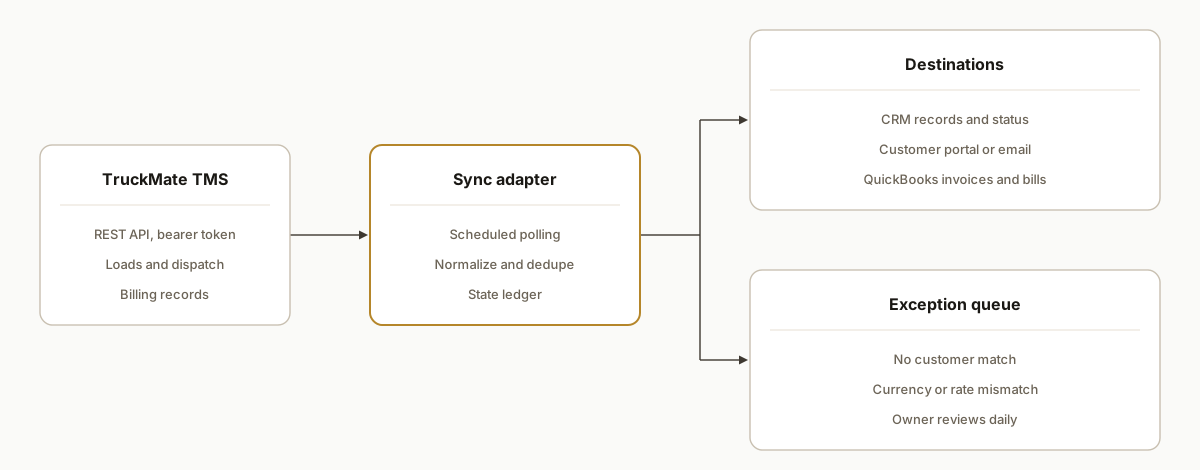
Two components carry the safety. The sync ledger records which load and which version has been written to which destination, which is what makes retries and backfills harmless. The exception queue takes anything that fails validation (no customer match, currency mismatch, rate change after invoicing) so a person decides instead of the code guessing.
Step-by-step: how to build it
Step 1: Confirm the access path before anything else
Ask your TruckMate administrator or Trimble account contact three questions: is the REST API licensed and running on your install, which host and port expose it, and who can issue credentials. Trimble documents the service on port 69000 under /tm, but the host depends on your deployment.
# Your host will differ. Verify the service is reachable and read its spec.
curl -s https://YOUR-TM-HOST:69000/tm/openapi.json | head
Gotcha: the OpenAPI document is the authoritative list of what your version exposes. Build against that, not against assumptions from another install.
Step 2: Pick an auth method by who can issue and revoke it
Trimble documents five Bearer token methods: a user API key, a login endpoint that issues a time-limited JWT, a client API key, a vendor API key, and TID. The docs do not rank them and we have no confirmed token lifetime, so the choice comes down to the operational cost each style puts on your side:
| Style | What you carry | Source of the claim |
|---|---|---|
| API key (user, client or vendor) | An administrator must create it once, reportedly in a Windows desktop app | Third-party review, verify with your admin |
| Login endpoint returning a JWT | Refresh logic in the adapter, because the token is time-limited | Trimble docs for time-limited, third-party review for short-lived |
If you take the JWT route, read the expiry from the login response instead of hardcoding it. Whichever style you pick, give the adapter its own service credential so you can revoke it without touching a person's login, and treat a repeated 401 as a revoked or wrong credential that pages a human rather than a retry loop.
Step 3: Poll with a watermark you control
Webhooks were not found in the documentation, so polling is the baseline. Whether your version exposes a changed-since style filter is something only your openapi.json can answer. Decide on that basis:
- If a modified-date filter exists, poll with a watermark.
- If it does not, pull the full active set and let the source-version hash in the ledger discard unchanged rows.
Watermark rules that hold either way: record the time the poll started, not when it finished, and advance the watermark only after every write in that batch succeeded. Re-reading an overlap window is safe because the ledger skips records whose hash has not changed.
started = now()
rows = fetch_loads(since=ledger.get_watermark("loads"))
process(rows)                            # ledger-checked writes
ledger.set_watermark("loads", started)   # only after process() succeeds
Gotcha: poll interval is a business decision, not a technical one. Customer status updates justify a short interval, invoicing can run on a slower cycle, and with rate limits unconfirmed you should start slow and tighten only when someone asks.
Step 4: Normalize into one neutral load record
The reader maps TruckMate fields into one flat record carrying load ID, customer, stops, status, rate, accessorials, invoice state and currency, and keeps the raw payload alongside for audit. We do not list TruckMate field names here because we have not confirmed them, and your openapi.json is the source of truth for them. The mapping lives in the reader only, so a version difference never reaches the writers.
Gotcha: compute the source-version hash over the raw payload, not the normalized record, so a change in a field you do not map still counts as a change.
Step 5: Write to destinations idempotently
Check the ledger before every write. If the load and version already landed, skip. For QuickBooks, create the invoice once and update it on later versions instead of creating another.
CREATE TABLE sync_ledger (
  load_id TEXT, destination TEXT, source_version TEXT,
  external_id TEXT, written_at TIMESTAMP,
  PRIMARY KEY (load_id, destination)
);
Gotcha: QuickBooks Online multicurrency, once enabled, locks customers and vendors to a currency, so mixed CAD and USD billing must be mapped deliberately.
Step 6: Route failures to an exception queue with reason codes
Use a closed list of reason codes so the daily digest can be sorted and counted. The three that matter most for load-to-invoice flow are the ones this design already names: no customer match, currency mismatch, and rate changed after invoicing.
REASONS = ("NO_CUSTOMER_MATCH", "CURRENCY_MISMATCH", "RATE_CHANGED_AFTER_INVOICE")

if not crm.find_customer(load.customer_ref):
    queue.add(load.load_id, reason="NO_CUSTOMER_MATCH")
    continue
if qbo_customer.currency != load.currency:
    queue.add(load.load_id, reason="CURRENCY_MISMATCH")
    continue
Gotcha: the third code is the dangerous one. Never auto-edit an invoice that was already sent. Queue it, because a human has to decide between a credit memo and a revised invoice.
Step 7: Backfill into the ledger, then shadow before you write
Replay a historical window through the reader and normalizer with destination writes switched off, so the ledger fills and the exception queue shows you every data problem up front. Then run in shadow mode: generate what the adapter would have written and diff it against what staff actually produced. Turn writes on one destination at a time.
We have used the backfill-first pattern in a live build, though on a different system. For BlackBoxMyCar we backfilled Shopify orders from Feb 1 to launch day into the Google Sheet sink before cutting over, and verified end to end with three real orders. That was a Make.com scenario, not TruckMate, so it is adjacent proof of the cutover discipline and not of this integration.
Where it gets complicated
Access is the long pole, so price it first. The REST API is single-tenant and tied to your install, SOAP may need a separate license per one vendor KB, and a Samsara integration is reported to go through a third-party integrator with deployment and monthly fees. Get licensing and cost in writing before you scope. Also keep the TMT Integration Toolkit REST API out of the conversation: it is a fleet maintenance product, not the TruckMate API.
Poll interval and unknown rate limits trade against each other. With rate limits unconfirmed and no push found, near-real-time status is only ever a shorter interval. Start slow, add backoff, and shorten the interval for status updates alone before touching invoicing.
Your version defines the API. Documentation for previous API versions is reachable through the openapi.json endpoint of a running service, so the spec on your server beats any example, including ours.
An unowned exception queue becomes a second backlog. Name the owner and the digest recipient before go-live.
What this actually changes
We have not shipped this specific integration for a customer, so we will not quote results. What the pattern changes is structural: one system of record writes to the others on a schedule, retyping disappears from the load-to-invoice path, and every mismatch becomes a visible exception instead of a month-end surprise. The TruckMate API documentation is the place to verify what your version exposes.
Scope turns on three things you can answer before a call: how many destinations you connect, whether your spec exposes a changed-since filter, and how clean your customer and currency data is. We scope it on a 45 minute call after reviewing your OpenAPI spec, and quote against a written list of acceptance tests.
Frequently asked questions
Should we poll the full active set or only changed loads?
It depends on your openapi.json. If a modified-date filter exists, poll with a watermark. If not, pull the full active set and let the source-version hash in the ledger discard unchanged rows. Either way the ledger makes re-reading safe, so the choice affects load on the server, not correctness.
What happens when a rate changes after the invoice went out?
The load lands in the exception queue with the reason code for a rate changed after invoicing. The adapter never edits an invoice that was already sent. A person decides between a credit memo and a revised invoice, and the ledger then records the version that was actually written.
Why does QuickBooks multicurrency matter for a TruckMate sync?
Once QuickBooks Online multicurrency is enabled, customers and vendors are locked to a currency. A CAD load against a customer set up in USD cannot be written cleanly, so the adapter checks currency before writing and queues a mismatch instead of guessing.
How do we cut over without double-entering or double-billing?
Backfill history into the ledger with writes off, run in shadow mode and diff the adapter's output against what staff produced, then enable writes one destination at a time. Because the ledger keys on load and destination, a retry or an overlapping poll cannot create a second invoice.
How long does a TruckMate integration take?
We do not quote a duration up front, because the gates come first: API licensed, host reachable, credentials issued, spec read. Those depend on your install and your administrator. Once they clear, the destination count and data cleanliness set the build. We scope it from your spec.
If your team retypes TruckMate loads into a CRM or QuickBooks, the first step is reading your OpenAPI spec, and that is where our workflow automation scoping starts. For a related pattern on another dispatch system, read our guide to ITS Dispatch load-to-invoice automation. To scope yours, book a 45 minute call and bring your OpenAPI spec if you have it.
Sources
- 1.TruckMate APIdeveloper.trimble.com
- 2.Trimble TruckMate TMS delivers the agility and flexibility you need to succeedtransportationinfo.trimble.com
Who would build this
Rex Automaton is an AI implementation agency with 250+ projects shipped since 2018, rated 4.9 from 33 reviews. Clients include Soft Pull Solutions, Capcon Networks, Iron Age Investments, IT360. You work directly with the people who build it.


Talk to the engineer who builds this
Bring the systems you run and the step your team retypes by hand. In 15 minutes we tell you whether your TruckMate integration can be built, how we would build it, and what it would take.
Book a 15 minute fit checkWant this built around your systems?
Nine questions, about 90 seconds. You see the revenue it is costing you, then pick a time.
See your optionsRather talk to a person first? Meet the team or tell us which system you run.