
A Point of Rental integration moves contracts, customers and billing data out of your rental system and into the CRM and accounting tools your team actually works in, without anyone re-keying a rental ticket. This guide is for equipment rental operators who already know the counter system is the source of truth and need it to talk to everything else. It covers what the documented connector and export paths allow, where they stop, and the staging-adapter pattern we build when they do.
One caveat up front. Point of Rental does not publish a public developer portal, so the details of its API (base URL, authentication, rate limits) are not something we can state from public sources. Access appears to be vendor-gated. Everything below is written so it holds whichever path your account turns out to have.
Definition: in this post, an integration is done when four keys hold. Every rental record carries a stable source key, every load carries a content hash so a re-export inserts nothing, every contract write carries a contract plus revision key so a later revision supersedes an earlier one, and every customer carries both a rental system key and a CRM id.
The problem it solves
Point of Rental documents two destination paths well enough to design around (Salesforce and the accounting connectors), and neither is documented as carrying everything a rental business needs. Everything else depends on what the vendor grants your account. Here is how the options compare for a Point of Rental shop, based on what the vendor documents publicly.
| Option | What it covers | Where it stops | Setup effort |
|---|---|---|---|
| Native Salesforce connector (Elite Advanced) | Account info, contact info and call logs; a Point of Rental press release also says contract line items sync so users can view them in Salesforce | Salesforce only; quotes and availability not documented | Vendor-led configuration |
| Native accounting connectors (Elite) | QuickBooks, Sage, Xero and Dynamics; the Xero integration release lists invoices, credit notes, cash payments, depreciation and client details | Which transaction types sync on each connector is not confirmed for every edition | Vendor-led configuration |
| Flexible GL export (Elite) | A general ledger export for accounting systems with no native connector | Journal level data, not a CRM feed | Mapping work on your side |
| Zapier | Documented for Rental Essentials, the smaller product | Not confirmed for Elite, so do not assume it | Low if you are on Essentials |
| Vendor API (the Elite API mentioned in press material) | Unconfirmed: scope, auth and limits are not public | Vendor-gated | Depends on what the vendor grants |
| Custom staging adapter | Whatever export or API path your account supports, normalized and pushed anywhere | You own the maintenance | A phased build |
How we choose between them:
- Salesforce on Elite Advanced: use the native connector first. Build only for what it does not carry, which in the documented mapping means quotes and availability.
- QuickBooks, Sage, Xero or Dynamics: use the native accounting connector first. Use the GL export only when your ledger has no connector, and accept that it gives you journal data, not customer history.
- Rental Essentials: Zapier is the cheapest thing to try, because it is the only edition where it is documented.
- Any other CRM, or any destination the paths above do not reach: you are building an adapter, and the first task is finding out which extraction path the vendor will grant.
What automatic invoicing is worth
Move the sliders to your own numbers. The defaults are only an example business, not client data.
Your own estimate. A job that creates its own invoice cannot be forgotten, but a wrong rate can still slip through.
Revenue billed each year that slips through today
$40,320
400 a month × $350 × 3% leaked × 80% closed × 12 months
- Staff cost of doing it by hand each year
- $10,920
- 6 hrs a week × $35/hr × 52 weeks
- Hours handed to the system each month
- 26 hrs
- 6 hrs a week × 52 ÷ 12
How the automation works
The rental system is never written to in the first phase. We pull records out on a schedule, land them untouched in a staging database, normalize them into a small schema we control, and push changes to the CRM and accounting tool through rules.
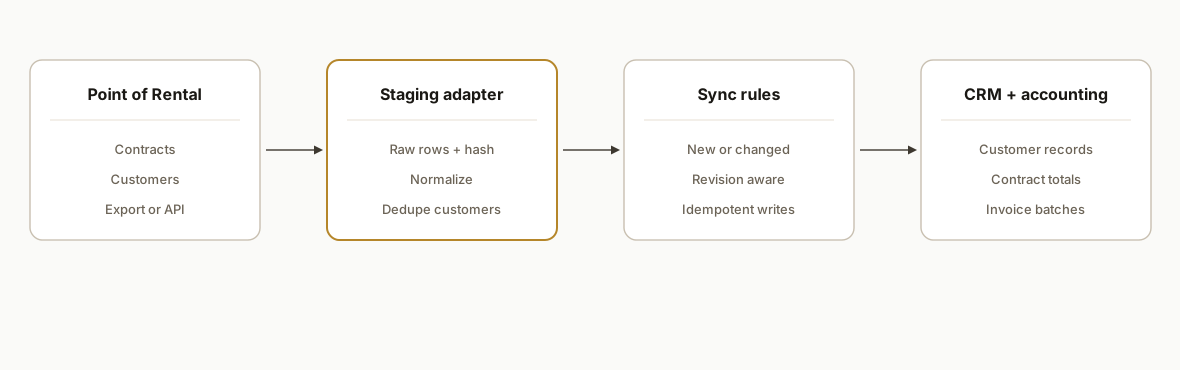
Only the extraction layer depends on your account, so we ask the vendor about it in a fixed order, from least to most trust required:
- Scheduled or on-demand export. Ask first, because the sample file settles the schema and costs the vendor little. CSV export, scheduled email and webhooks are all unconfirmed publicly, so ask which of them your edition has rather than assuming one.
- Vendor API. The cleanest feed if granted, but scope, auth and limits are unknown until the vendor answers. Ask for the object list (contracts, line items, payments) before agreeing to build on it.
- Database level read agreed with the vendor. The widest view of the data, and the one that needs the most vendor trust. Treat it as the last resort when 1 and 2 omit contract lines or payments.
The GL export sits beside this list, not in it: it feeds a ledger, not a CRM, so it never replaces one of the three. Downstream of extraction the build is identical whichever you get, and Steps 2 to 5 below define it.
Step-by-step: how to build it
Step 1: Establish what your account can actually export
Before any design, get a written answer from Point of Rental on three questions: is API access available on your edition, what scheduled or on-demand export exists, and which transaction types the accounting connector carries. Ask for a sample export of one week of contracts. That file decides the whole build.
We keep a one page capability record per account so nobody builds against an assumption.
account_capabilities:
  edition: confirm_with_vendor
  vendor_api_access: unconfirmed
  scheduled_export: unconfirmed
  accounting_connector: confirm_which
  sample_export_received: false
  entities_in_sample: []
The gotcha: the sample export must contain a contract with multiple line items, a partial return and a deposit. Clean samples hide the cases that break sync later.
Step 2: Land raw data in a staging table
Whatever the extraction path, write rows to staging unchanged. Hash each row so you can tell a real change from a re-export of the same data.
create table staging_contracts (
  id bigserial primary key,
  source_key text not null,
  payload jsonb not null,
  content_hash text not null,
  loaded_at timestamptz not null default now(),
  unique (source_key, content_hash)
);
The unique constraint on source key plus hash means a repeat load of identical data inserts nothing. Your column headers and key names will come from your export, so the source key is a decision you make once, with the sample file open.
Step 3: Normalize into a schema you control
Map staging rows into four tables you own: customers, contracts, contract lines and payments. Keep a stable internal id and store the rental system key beside it.
create table customers (
  id uuid primary key default gen_random_uuid(),
  por_key text unique not null,
  name text, email text, phone text,
  crm_id text, updated_at timestamptz
);
The unique por_key stops the same rental record being inserted twice. It does not stop the counter creating two records for one real customer. For that we match on email first, then phone, then normalized company name, and send near matches to a review queue instead of merging them silently.
Step 4: Push to the CRM only what the native path does not carry
The adapter's job in the CRM is defined by the gap in the table above. On Salesforce with Elite Advanced the connector already maps account info, contact info and call logs, and the vendor says contract line items sync too. We write a field map before any code so the adapter never duplicates it.
crm_field_ownership:
  native_connector:
    - account_info
    - contact_info
    - call_logs
    - contract_line_items
  adapter:
    - contract_totals
    - last_rental_date
    - open_quote_count
  match_on: crm_id, then email
On any other CRM there is no native connector, so the adapter owns all of it and the same crm_id then email lookup applies. Quotes are the field we verify first against the sample export, since the vendor does not document them for the Salesforce path.
Step 5: Send billing data to accounting
If your native accounting connector covers invoices and payments, leave it alone. Where it does not, the adapter builds journal or invoice batches from the normalized tables and posts them with an idempotency key built from the contract id and revision.
key = f'{contract.por_key}:{contract.revision}:{kind}'
if not already_posted(key):
    post_to_accounting(batch, idempotency_key=key)
    mark_posted(key)
The gotcha: which transaction types sync (deposits, tax, payments) is not confirmed from public sources, so run a full cycle in a sandbox company file and reconcile totals line by line before going live.
Step 6: Reconcile weekly and run reports from the same tables
A sync nobody watches drifts. Each week we compare staging against both destinations on three numbers and alert on any difference.
reconcile:
  schedule: weekly
  checks: [contract_count, invoice_total, payment_total]
  alert_on_delta: true
A contract count mismatch usually means a missed load or an unmerged duplicate customer. An invoice or payment total mismatch usually means a revised contract that did not supersede its earlier revision, or a deposit the connector treats differently. Once these three numbers hold, reports such as lapsed customers are plain queries over the same tables, with no separate project.
Where it gets complicated
Access is the real critical path. Because the API is not public, the first weeks of a build are often a conversation with the vendor, not code. Start that conversation before you sign a statement of work.
Availability data is the hardest thing to sync. We found no Point of Rental documentation on availability or quoting integrations. Availability is a live, counter-driven number. We treat it as read-only reporting unless the vendor confirms a supported path, and we do not promise real time availability on a website.
Edition differences hide in connector names. Sage alone is split across separate connectors (200, 300, 50 and Intacct), and Zapier is documented only for Rental Essentials. Confirm your exact edition and connector before you design around either.
The sample export is your test suite. Run the multi-line contract, the partial return and the deposit through the pipeline three times. The second load of the same file should insert zero staging rows. Edit one line and load again, and you should get exactly one new staging row and a new revision that supersedes the old one downstream. If either result differs, fix it before any writer goes live.
Two writers can fight over one CRM field. If the native connector and the adapter both touch a field, the later sync silently overwrites the earlier one. The field ownership map in Step 4 is the control: a field belongs to one side, and anything not on the adapter list is never written by us.
What this actually changes
Build the adapter when your CRM has no native connector, when you need quotes in a place the connector does not reach, or when your ledger connector leaves out deposits or payments. Skip it when Salesforce on Elite Advanced and a native accounting connector already cover your fields, because then the work is configuration, not code.
We scope in three gated phases, because access is the unknown and we would rather quote a phase we can see than a whole project we cannot.
- Read-only phase. Extraction, staging and the weekly reconciliation. It is done when the three numbers match on the sample export. Nothing is written to your CRM or ledger.
- CRM writer. Only the fields on the adapter side of the ownership map. It starts once the sample export has been received and the quote fields are verified.
- Accounting writer. Only the batches your native connector does not carry. It starts after a sandbox company file reconciles line by line.
We quote phases 2 and 3 after we see your sample export, since contract revisions and deposits drive their effort, not record volume.
Frequently asked questions
Does Point of Rental have an API?
Press material refers to an Elite API, and a Point of Rental page says it can integrate with most CRMs via API. We found no public developer portal, authentication method or rate limit, so access looks vendor-gated. Ask which API or export options your edition includes, and request the object list and a sample export before committing.
Can you connect Point of Rental to Zapier or Make?
Zapier is documented only for Rental Essentials, the smaller product. For Elite it is unconfirmed, and Make is unconfirmed for both. If you run Elite, do not budget a Zap. Ask the vendor in writing, and plan on a native connector or an adapter if the answer is no.
Does Point of Rental integrate with Salesforce?
Yes, a direct integration is documented for Elite Advanced. It maps account information, contact information and call logs, and the vendor's release says contract line items also sync. Quotes and availability are not documented, so configure the connector first and check those two against a sample export before scoping custom work.
Can Point of Rental sync with QuickBooks or Xero?
Elite lists native connectors for QuickBooks, Sage, Xero and Dynamics, plus a flexible GL export for ledgers without one. The Xero release lists invoices, credit notes, cash payments, depreciation and client details. Deposits, tax and payments are not confirmed per connector, so test one full cycle in a sandbox company file and reconcile totals.
How long does a custom Point of Rental integration take?
We do not quote one number, because the first gate is vendor access, not code. The build runs in three phases: read-only staging and reconciliation, then a CRM writer, then an accounting writer. We quote the first immediately and the others once we have seen your sample export.
Can you sync equipment availability to a website?
We would not promise it. We found no vendor documentation for an availability integration, and availability changes constantly at the counter. We treat it as read-only reporting unless the vendor confirms a supported, safe path.
If your rental counter runs on Point of Rental and the CRM, quotes or ledger are lagging behind it, we can map your export or API options and scope a phased CRM automation build. For a comparable adapter pattern on a system with no public API, see our post on ITS Dispatch load to invoice automation. When you are ready, book a 20 minute call and bring a sample export.
Sources
- 1.point of rental enhances salesforce integrationpoint-of-rental.com
- 2.xero integrationpoint-of-rental.com
- 3.Customer Item Historyhelp.point-of-rental.com
- 4.help.point-of-rental.comhelp.point-of-rental.com
Want us to build this for you?
Nine questions, about 90 seconds. You see the revenue it is costing you, then pick a time. No pitch.
See your options