
Here is how we build this: we ingest vendor invoices from email and PDFs, extract vendor, dates, totals and line items, route for approval, then create AppFolio Bills with the source PDF attached and the right property or owner coding. If you run AP for a property management company, this shows exactly how the system works, where it gets tricky, and how we bridged AppFolio's integration gaps safely.
Invoice automation is: a pipeline that turns unstructured invoices into approved, coded bills in your accounting system without manual data entry.
The problem it solves
Manual invoice entry required an AP coordinator to monitor a shared inbox, download attachments, key fields into AppFolio, guess property coding, chase approvals, and finally attach the PDF. Missed approvals, duplicate keys, and vendor name drift caused rework every week. APQC reports that median cost to process a single invoice runs in the ten-dollar range, while top performers get that down to a few dollars per invoice, a spread largely tied to automation maturity (source: APQC, Metric of the Month: Cost to Process a Single Invoice).
| Step | Manual process | Automated process |
|---|---|---|
| Intake | Check AP inbox, download PDFs, rename files | Dedicated inbox auto-captured, PDFs parsed on arrival |
| Data entry | Key vendor, date, invoice number, amount, GL | OCR + extraction fills fields, rules set GL |
| Property routing | Ask manager which property to code | Auto-match by vendor rules, memo text, or prior history |
| Approvals | Email back-and-forth chains | One-click Approve/Hold/Reject with audit trail |
| Create bill | Re-key into AppFolio, attach PDF | Bill posted via partner API or Smart Bill Entry handoff; PDF attached |
| Duplicates | Found late by exceptions | Idempotency keys block duplicates at intake |
A longer invoice cycle drives working-capital drag. Industry benchmarks put median invoice cycle time around a week, while top-quartile teams cut it to a few days with automation and straight-through processing (source: APQC, Invoice Cycle Time benchmark page).
For platform background and what AppFolio exposes, see our practical overview: AppFolio API access and integration in 2026 and the AppFolio workflow integration guide.
What it is worth: no late fees, no double payments, a cleaner close
Every vendor bill keyed by hand is a chance to pay it late, pay it twice or code it wrong. Turning the ap@ inbox into coded AppFolio bills, with the source PDF attached and duplicates blocked, stops the leaks and gives month end fewer exceptions.
- No money leaking: duplicate prevention and on time approvals stop late fees and double payments.
- A cleaner close: every bill carries its PDF and an approval trail.
- Hands off intake: your AP person reviews exceptions instead of typing.
Industry benchmarks such as APQC's cost to process a single invoice put the gap between manual and automated AP at several dollars per invoice.
What hands off vendor bill entry is worth
Move the sliders to your own numbers. The defaults are only an example portfolio, not client data.
Cash lost each year to late fees and duplicate payments
$1,800
$150 a month × 12
- Staff cost of keying bills by hand each year
- $12,600
- 300 bills × 6 min × $35/hr × 12 months
- Hours handed to the system each month
- 30 hrs
- 300 bills × 6 min ÷ 60
How the automation works
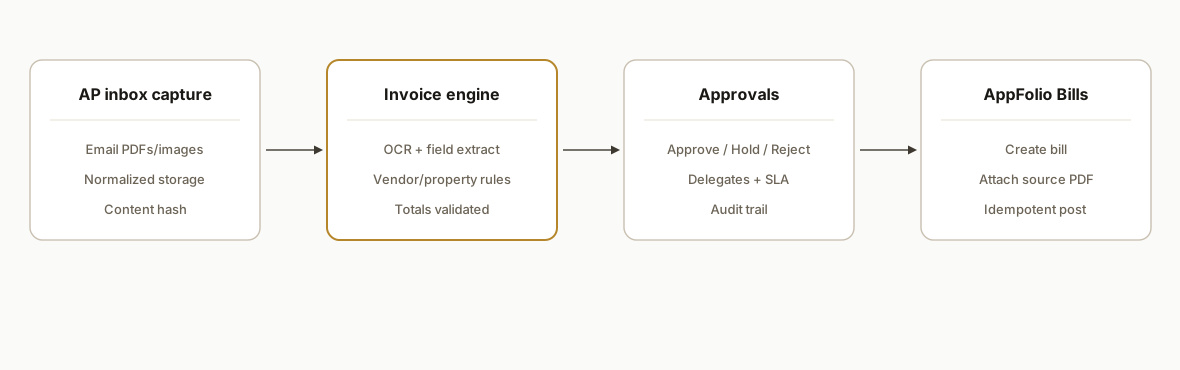
At a high level: invoices land in a dedicated inbox. An engine extracts fields and normalizes them. A rules layer assigns property and GL. Approvals happen in Slack or email. Approved invoices become AppFolio Bills, and the original PDF is attached. Errors route to a review queue.
- Inbound capture: A dedicated ap@ inbox forwards to a webhook. We accept PDF, image, and vendor-portal email bodies. Filenames are normalized and stored with a content hash.
- Invoice engine (extraction + normalization): OCR and layout parsing extract vendor name, invoice number, PO or work order refs, service dates, amounts, tax, and line items. We validate totals and classify credits vs bills.
- Routing and coding: We match vendor to AppFolio vendor records, infer property from rules and history, and choose GL accounts from a per-vendor matrix. Splits across properties become separate bills if needed.
- Approvals: Approvers get an actionable card with Approve, Hold, or Reject. Holds collect comments. Rejections loop back to the AP queue with the message captured.
- AppFolio handoff: There are two paths. If you have access to AppFolio Stack partner APIs, we create Bills and upload the PDF attachment under those credentials. If you do not, we hand bills into AppFolio's native intake features like Smart Bill Entry while preserving our approvals and coding.
Set up an ap@ vendor inbox that vendors will actually use
Near-miss searches point to one blocker: the ap@ address. Here is how we roll it out so vendors send clean PDFs and your capture rate climbs.
- Address: use ap@yourdomain.com. Create aliases for properties or regions when useful: ap+west@yourdomain.com, ap+123main@yourdomain.com.
- Allowlist: add your automation relay to Google Workspace approved senders. Ask top vendors to safelist ap@yourdomain.com so acknowledgements do not bounce.
- Attachment standards: ask for 1 invoice per PDF. Maximum 25 MB. If a portal only sends a link, request a PDF copy be attached or enable their PDF delivery option.
- Acknowledgement: auto-reply that confirms receipt with a vendor-facing reference id. This cuts duplicate sends.
- Basic mail hygiene: publish SPF, DKIM, and DMARC for your domain so vendor IT teams do not quarantine your acknowledgements.
Template to notify vendors of the new address:
Subject: New accounts payable address: ap@yourdomain.com

Please send all invoices to ap@yourdomain.com. One invoice per PDF. Include the property name or address in the subject. If you use a portal, enable PDF attachments to email.

We will acknowledge receipt automatically. Questions: ap@yourdomain.com.
If you need robust PDF handling tips beyond invoices, see our walkthrough on extracting PDF receipts to spreadsheets.
ap@ vs ap+vendor vs per-vendor aliases: which to choose
Buyers often ask: should we use a single ap@ or per-vendor addresses. Our rule of thumb:
- Start with ap@: simplest for vendors and easiest to staff and monitor.
- Add ap+property or ap+region when property-level coding is primary. It lets you pre-tag routing by alias.
- Use ap+vendor only for high-volume vendors with special routing. Too many aliases confuse senders.
Routing logic in the capture step should read the alias to set defaults, then let rules and history refine property and GL. Always fall back gracefully to ap@ with memo parsing when an alias is not used.
Step-by-step: how to build it
1) Capture invoices from a dedicated AP inbox
Set a forwarding rule from ap@ to a webhook. If you live in Google Workspace, Apps Script can label and hand off attachments with stable IDs.
// Code: Google Apps Script, forward labeled invoices to your API
function forwardInvoices() {
  const label = GmailApp.getUserLabelByName('AP/Invoices');
  const threads = label.getThreads(0, 50);
  const endpoint = PropertiesService.getScriptProperties().getProperty('INBOUND_API_URL');
  threads.forEach(t => {
    t.getMessages().forEach(m => {
      m.getAttachments({includeInlineImages: false}).forEach(att => {
        if (!att.getContentType().includes('pdf')) return;
        const payload = {
          messageId: m.getId(),
          from: m.getFrom(),
          subject: m.getSubject(),
          received: m.getDate().toISOString(),
          filename: att.getName(),
          bytesB64: Utilities.base64Encode(att.getBytes()),
        };
        UrlFetchApp.fetch(endpoint, {
          method: 'post',
          contentType: 'application/json',
          payload: JSON.stringify(payload)
        });
      });
    });
    t.removeLabel(label); // prevent double-sends
  });
}
Key gotcha: Gmail attachments can include image scans and vendor-portal HTML. Normalize everything to PDF before extraction.
2) Extract fields with OCR plus lightweight validation
We run OCR and a layout-aware parser, then validate core fields against totals and dates.
# Code: Python, extract invoice fields and validate totals
import io, base64, re, hashlib
from datetime import datetime
from pypdf import PdfReader

NUMBER = re.compile(r"invoice\s*#?:?\s*([A-Za-z0-9\-\/]+)", re.I)
TOTAL  = re.compile(r"total\s*:?:?\s*\$?\s*([0-9\,]+\.?[0-9]{0,2})", re.I)
DATE   = re.compile(r"(\d{1,2}[\-/]\d{1,2}[\-/]\d{2,4})")

def parse_pdf_b64(b64):
    pdf = PdfReader(io.BytesIO(base64.b64decode(b64)))
    text = "\n".join(page.extract_text() or "" for page in pdf.pages)
    inv_no = (NUMBER.search(text) or [None, None])[1]
    total  = (TOTAL.search(text) or [None, None])[1]
    date_m = DATE.search(text)
    inv_dt = datetime.strptime(date_m.group(1), "%m/%d/%Y") if date_m else None
    # crude line split example, real builds use layout segments
    lines = [l for l in text.splitlines() if l.strip()]
    sha = hashlib.sha256(text.encode("utf-8")).hexdigest()
    return {
        "invoice_number": inv_no,
        "invoice_date": inv_dt.strftime("%Y-%m-%d") if inv_dt else None,
        "total": float(total.replace(",", "")) if total else None,
        "lines": lines[:50],
        "content_hash": sha,
    }
Gotcha: PDFs can include both text and raster images. Add an OCR pass for image-only pages before text extraction.
3) Match vendor and infer property with rules and history
We keep a compact vendor registry with domains, canonical names, and default GL coding per property. When history exists, last-used property gets a weighted vote.
// Code: TypeScript, vendor + property inference
import Fuse from 'fuse.js'

type Vendor = { id: string; name: string; domains: string[]; defaultGL: Record<string,string> }

export function inferVendorAndProperty(
  vendors: Vendor[],
  fromEmail: string,
  memo: string,
  prior: { propertyId: string, count: number }[]
) {
  const domain = fromEmail.split('@')[1].toLowerCase()
  let match = vendors.find(v => v.domains.includes(domain))
  if (!match) {
    const f = new Fuse(vendors, { keys: ['name'], threshold: 0.3 })
    match = f.search(memo).at(0)?.item
  }
  const propertyVotes = new Map<string, number>()
  prior.forEach(p => propertyVotes.set(p.propertyId, (propertyVotes.get(p.propertyId)||0) + p.count))
  // simple memo rule example
  if (/\b1234\b/.test(memo)) propertyVotes.set('prop_1234', (propertyVotes.get('prop_1234')||0) + 5)
  const propertyId = Array.from(propertyVotes.entries()).sort((a,b) => b[1]-a[1])[0]?.[0]
  return { vendor: match, propertyId }
}
Gotcha: do not let fuzzy matching create new vendors silently. Require a human confirmation for any score below a safe threshold.
4) Send an approval card with one-click actions
We push an actionable card to Slack or email. Approve creates the bill. Hold collects a comment. Reject closes the item with a reason.
// Code: Node.js, Slack approval card
import { WebClient } from '@slack/web-api'
const slack = new WebClient(process.env.SLACK_BOT_TOKEN)

export async function sendApproval(inv) {
  await slack.chat.postMessage({
    channel: inv.approverSlackId,
    text: `Invoice ${inv.invoice_number} from ${inv.vendor.name}`,
    blocks: [
      { type: 'section', text: { type: 'mrkdwn', text: `*${inv.vendor.name}*, $${inv.total.toFixed(2)}\n${inv.memo||''}` }},
      { type: 'actions', elements: [
        { type: 'button', text: { type: 'plain_text', text: 'Approve' }, style: 'primary', value: inv.id, action_id: 'approve' },
        { type: 'button', text: { type: 'plain_text', text: 'Hold' }, value: inv.id, action_id: 'hold' },
        { type: 'button', text: { type: 'plain_text', text: 'Reject' }, style: 'danger', value: inv.id, action_id: 'reject' }
      ]}
    ]
  })
}
Gotcha: capture the approver's identity and timestamp on every click. AP audits will ask for who approved what and when.
5) Create the AppFolio Bill and attach the PDF
When approved, we create an AppFolio Bill and upload the source PDF. AppFolio Stack exposes partner APIs for Bills and Attachments, but access and specifics are partner-gated. We keep our call site abstract: URL and auth come from your AppFolio Stack onboarding.
// Code: Node.js, abstracted AppFolio Bill creation
import axios from 'axios'

async function createAppFolioBill({ vendorId, propertyId, invoiceNumber, invoiceDate, total, glCode, memo }) {
  const url = process.env.APPFOLIO_BILLS_API_URL // provided during partner onboarding
  const token = process.env.APPFOLIO_STACK_TOKEN  // partner auth provided during onboarding
  const payload = {
    vendorId, propertyId, invoiceNumber, invoiceDate,
    total, memo,
    lines: [{ glAccount: glCode, amount: total }]
  }
  const resp = await axios.post(url, payload, { headers: { Authorization: `Bearer ${token}` } })
  return resp.data // expect a bill id in partner responses
}

async function uploadBillAttachment(billId, pdfBytes) {
  const url = process.env.APPFOLIO_ATTACHMENTS_API_URL // partner-provided
  const token = process.env.APPFOLIO_STACK_TOKEN
  await axios.post(url, { billId, filename: 'source.pdf', bytesB64: pdfBytes.toString('base64') },
                   { headers: { Authorization: `Bearer ${token}` } })
}
Gotcha: not every AppFolio customer has Stack partner access. When access is not enabled, we hand off to AppFolio's native Smart Bill Entry and Automated AP features, preserving the approval and coding context in the PDF and memo.
6) Block duplicates with idempotency keys and a ledger
Prevent re-keys by hashing vendor + invoice number + date + total. We store that key and refuse duplicate posts.
// Code: TypeScript, idempotency guard
import crypto from 'crypto'
import { sql } from './db'

export async function ensureUnique(vendorId: string, invoiceNumber: string, date: string, total: number) {
  const key = crypto.createHash('sha256').update(`${vendorId}|${invoiceNumber}|${date}|${total}`).digest('hex')
  const row = await sql`select id from ap_idempotency where key = ${key}`
  if (row.length) throw new Error('DUPLICATE_INVOICE')
  await sql`insert into ap_idempotency (key) values (${key})`
  return key
}
Gotcha: vendors sometimes reuse numbers on credit memos. Include type and sign in the key or treat credits in a parallel namespace.
Where it gets complicated
- Partner API access is gated: AppFolio's Stack APIs, including Bills and Attachments, sit behind partner enrollment and plan tiers. Base URLs and auth are not publicly documented. We ship with two paths: call the partner API when enabled, or hand off to Smart Bill Entry when not. This avoided blocking go-live on partnership timelines. If you are evaluating readiness, scan our AppFolio API integration guide and limits.
- Vendor normalization and cross-property billing: The same vendor can bill multiple properties with inconsistent naming. We enforce canonical vendor identities and create separate bills when a single PDF covers multiple properties.
- GL and tax logic: Coding lines can be straightforward for fixed-fee vendors and messy for time-and-materials. We kept deterministic GL defaults per vendor plus an override rule set keyed on memo phrases, then surfaced outliers to a human queue.
- PDF edge cases: Scanned images, password-protected files, and massive multi-page draws happen. We added an OCR fallback, password strip with explicit logging, and a size cap with a retry prompt to request a smaller export from the vendor.
- Approvals in the real world: People are out of office. We configured delegates and day-2 escalation. Approvals are time-boxed, with an "approve under dollar threshold" rule for recurring utilities.
Frequently asked questions
Does AppFolio have an API for Bills?
Yes. AppFolio's Stack partner APIs include Bills create and update and also support uploading attachments to bills. Access is partner and plan gated, and specifics like base URLs and auth are provided during partner onboarding, not in public docs.
Can I do this with Zapier or Make.com?
Not directly. There is no native AppFolio app in Zapier or Make.com. You can use Email and Webhooks or HTTP modules for the capture and approval pieces, but creating Bills in AppFolio requires either Stack partner APIs or handing off into AppFolio's native Smart Bill Entry. Community guidance points to generic HTTP when a native app is absent.
What if we already use Smart Bill Entry or Automated AP in AppFolio?
Keep it. Our system complements native capture by adding standardized approvals, idempotency, property and GL rules, and vendor normalization. Where partner APIs are not available, we hand approved invoice PDFs into Smart Bill Entry with the coding context preserved.
How do you prevent duplicate bills?
We compute an idempotency key from vendor, invoice number, date, and total and store it in a ledger. Any repeat of that tuple is blocked. Credits and special cases use a parallel namespace so legitimate reversals go through.
Can it split one invoice across multiple properties or GL accounts?
Yes. We either create separate AppFolio Bills per property split or, where your coding policy allows, create multiple lines on one bill. The choice is driven by your accounting policy and what your AppFolio configuration supports.
What does ongoing cost look like?
Infrastructure is light: inbox capture and approvals run on serverless, storage is small, and OCR costs only apply per page. The bigger investment is the initial rules and vendor normalization. After that, the system behaves like a utility.
If you want this running against your AppFolio environment, we deploy and support it as described. See how we handle AppFolio reporting in our related post on Owner Statements automation, or explore our document automation services. When you are ready, book a 20-minute call and we will scope your exact AP setup.
Want us to build this for you?
Nine questions, about 90 seconds. You see the revenue it is costing you, then pick a time. No pitch.
See your options