
AppFolio workflow integration is the practice of connecting AppFolio data to external tools so recurring work runs itself: maintenance tickets route to the right vendor, owners receive timely communications, and delinquent accounts trigger dunning sequences without manual exports.
Rex Automaton is an AI implementation agency that builds these AppFolio workflows for property management companies.
We build these patterns for property managers who want maintenance routing, owner updates, and AR follow-ups to run on schedule. This guide shows exactly how we wire it: where to use AppFolio Stack API objects, and where a scheduled CSV export with a parser inbox is the safer, faster path.
The problem it solves
Most teams copy data out of AppFolio to make other tools work. A coordinator exports a report, cleans a CSV, pastes data into email or a CRM, and hopes nothing changed since the last export. Work breaks on vacations, columns drift, and nobody remembers the one VLOOKUP the last analyst added to make the file import.
| Manual workflow | Automated workflow |
|---|---|
| Pull Work Orders report weekly, sort by property, email vendors one by one | Scheduled CSV export lands in a parser inbox. The integration engine reads it, matches vendors, and creates tickets automatically |
| Assemble owner updates from multiple reports and mail-merge in Outlook | Owners are read from an API or CSV and get templated, portfolio-specific updates on a schedule |
| Review Delinquency report daily, paste into SMS tool, send reminders | Delinquent Charges are polled via API on Plus or Max, or ingested from a scheduled CSV. Dunning emails and SMS fire with guardrails |
The change is predictable processing on a clock. Less keystroking, fewer missed follow-ups, and cleaner handoffs to vendors and CRMs.
What it is worth: maintenance, leasing and accounting that move on their own
Every handoff between AppFolio and another tool is a place where work waits on a person. Automating those handoffs means maintenance, leasing and accounting move as soon as something changes, and the team spends its time on owners and residents.
- Growth on the same team: the hours spent moving data go to owners and new doors.
- Faster responses: work starts when the data changes, not when someone checks.
- Fewer dropped balls: every handoff is logged.
We run this pattern on live AppFolio data for Iron Age Investments, a real estate investment firm, where a weekly Apps Script composes each investor's notes from AppFolio reports with no exports. Their founder: "Jacky shipped exactly what was scoped, on time, and then proactively suggested the next three things we should automate."
What automating your AppFolio reporting is worth
Move the sliders to your own numbers. The defaults are only an example portfolio, not client data.
Management fees from the doors the same team could take on
$62,400
(6 hrs × 52 ÷ 12) ÷ 0.5 hrs per door × $100 × 12 months
- Doors the freed hours could cover
- 52
- 26 hrs a month ÷ 0.5 hrs per door
- Staff cost of doing it by hand each year
- $10,920
- 6 hrs a week × $35/hr × 52 weeks
- Hours handed to the system each month
- 26 hrs
- 6 hrs a week × 52 ÷ 12
How the automation works
At a high level we use two integration surfaces: AppFolio Stack API objects when your plan permits, and scheduled CSV email exports as the universal fallback. A small orchestration service normalizes the inputs and fans them out to maintenance dispatch, owner communications, or AR reminders.
- AppFolio Stack API where available: AppFolio publishes an API surface via AppFolio Stack that includes objects like Delinquent Charges, Vendors, Properties, and Tenants. Access is plan-gated and partner onboarded. On Plus you get read-only API. On Max you get read and write. We use this for delinquency polling and fresh entity reads when you have access.
- CSV email-ingest fallback: AppFolio portals can export reports to CSV or Excel. Teams commonly schedule emailed CSVs to a parser inbox as a simple integration path. We harden that path with idempotency keys and schema drift checks.
- Routing engine: A small worker normalizes fields, applies routing rules, and pushes to downstream systems: ticketing or vendor mailboxes for maintenance, your CRM or email platform for owners, and your email or SMS provider for AR.
- Idempotency and audit: We compute a natural key per record and store a ledger so replays do not create duplicates. Every send logs the source row and the downstream action.
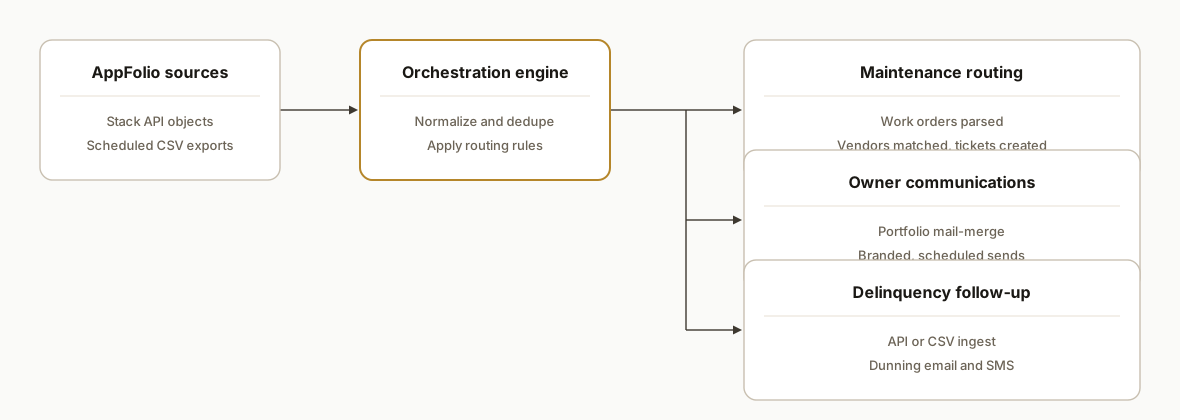
AppFolio maintenance integration: how we route Work Orders
When a buyer searches for AppFolio maintenance integration, they want Work Orders moving without a coordinator in the loop. Here is the exact pattern we ship.
- Schedule the Work Orders export to a dedicated inbox label. Store attachments in cloud storage with a timestamped filename and a checksum.
- Parse rows, compute a composite key: Work Order ID plus Reported Date. Use that for idempotency in a ledger so resends do not duplicate tickets.
- Enrich with reference data. If your plan includes API access, read Vendors and Properties to validate emails, phone numbers, and active status before dispatch. Otherwise keep a vendor routing table in a Sheet for operations to edit.
- Route by rules: category to vendor, priority to SLA, property to geo vendor. Unknown categories fall back to a human-approval queue so nothing drops.
- Deliver work: create a ticket in your vendor system or send a structured vendor email with the Work Order details. Capture the downstream reference for audit.
If you want more depth on the reporting side, we documented row-level fields and idempotency choices here: Automate AppFolio Work Order Reporting. For teams that want a simple operational sink, we also covered the reliable path to sheets: AppFolio to Google Sheets Automation.
AppFolio API for maintenance: what we actually use
Buyers ask for AppFolio API maintenance integration. The short answer: use AppFolio Stack to read the freshest entities when your plan permits, and design the rest of the workflow so it swaps from CSV to API without a rebuild.
- Plan access: Plus lists API read only. Max lists API read and write. Expect partner onboarding to receive credentials and environment details.
- Practical usage: we read Vendors, Properties, Tenants to validate contacts and portfolio context. For delinquency we poll Delinquent Charges when permitted. Exact endpoints and auth details come from partner onboarding and sit in configuration, not hardcoded.
- Writes: if your Max plan and partner docs enable writes for the object you need, we wire that with change logging and a dry-run phase. If not, we keep work-in-progress state in our ledger and reflect outcomes through your owner comms or internal tools.
See our deeper write-up on plan limits and safe patterns: AppFolio API Integration Guide and Limits. For downstream analytics, batch to a warehouse: AppFolio to Power BI Integration or AppFolio to Postgres Database Sync.
AppFolio Zapier integration: safe patterns without a native app
There is no official Zapier app for AppFolio. You can still connect AppFolio data to your stack with Zapier using Gmail and Webhooks safely.
Pattern A: Gmail attachments to downstream actions
- Trigger: Gmail New Attachment with a filter on the scheduled AppFolio sender and a label like appfolio or reports.
- Action: Storage by Zapier or AWS S3 upload to persist the CSV.
- Action: Code by Zapier to parse CSV headers and rows. Validate expected headers before proceeding.
- Paths: branch by workflow. Maintenance rows go to your ticketing API or vendor mailbox. Delinquency rows go to email or SMS. Owner rows go to your email platform.
- Action: Webhooks by Zapier to call your vendor or internal webhook with a structured JSON payload.
Pattern B: Your worker to Zapier to CRMs
- Your worker ingests AppFolio CSV or API. It normalizes, deduplicates, and posts a webhook to Zapier with just the fields a CRM needs.
- Zapier receives via Catch Hook, then creates or updates records in HubSpot, ActiveCampaign, or a dialer. This keeps Zapier focused on the last mile while your worker handles drift and idempotency.
We prefer Pattern B for maintenance because it survives schema drift and retries gracefully. The Gmail path remains useful for a quick start if you add header checks and an idempotency key.
Zapier header validation and keying example
// Code by Zapier: validate headers and compute a stable key per row
const required = [
  'Work Order ID',
  'Reported Date',
  'Property',
  'Category',
  'Priority'
];
const rows = inputData.csv_rows; // array of row objects from a previous CSV parser step
const missing = required.filter(h => !(h in rows[0] || rows.length === 0));
if (missing.length) {
  throw new Error(`Missing headers: ${missing.join(', ')}`);
}
return rows.map(r => ({
  key: `${r['Work Order ID']}:${r['Reported Date']}`,
  property: r['Property'],
  category: r['Category'],
  priority: r['Priority']
}));
AR CSV integration: from Delinquency export to dunning
If you type ar csv integration, you want a concrete, safe way to turn the Delinquency export into scheduled dunning without duplicates. This is the approach we ship.
- Schedule the Delinquency report to a parser inbox on a daily cadence.
- Compute a composite key per row using a business identifier and an as_of field. Store that in a ledger so retries never double-send.
- Choose channels by policy: email first, SMS only with consent, and stop on payment or dispute flags.
- Throttle per tenant and per property so messages respect quiet hours and frequency caps.
// Transform a delinquency CSV into a dunning queue
import { parse } from 'csv-parse/sync';

type DunningItem = {
  key: string;
  contactEmail?: string;
  contactPhone?: string;
  amountDueCents: number;
  asOf: string;
};

export function buildDunningQueue(csvBuf: Buffer): DunningItem[] {
  const rows = parse(csvBuf, { columns: true, skip_empty_lines: true });
  const out: DunningItem[] = [];
  for (const r of rows) {
    // Use identifiers available in your export. Keep the same key shape across API and CSV.
    const key = `${r['Charge ID']}:${r['As Of']}`; // aligns with the API keying pattern used in our worker
    out.push({
      key,
      contactEmail: r['Email'],
      contactPhone: r['Phone'],
      amountDueCents: Math.round(parseFloat(r['Amount Due']) * 100),
      asOf: r['As Of']
    });
  }
  return out;
}
We keep message templates versioned and include the ledger key in metadata so support can trace any send. If you want a pure reporting sync for finance, see Automate AppFolio Delinquency Report and for analytics scale see AppFolio to BigQuery Reporting Sync.
AppFolio API maintenance integration: upgrade path without a rebuild
Many teams start with CSV for Work Orders, then gain Stack API access later. We design the worker so the source is swappable by configuration.
// One code path, two sources: csv or api
export async function loadWorkOrders(source: 'csv' | 'api', blob?: Buffer) {
  if (source === 'csv') {
    return parseCsvWorkOrders(blob as Buffer);
  }
  // When API access is granted, read from the partner-provided base URL and token.
  // Keep endpoints and credentials in environment variables injected during onboarding.
  return fetchApiWorkOrders({
    baseUrl: process.env.APPFOLIO_API_URL as string,
    token: process.env.APPFOLIO_API_TOKEN as string
  });
}
Cutover checklist:
- Run both sources in parallel in a dry-run window. Compare record counts and a hash of normalized fields.
- Namespace keys by source during overlap to prevent collisions, then remove the CSV namespace once parity is proven.
- Keep vendor routing, SLAs, and templates unchanged so the only variable is the input surface.
Step-by-step: how to build it
Step 1: Choose your integration surface and confirm plan access
Decide per workflow whether to use the API or CSV. AppFolio lists "AppFolio API read only" on Plus and "AppFolio API read/write" on Max. If you do not have API access or partner onboarding yet, schedule the report to email and parse that reliably.
# Decision checklist
- Maintenance routing: start with CSV export of Work Orders. API later for Vendors and Properties
- Owner comms: start with Owner or Portfolio CSV exports for mail-merge
- Delinquency: prefer API polling of Delinquent Charges on Plus or Max. Otherwise schedule a daily CSV
Key gotcha: public developer pages do not disclose base URL or auth details. Treat API credentials and endpoints as provided during partner onboarding. Build your code to read API_URL and API_TOKEN from env vars so you can swap surfaces.
Step 2: Set up a parser inbox and save attachments safely
Create a dedicated inbox for scheduled CSVs. Forward only the AppFolio report emails into a label and let a small Apps Script or IMAP job pull attachments and store them in cloud storage for the worker.
// Apps Script: pull new CSVs from a Gmail label and upload to Drive
function ingestScheduledCSVs() {
  const label = GmailApp.getUserLabelByName('appfolio/scheduled');
  const threads = label.getThreads(0, 50);
  threads.forEach(t => {
    t.getMessages().forEach(m => {
      m.getAttachments({includeInlineImages: false, includeAttachments: true})
       .filter(a => /\.csv$/i.test(a.getName()))
       .forEach(a => {
         const blob = a.copyBlob();
         const file = DriveApp.getFolderById(PropertiesService.getScriptProperties().getProperty('CSV_FOLDER_ID'))
           .createFile(blob).setName(`${Date.now()}_${a.getName()}`);
         // Write a small sidecar JSON to signal the worker
         // contents: { fileId, filename, receivedAt }
       });
    });
    // Optional: remove label to avoid reprocessing
    t.removeLabel(label);
  });
}
Gotcha: AppFolio report formats can change. Snapshot the first header row per report and alert on drift before processing.
Step 3: Transform maintenance CSVs and route to the right vendor
Parse the Work Orders export, compute a deterministic key, match vendors by property or category, then create tickets or vendor emails. Keep the vendor map in a table so operations can change routing without code.
// Node.js: parse CSV and fan out to vendors
import { parse } from 'csv-parse/sync';
import axios from 'axios';

export async function handleWorkOrders(csvBuf: Buffer) {
  const rows = parse(csvBuf, { columns: true, skip_empty_lines: true });
  for (const r of rows) {
    const key = `${r["Work Order ID"]}:${r["Reported Date"]}`; // idempotency key
    if (await seen(key)) continue;

    const vendor = await pickVendor({
      property: r["Property"],
      category: r["Category"],
      priority: r["Priority"],
    });

    if (vendor.type === 'ticketing') {
      await axios.post(process.env.TICKETING_URL as string, {
        title: `[${r["Property"]}] ${r["Category"]}: ${r["Problem Description"]}`,
        details: r["Detailed Description"],
        vendorId: vendor.id,
        attachments: [],
      }, { headers: { Authorization: `Bearer ${process.env.TICKETING_TOKEN}` }});
    } else {
      await sendVendorEmail(vendor.email, r);
    }

    await markSeen(key);
  }
}
Gotcha: new categories appear over time. Add a default routing rule with a human approval queue so unknown categories do not silently drop.
Step 4: Poll delinquent charges via API or ingest the daily CSV
If your plan includes API access, read the Delinquent Charges object on a schedule and trigger dunning sequences. Otherwise, use the CSV path. Store an as_of date and the charge identifier as a composite key so reminders never double-send.
// Generic API poller: env-configured URL and token from partner onboarding
import axios from 'axios';

export async function pollDelinquentCharges() {
  const url = `${process.env.APPFOLIO_API_URL}/delinquent_charges`; // endpoint shape is illustrative
  const resp = await axios.get(url, {
    headers: { Authorization: `Bearer ${process.env.APPFOLIO_API_TOKEN}` }
  });
  for (const c of resp.data.items ?? []) {
    const key = `${c.charge_id}:${c.as_of}`;
    if (await seen(key)) continue;
    await queueDunning(c);
    await markSeen(key);
  }
}
Gotcha: do not assume public base URLs or auth mechanics. Keep these in configuration supplied during AppFolio Stack onboarding. If you are on CSV, parse the daily Delinquency export with the same idempotency scheme.
Step 5: Generate owner communications from exports and send
Use a simple document template with token replacement for each owner or portfolio. We keep the template in Drive and fill tokens from the Owner or Portfolio CSV, then send through your email provider.
// Apps Script: simple owner mail-merge from a template
function sendOwnerUpdate(row) {
  const tmplId = PropertiesService.getScriptProperties().getProperty('OWNER_TEMPLATE_ID');
  const file = DriveApp.getFileById(tmplId).makeCopy(`Owner Update - ${row.OwnerName}`);
  const doc = DocumentApp.openById(file.getId());
  let body = doc.getBody().getText();
  body = body.replaceAll('{{OWNER_NAME}}', row.OwnerName)
             .replaceAll('{{PORTFOLIO_NAME}}', row.Portfolio)
             .replaceAll('{{UNITS}}', String(row.UnitCount))
             .replaceAll('{{HIGHLIGHTS}}', row.Highlights || '');
  doc.getBody().setText(body);
  doc.saveAndClose();
  GmailApp.sendEmail(row.Email, `Update for ${row.Portfolio}`, body, { name: 'Asset Management' });
}
Gotcha: send owner communications from an appropriate mailbox and brand. If legal requires opt-outs for broad notices, send via your marketing platform instead of raw Gmail.
Step 6: Add a ledger for idempotency and monitoring
Whether you run API or CSV, store a row per action you took. This single table prevents duplicates and powers dashboards and alerts.
-- Postgres ledger for cross-workflow idempotency and audit
create table if not exists integration_ledger (
  key text primary key,
  workflow text not null,      -- maintenance, owner_comms, delinquency
  source text not null,        -- api, csv
  payload jsonb not null,
  delivered_at timestamptz not null default now(),
  downstream_ref text          -- ticket id, email id, provider message id
);
Gotcha: do not rely on filenames or email timestamps as identity. Always compute a key from business fields like Work Order ID plus date, or Charge ID plus as_of.
Where it gets complicated
- Plan-gated API access: AppFolio's pricing page shows API access is read only on Plus and read/write on Max. Expect partner onboarding. Because public developer docs do not disclose base URL or auth, build your code to treat these as injected configuration.
- No official Zapier app: Zapier lists 6,000 plus apps in its directory, but there is no official AppFolio connector. The pattern we use is Webhooks by Zapier on the downstream side or a standalone worker that ingests emailed CSVs and pushes to your tools. Source: Zapier Apps directory and Zapier community guidance.
- Schema drift in CSVs: Columns can appear, rename, or reorder without notice. Protect your parser with header-name mapping, not column indexes. Alert when an expected header is missing before you process rows.
- Email deliverability to parser inbox: If your scheduled report emails start landing in spam, the pipeline halts. Give the parser inbox a first-class mailbox, add sender allow-lists, and avoid auto-forward chains that rewrite headers.
- Idempotency across multiple sources: When maintenance or AR data can arrive via both API and CSV during cutover, key collisions can happen. Namespacing the source inside your composite key avoids duplicates and makes replay safe.
Frequently asked questions
Does AppFolio have an official API?
Yes. AppFolio exposes an API via AppFolio Stack with objects like Delinquent Charges, Vendors, Properties, and Tenants. Access is plan-gated and requires partner onboarding. Plus provides read-only access. Max provides read and write.
Is there a native Zapier or Make.com connector for AppFolio?
There is no official AppFolio app in Zapier's directory. The common approach is to use Webhooks by Zapier to call your integration or to ingest scheduled CSV exports and push data to your downstream tools. Treat Make similarly unless your account has a private connector.
Can this run in real time?
When an official webhook is not available, near real time means polling the API on a short cadence or scheduling emailed CSV exports frequently. We design around idempotency so tighter schedules do not create duplicates if the same record appears twice.
Which AppFolio plan do I need?
If you want to read entities or reports via the API, AppFolio lists API read only on Plus and read/write on Max. If you are on a lower tier or waiting on partner onboarding, the CSV email-ingest path works today and can be swapped to API later.
How long does a typical integration take to go live?
Maintenance routing and delinquency follow-up often start with the CSV path and can go live quickly once you schedule the reports. API-backed reads require access and credentials. We design both paths so they are swappable without a rebuild.
Can a non-developer set this up?
You can schedule exports and forward them to a parser inbox without code. The reliable parts, like schema drift handling, idempotency, and downstream API pushes, benefit from an engineer so the system survives drift and resend scenarios.
If you want maintenance, owner communications, and AR running on a clock instead of on someone's to-do list, this is the pattern we build. See our AppFolio reporting posts for context in the same ecosystem: How to Automate AppFolio Work Order Reporting and AppFolio API Integration Guide and Limits. If you prefer to hand it off end-to-end, review our workflow automation services and book a 20-minute call.
Who would build this
Rex Automaton is an AI implementation agency with 250+ projects shipped since 2018, rated 4.9 from 33 reviews. Clients include Soft Pull Solutions, Capcon Networks, Iron Age Investments, IT360. You work directly with the people who build it.


Want this built around your systems?
Nine questions, about 90 seconds. You see the revenue it is costing you, then pick a time. No pitch.
See your optionsRather talk to a person first? Meet the team or tell us which system you run.