
We built and shipped a load tracking and carrier status automation for a mid-size freight brokerage. It listens to ELD or GPS pings and driver replies, computes geofenced milestones and ETAs, notifies customers at the right moment, and syncs statuses back to the TMS. In production it replaced most check calls and eliminated double entry.
Load tracking automation is the system that consumes telematics and driver signals, turns them into arrival or departure events and ETAs, then updates your customers and TMS without manual calls or emails.
The problem it solves
Teams were burning hours on check calls and inbox triage. Carriers ran a mix of ELD portals. Some drivers texted updates. The TMS wanted clean milestone codes, but operations staff retyped everything from email threads. Customers got late or inconsistent notifications. No one trusted the single source of truth.
| Task | Manual process | Automated process |
|---|---|---|
| En-route visibility | Dispatcher calls or texts driver every few hours. | ELD or phone GPS pings stream in, deduped and normalized. |
| Arrive/Depart detection | Driver says "I'm here" and "rolling" by text. | Geofence hit computes Arrived. Dwell threshold or gate exit computes Departed. |
| ETA updates | Gut feel from dispatcher based on last call. | ETA is recomputed on each ping with traffic and dwell rules, then throttled to avoid noise. |
| Customer notifications | Manual email at pickup and POD. | Templated emails or SMS on state change with shipment context and link. |
| TMS status | Rep keys codes after reading email. | Status codes are written by adapter. API first, DOM fallback when no API. |
According to the American Transportation Research Institute, the average marginal cost of trucking was over $2 per mile in recent years, which means every hour of unnecessary detention or check calls compounds quickly for both broker and carrier (source: ATRI, An Analysis of the Operational Costs of Trucking).
How the automation works
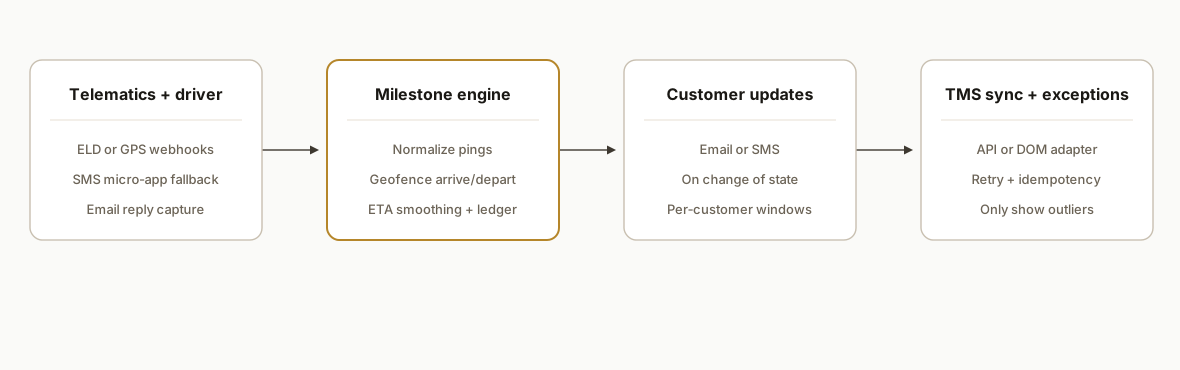
We treat tracking like any other workflow: define the states you care about, normalize messy inputs into a single stream, detect state changes safely, then fan out to customers and systems.
- Signal ingestion: ELD or GPS provider webhooks where available. Polling where a provider cannot push. SMS micro-app link for small carriers or owner-operators that will not share ELD. Email reply parsing as a last resort.
- Normalization and rules engine: One schema for pings and messages. Geofence arrival and departure detection with dwell and jitter rules. ETA smoothing. A ledger to keep state transitions idempotent.
- Notification service: Templated emails and SMS fire only on change of state, with per-customer windows and quiet hours.
- TMS sync: Adapters write milestone codes. When an API is missing, we use a safe browser automation wedge to update the record until a native path exists.
- Exceptions board: A small Next.js panel surfaces late arrivals, stale pings, and geofence misses so humans only touch true exceptions.
Step-by-step: how to build it
1) Define milestones and geofences
Start with the exact states your TMS and customers expect: Dispatched, En Route, Arrived Pickup, Departed Pickup, Arrived Delivery, Departed Delivery, POD. Build geofences from facility lat, lon, and an agreed radius.
// haversine distance in meters
function distanceM(lat1, lon1, lat2, lon2) {
  const R = 6371000;
  const toRad = d => d * Math.PI / 180;
  const dLat = toRad(lat2 - lat1);
  const dLon = toRad(lon2 - lon1);
  const a = Math.sin(dLat/2)**2 + Math.cos(toRad(lat1))*Math.cos(toRad(lat2))*Math.sin(dLon/2)**2;
  return 2 * R * Math.atan2(Math.sqrt(a), Math.sqrt(1-a));
}

function insideGeofence(ping, fence) {
  return distanceM(ping.lat, ping.lon, fence.lat, fence.lon) <= fence.radiusM;
}
Gotcha: many facilities are not circles. When polygons are available, prefer point-in-polygon tests and keep a small buffer for GPS drift.
2) Ingest pings and normalize
Accept telematics webhooks and SMS-app posts into one table. Normalize provider IDs, timestamps, and coordinate precision. Store raw payloads for audit.
// Node.js express stub
app.post("/webhooks/ping", async (req, res) => {
  const { provider, truckId, ts, lat, lon, speedKph, raw } = mapToUnified(req.body);
  await db.query(
    `insert into pings(provider, truck_id, ts, lat, lon, speed_kph, raw)
     values($1,$2,$3,$4,$5,$6,$7)
     on conflict(provider, truck_id, ts) do nothing`,
    [provider, truckId, ts, lat, lon, speedKph, raw]
  );
  res.sendStatus(200);
});
Gotcha: some providers batch pings or replay on retry. De-duplicate on a compound key like provider, truck, timestamp.
3) Build an idempotent state machine
Detect state changes once per shipment and write them atomically. The ledger prevents duplicate notifications and double TMS updates.
-- one row per shipment state
create table shipment_states (
  shipment_id text not null,
  state text not null,
  occurred_at timestamptz not null,
  primary key (shipment_id, state)
);

-- attempt to write ArrivedPickup once
insert into shipment_states(shipment_id, state, occurred_at)
values ($1, 'ArrivedPickup', $2)
on conflict (shipment_id, state) do nothing;
Gotcha: add a monotonic guard. If you somehow see DepartedPickup before ArrivedPickup, hold it and backfill the missing state if the ping trail justifies it.
4) Compute ETAs and dampen noise
Recompute ETA on every ping, but only emit when it changes meaningfully.
function estimateEtaMeters(remainingMeters, avgSpeedKph = 70) {
  const mps = (avgSpeedKph * 1000) / 3600;
  return new Date(Date.now() + (remainingMeters / mps) * 1000);
}

function shouldNotifyEta(prevEta, nextEta) {
  const deltaMin = Math.abs(nextEta - prevEta) / 60000;
  return deltaMin >= 10; // only surface 10+ minute swings
}
Gotcha: dwell at pickup destroys naive ETA. Freeze ETA while inside a pickup fence until DepartedPickup is recorded.
5) Wire customer notifications
Use templates and send only on change of state or material ETA shift.
import Handlebars from "handlebars";

const tpl = Handlebars.compile(
  "Shipment {{ref}}: {{state}} at {{time}} for {{pickup}} → {{delivery}}. {{#if eta}}ETA {{eta}}{{/if}}"
);

async function notify(event) {
  const body = tpl(event);
  await email.send({ to: event.contacts, subject: `Update: ${event.ref}`, text: body });
  if (event.smsContacts?.length) await sms.send({ to: event.smsContacts, body });
}
Gotcha: respect quiet hours. Some shippers want SMS during the day and email after hours. Store preferences per customer and lane.
6) Sync status back to the TMS
Prefer native adapters. When a TMS does not expose a suitable write path, we use a guarded browser automation wedge.
// Playwright fallback: minimal DOM write with guardrails
import { chromium } from "playwright";

async function updateTmsStatus(loadId, state) {
  const browser = await chromium.launch();
  const page = await browser.newPage();
  await page.goto(process.env.TMS_URL);
  await page.fill('#username', process.env.TMS_USER);
  await page.fill('#password', process.env.TMS_PASS);
  await page.click('button[type="submit"]');
  await page.goto(`${process.env.TMS_URL}/loads/${loadId}`);
  await page.selectOption('#status', state);
  await page.click('#save');
  await browser.close();
}
Gotcha: DOM paths change. Keep this as a temporary wedge with alerts when selectors fail, and migrate to a native path as soon as the vendor enables it.
Where it gets complicated
Provider diversity. Carriers bring a dozen different ELD vendors. Payloads vary. Some push, some only pull. We solved this with per-provider mappers into a single schema and a polling fallback for providers without webhooks.
False arrivals and departures. Yard jockey moves trigger in-out-in patterns. We required a dwell threshold for Arrived and an exit-buffer for Departed. The combination killed most flapping.
Timezones and windows. A shipper's 08:00 dock in Central time is not the same window your team sees in Pacific. We store all timestamps in UTC, attach timezones at the location level, and render messages in the customer's local time.
Replay storms and duplicates. When a provider retries a webhook after a 500, it can resend the last N pings. Our insert-ignore pattern on a compound key plus a recent-ping cache prevented state churn and duplicate notifications.
Polygon geofences. Many DCs are irregular. Circles produce early Arrived near the highway. We added polygon support and a 30, 50 meter buffer on edges to avoid GPS bounce.
TMS writeback gaps. Some TMS products do not expose the status field we needed. We shipped with a guarded Playwright path and a retry queue. When the vendor later enabled a proper write, we swapped the adapter without touching upstream logic.
According to the FMCSA, most interstate carriers must use an electronic logging device, which means position data exists for the majority of trucks on US roads (source: FMCSA ELD rule). That reality is what makes a broker-side tracking engine viable even with mixed fleets.
What this actually changes
For a brokerage running live loads every day, the change is structural. Dispatchers stopped dialing phones just to ask "where are you now." Customers received consistent, branded updates at pickup, at meaningful ETA shifts, and on POD, without someone retyping a driver's text. The TMS reflected the real state of the load without waiting on inbox processing. Exceptions became visible and fixable because everything else handled itself.
We did not chase perfection. We targeted high-confidence milestones first, shipped with a safe SMS fallback for carriers that could not or would not share ELD, and kept adapters swappable so the engine did not marry any one vendor.
Frequently asked questions
Do we need an ELD integration to make this work?
No. ELD or GPS webhooks give the best signal, but we also ship with a phone-GPS micro-app and an SMS reply path for small carriers or owner-operators. You can start with SMS and add ELD providers as you get carrier consent.
How real-time is the tracking?
With webhook-based providers you see state changes within seconds. With polling the cadence is a design choice. Five to fifteen minutes is a common balance between freshness and noise. Notifications are throttled so customers only see meaningful changes.
How do you prevent duplicate emails or TMS writes?
We write every milestone to an append-only ledger keyed by shipment and state. Notifications and TMS writes read from that ledger and only fire on a new state or a material ETA delta. Replayed pings are ignored by design.
What does this cost monthly?
Infrastructure is modest. The primary ongoing costs are SMS, email, and any telematics aggregator fees you choose to use. The one-time engineering cost covers adapters, geofencing rules, and the state machine. Exact numbers depend on volume and vendors.
How long does an implementation take?
A typical first deployment with one ELD provider, an SMS fallback, and a single TMS adapter lands in 3 to 6 weeks. Adding providers is a repetition of the same mapper pattern. DOM-based TMS wedges can be done faster, then replaced by native paths later.
Can my ops team manage this without a developer?
Yes for day-to-day. Geofences, customers, and notification templates live in an admin UI or a spreadsheet config. Engineering is needed for new provider adapters or when a TMS vendor exposes a better write path you want to adopt.
If you want this running against your lanes and customers, we already built the engine and the adapters. See how we approach dispatch visibility in our related post on freight broker dispatch dashboards, or explore our broader workflow automation services. When you are ready to scope your lanes and TMS, book a 15-minute call.
Want us to build this for you?
Nine questions, about 90 seconds. You see the hours it is costing you, then pick a time. No pitch.
Get your free assessment