
Rex Automaton builds custom integrations that push customers, sales orders and invoices from a CRM or storefront into Microsoft Dynamics GP through eConnect or Web Services, so nobody retypes an order into the ERP. This guide is for a director at a mid market operator who is still on GP, already knows the retyping has to stop, and wants to know what the integration surface really allows. It covers the two Microsoft paths, where each one falls short, the architecture we use, and what to ask before you scope the work.
Dynamics GP integration means moving records between GP and another system through its supported developer interfaces instead of by hand or by raw database writes.
The problem it solves
The CRM and GP each hold a customer record and neither knows when the other changes, so the two drift until someone reconciles by hand. Any fix has to settle who owns each record and how GP is reached before it settles how to connect.
The reachability question is what rules options in or out. Microsoft's developer tools documentation for Dynamics GP lists three parts: Web Services, Visual Studio Tools and eConnect. eConnect is a .NET and XML interface, and Web Services sits on top of it. That has two design consequences. First, whatever submits documents must be a .NET component running where it can reach GP. Second, Web Services cannot do anything eConnect cannot. We could not confirm a public REST base URL, a Web Services authentication method, or native webhooks from a Microsoft source, so none of our designs depend on them. One third party document lists 18888 as eConnect's default port. That is not a Microsoft source, so we treat it as a firewall question for your network team, not a fact.
Here is what we could and could not establish for each option, and the condition under which each one wins.
| Option | What the sources confirm | What we could not confirm | Wins when |
|---|---|---|---|
| eConnect direct | .NET and XML interface. DBSync's docs say it does not cover every GP object or interaction | Auth method, default port from a Microsoft source | Your objects pass the test matrix on eConnect |
| Web Services for GP | A SOAP-style service on top of eConnect, so it shares eConnect's limits. One developer reports cash receipts cannot be applied through it but can through eConnect (the comparisons date from about 2010 to 2012) | Auth method, whether the cash receipt gap still exists on your version | All three of your hardest objects pass on it |
| Zapier or Make | We found no native GP connector, and GP usually sits behind a firewall these cloud tools cannot reach | Whether any connector exists | You are willing to build and host a gateway anyway, at which point they add little |
| Middleware (DBSync, Tray.ai, Stacksync, APPSeCONNECT) | Stacksync's connector uses SQL access plus eConnect stored procedures | Pricing and mapping depth for every vendor | Your objects are standard and the vendor shows them working on your GP version |
| Custom build | You own the queue, mapping and runbook, and the gateway reaches GP from inside your network | Nothing external to verify, the cost is your own scope | Pricing, tax, approval or customer matching rules are specific to you |
The decision rule we use: if the middleware vendor cannot demonstrate your hardest object in a GP test company, it is not a shortcut, it is the same test matrix with someone else's code in the middle. If it can, buy it. We have not verified CSV export, scheduled email export or webhooks in native GP, so we do not design around them.
What keeping your systems in sync is worth
Move the sliders to your own numbers. The defaults are only an example business, not client data.
Revenue from deals that stop slipping each year
$100,800
80 a month × 12 × 5% × 70% × $3000
- Deals kept a year
- 34
- 80 × 12 × 5% × 70%
- Staff cost of doing it by hand each year
- $9,100
- 5 hrs a week × $35/hr × 52 weeks
- Hours handed to the system each month
- 22 hrs
- 5 hrs a week × 52 ÷ 12
How the automation works
The system is a one way, event driven sync with a queue in the middle. A trigger in the CRM or storefront writes an event with a stable source ID. A mapping service validates it and turns it into the GP document. A small .NET gateway inside your network submits it through eConnect or Web Services and returns the GP document number to the CRM record.
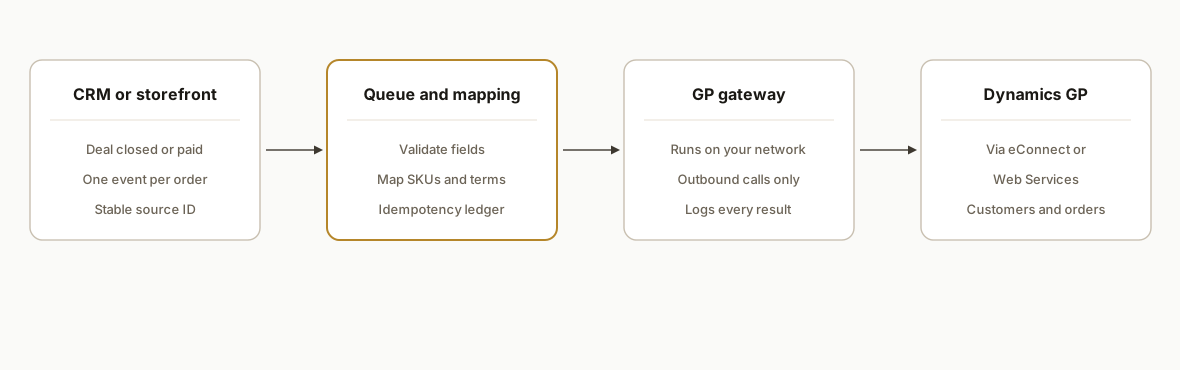
The gateway is outbound only. Because GP usually sits behind a firewall, it pulls work from the queue instead of exposing GP to the internet. It is also the only component that knows about eConnect. Microsoft ends GP support on December 31, 2029, with security patches through April 30, 2031, so the queue, the ledger and the mapping files are built to carry over to whatever replaces GP, and a replacement swaps one component.
Step-by-step: how to build it
Step 1: Inventory the objects and decide direction
List which records move and which system owns each one, then give every object exactly one direction. The same list becomes your test matrix in step 2, so keep it short.
objects:
  customer:     { owner_after_creation: gp,  direction: crm_to_gp_on_first_order }
  sales_order:  { owner: crm,                direction: crm_to_gp }
  cash_receipt: { owner: gp,                 direction: test_first }
The gotcha: two way sync of everything is where these projects die. A direction you cannot name is an object you are not ready to build.
Step 2: Confirm what your GP version supports
Do not trust a 2010 era comparison of eConnect and Web Services. Pick the three hardest objects in your process and prove each one end to end in a test company before committing to a path. If an object only works through eConnect, the gateway uses eConnect.
Test matrix (run in a GP test company)
object            eConnect   Web Services
customer create   pass/fail  pass/fail
sales order       pass/fail  pass/fail
cash receipt      pass/fail  pass/fail
Step 3: Build the idempotency ledger
Every event gets a row keyed by source ID. The gateway checks the ledger before it writes, so a retry never creates a second order.
create table sync_ledger (
  source_id    varchar(64) primary key,
  object_type  varchar(32) not null,
  status       varchar(16) not null,
  gp_doc_no    varchar(32) null,
  last_error   text null,
  updated_at   timestamp not null
);
The gotcha: GP rejecting a document does not mean nothing was written elsewhere, so log the outcome of every call.
Step 4: Write the mapping layer
Map source values to GP values in a config file, not in code, so finance can correct a payment term or item mapping without a release.
mapping:
  payment_terms:
    net_30: NET30
    due_on_receipt: COD
  sku_to_item:
    WIDGET-LG: WID-L-100
unmapped_policy: hold_for_review
The gotcha: an unmapped SKU should hold the order, not guess.
Step 5: Build the gateway
The gateway pulls from the queue over an outbound connection, builds the eConnect or Web Services request for the document type, and records the result. We take the document and node names from Microsoft's eConnect reference for your installed version and do not print them here, because we did not verify them against a current source.
The mechanic that matters is the ordering around the submit call. The ledger write and the GP write are not one transaction, so we mark the row before submitting.
loop every 30 seconds:
  batch = queue.claim(limit=20)
  for event in batch:
    if ledger.status(event.source_id) == done: ack and skip
    if ledger.status(event.source_id) == in_flight: park(reason="crash window")
    ledger.set(event.source_id, in_flight)
    result = submit_to_gp(event)
    ledger.record(event.source_id, result)
    ack(event) or park(event, result.error)
If the gateway dies after GP accepts a document but before the ledger records it, the row stays in_flight. We never retry those automatically, because a retry would create the duplicate the ledger exists to prevent. They go to the parked list for a person to check against GP. The gotcha: keep batches small so one bad record does not block the rest.
Step 6: Make parked events visible
The ledger already holds everything the review list needs. A parked row carries the object type, the reason in last_error and the time it stopped, so the review list is one query over it, not a separate system.
select source_id, object_type, last_error, updated_at
from sync_ledger
where status = 'parked'
order by updated_at;
Finance fixes the cause, usually a row in the mapping file, and releases the event. The gotcha: a parked event that nobody sees is a silent failure, so the alert should point at this list and the list should be the first thing finance opens each morning.
Step 7: Reconcile before cutover
Run the integration beside manual entry and reconcile in both directions. Every ledger row marked done must have a gp_doc_no that exists in GP. Every document staff typed by hand must either match a ledger row or have an explained reason it does not.
select object_type, status, count(*) as rows_in_state
from sync_ledger
group by object_type, status;
Our cutover rule is that no parked rows are unexplained and no hand typed document lacks a counterpart. The gotcha: a matching total proves little. Compare document by document, because two errors can cancel out in a count.
Where it gets complicated
eConnect coverage is incomplete. DBSync's documentation says eConnect does not cover every GP object or interaction. Any step in your process that lands in a gap becomes a design decision, so find it in the step 2 matrix and not in week six.
Web Services will not rescue a failed eConnect cell. It is a front end to eConnect and inherits its limits. The cash receipt report is the one concrete example we have, and it is old, so retest it on your version.
Reachability is a network task. The 18888 port comes from a third party document, and the Web Services auth method is unconfirmed. Put both on your network team's list before the gateway is scoped.
Customer identity needs a written matching rule. The CRM account and the GP customer ID rarely match, so decide the key (tax ID, email domain, manual link) and what happens on a near match before building. The lifecycle dates are on Microsoft's lifecycle page for Dynamics GP, which is where to confirm them.
What this actually changes
An order is entered once, at the source, and GP receives it through the gateway. What finance sees changes from keying to reviewing the parked list. We are not quoting a client result, because this is the pattern we design to and not a deployment we are claiming. The same queue, ledger and exception review structure applies to Sage 100 order entry automation, and only the gateway and its supported object list change per ERP.
What it costs and who builds it
We do not publish a number, because we have no tested figure to stand behind. Cost moves with three things you can count: the rows in your object ownership list, the size of the mapping config, and how many cells in the step 2 matrix fail on Web Services and force the eConnect path. We scope after running the matrix and quote a fixed scope against what it found. If a middleware vendor shows your hardest objects working in a GP test company, buy that. Plan an owner for the parked list after launch.
Frequently asked questions
Does Dynamics GP have an API?
GP has developer interfaces rather than a REST API we could confirm. Microsoft documents Web Services, Visual Studio Tools and eConnect. We could not confirm a public base URL or a Web Services authentication method, so we ask your GP administrator for both during discovery and design nothing that depends on them beforehand.
Should I use eConnect or Web Services?
Run customer create, sales order and cash receipt through both in a GP test company, and pick Web Services only if every cell passes. The one report we found says cash receipts apply only through eConnect. It is about a decade old, so the result on your version is the only evidence that counts.
Can Zapier or Make connect to Dynamics GP?
We found no native connector for either. The practical blocker is the firewall: cloud tools cannot reach GP without extra network work. Middleware names we found are DBSync, Tray.ai, Stacksync and APPSeCONNECT, and our test is the same for each: ask the vendor to run your hardest object in a GP test company.
How do you prevent duplicate orders in GP?
Every source event carries a stable ID that is the ledger's primary key, and the gateway marks a row in_flight before it submits. A row left in_flight after a crash is parked for a person to check against GP, never retried automatically, because a blind retry is how a second order appears.
Is it worth building on GP if support ends in 2029?
Often yes, if the build is modular. Microsoft ends GP support on December 31, 2029, with security patches until April 30, 2031. Only the gateway is GP specific, so a later ERP swap replaces one component and keeps the queue, ledger and mapping files.
How long does a Dynamics GP integration take?
We will not quote a duration without your object list. Two steps gate the calendar: the test matrix, because a failed Web Services cell changes the build, and the reconciliation run in step 7, because cutover waits until every difference is explained. A one direction customer and sales order sync is the smallest useful scope.
If your team is retyping CRM or storefront orders into GP, our custom AI integration work covers exactly this pattern, and the Sage 100 order entry post shows the same structure on another ERP. Book a 20 minute call and we will tell you which interface path fits your objects before you commit to anything.
Sources
- 1.Developer Toolslearn.microsoft.com
- 2.learn.microsoft.comlearn.microsoft.com
Who would build this
Rex Automaton is an AI implementation agency with 250+ projects shipped since 2018, rated 4.9 from 33 reviews. Clients include Soft Pull Solutions, Capcon Networks, Iron Age Investments, IT360. You work directly with the people who build it.


Want this built around your systems?
Nine questions, about 90 seconds. You see the revenue it is costing you, then pick a time. No pitch.
See your optionsRather talk to a person first? Meet the team or tell us which system you run.