
Gravity Forms to Google Sheets sync works best when you skip Zapier and wire Gravity Forms directly to a Google Apps Script endpoint: new entries push in real time, edits post through a WordPress hook, rows dedupe by the stable , and file uploads mirror into Google Drive with links stored in the sheet. This is for teams that need a single sheet of truth and reliable update behavior.
Gravity Forms to Google Sheets integration is: a direct webhook and REST-backed pipeline that upserts each entry into a sheet by entry_id and mirrors file uploads to Drive so downstream reporting and ops stay consistent when submissions change.
The problem it solves
Most Gravity Forms to Google Sheets guides stop at new submissions. Edits to entries are missed, duplicate rows appear when someone resubmits, and file uploads remain as website URLs that later 404 when media is reorganized. Zapier triggers on new entries only, so change handling requires polling or custom glue.
Here is the before vs after in concrete terms.
| Step | Manual or basic connector | Automated direct sync |
|---|---|---|
| New submission | CSV export or Zapier row append | Webhook POST to Apps Script upsert |
| Edits to entries | Not captured without re-export | WordPress hook posts updates instantly |
| Dedupe | VLOOKUP by email, brittle | Primary key: entry_id column, idempotent upsert |
| Attachments | Stays as site URL, can break | File fetched, stored in Drive, link in sheet |
| Latency | Batch, human-triggered | Seconds from submit or edit |
| Cost | Connector task fees | Included with WordPress license and Apps Script free tier |
How the automation works
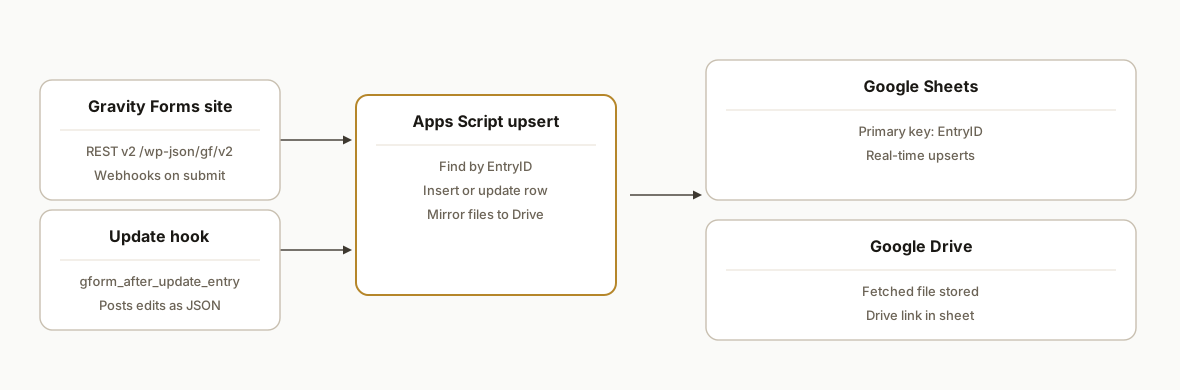
We use two push paths from Gravity Forms and an upsert engine on the Sheets side. New submissions fire via the Webhooks Add-On. Edits fire from the gform_after_update_entry hook. Both send JSON to a Google Apps Script web app that locates the row by entry_id and updates it in place. If the form includes file uploads, the engine fetches the file from the public URL and saves a copy in Drive, then writes the Drive link into the row.
- Gravity Forms REST v2 and webhooks: the site exposes /wp-json/gf/v2 and supports webhooks on submit. REST v2 accepts Basic Auth or OAuth 1.0a when you need server-to-server reads.
- New submissions: the first-party Webhooks Add-On posts to our endpoint with the merge tag and mapped fields.
- Entry updates: a small functions.php hook uses gform_after_update_entry to POST changes to the same endpoint so edits upsert instead of duplicating.
- Upsert engine: an Apps Script web app receives JSON, finds the row by an EntryID column, inserts if missing, updates if found, and handles type normalization.
- Attachments: file-upload fields provide public URLs. The engine fetches the binary, saves it in Drive, and stores the Drive URL for stable access.
Step-by-step: how to build it
1) Create the destination Google Sheet and headers
Create a sheet with a header row that includes EntryID and one column per form field. Include AttachmentLink if you mirror uploads. The EntryID column is the unique key for upserts.
A: EntryID | B: SubmittedAt | C: Name | D: Email | E: Message | F: AttachmentLinkKey detail: keep header names stable. The upsert script matches by header label, not column number, so reordering will not break the sync.
2) Deploy the Apps Script web app receiver
In the Sheet, open Extensions: Apps Script and paste this doPost handler. It upserts by EntryID, normalizes timestamps, and mirrors attachments.
const SHEET_NAME = 'Sheet1';
const DRIVE_FOLDER_ID = 'PUT_YOUR_FOLDER_ID_HERE';

function doPost(e) {
  try {
    const body = JSON.parse(e.postData.contents);
    // Expecting { entry_id: '123', submitted_at: '2026-08-19T16:31:02Z', fields: { Name: '...', Email: '...', Message: '...' }, attachments: ['https://.../file.pdf'] }
    const sheet = SpreadsheetApp.getActive().getSheetByName(SHEET_NAME);
    const headers = sheet.getRange(1, 1, 1, sheet.getLastColumn()).getValues()[0];
    const entryId = String(body.entry_id);

    // Build a row object keyed by header
    const rowObj = {};
    rowObj['EntryID'] = entryId;
    rowObj['SubmittedAt'] = body.submitted_at || new Date().toISOString();
    Object.keys(body.fields || {}).forEach(k => { rowObj[k] = body.fields[k]; });

    // Mirror first attachment to Drive and store link
    if (body.attachments && body.attachments.length) {
      const url = body.attachments[0];
      const resp = UrlFetchApp.fetch(url);
      const blob = resp.getBlob();
      const file = DriveApp.getFolderById(DRIVE_FOLDER_ID).createFile(blob).setName(blob.getName());
      rowObj['AttachmentLink'] = file.getUrl();
    }

    // Find row by EntryID and upsert
    const data = sheet.getDataRange().getValues();
    let targetRow = -1;
    for (let r = 1; r < data.length; r++) {
      if (String(data[r][0]) === entryId) { targetRow = r + 1; break; }
    }

    const rowArray = headers.map(h => rowObj[h] !== undefined ? rowObj[h] : '');
    if (targetRow === -1) {
      sheet.appendRow(rowArray);
    } else {
      sheet.getRange(targetRow, 1, 1, headers.length).setValues([rowArray]);
    }

    return ContentService.createTextOutput(JSON.stringify({ ok: true })).setMimeType(ContentService.MimeType.JSON);
  } catch (err) {
    console.error(err);
    return ContentService.createTextOutput(JSON.stringify({ ok: false, error: String(err) })).setMimeType(ContentService.MimeType.JSON);
  }
}
Publish it as a web app. Set Who has access to Anyone with the link or restrict with a secret token you check in doPost.
3) Configure the Gravity Forms Webhooks Add-On for new entries
From WordPress admin, add a Webhook on the target form. Point it to the web app URL. Include JSON that sends the entry_id and the fields you care about. The Webhooks Add-On requires an Elite or Nonprofit license.
{
  "entry_id": "{entry_id}",
  "submitted_at": "{date_created}",
  "fields": {
    "Name": "{Name:1}",
    "Email": "{Email:2}",
    "Message": "{Message:3}"
  },
  "attachments": ["{FileUpload:4}"]
}
Gotcha: file-upload merge tags resolve to a public URL by default. We fetch the binary and store it in Drive so downstream links remain stable even if media paths change later.
4) Post updates when entries are edited in WordPress
Zapier does not have an update trigger. We post edits directly from WordPress using the gform_after_update_entry action so the same receiver upserts the row.
// In your theme's functions.php or a small mu-plugin
add_action('gform_after_update_entry', function($form, $entry_id, $original_entry) {
  $endpoint = 'https://script.google.com/macros/s/YOUR_DEPLOY_ID/exec';

  // Build a minimal payload. Map only the fields you need in Sheets.
  $entry = GFAPI::get_entry($entry_id);
  $payload = [
    'entry_id' => strval($entry_id),
    'submitted_at' => $entry['date_created'],
    'fields' => [
      'Name' => rgar($entry, '1'),
      'Email' => rgar($entry, '2'),
      'Message' => rgar($entry, '3'),
    ],
  ];

  $args = [
    'headers' => ['Content-Type' => 'application/json'],
    'body' => wp_json_encode($payload),
    'timeout' => 10,
  ];

  // Fire and forget. Consider logging $response on WP_DEBUG.
  wp_remote_post($endpoint, $args);
}, 10, 3);
If you cannot add code to the theme, a small site-specific plugin works the same way. In production we include a shared secret in the request and verify it in doPost.
5) Optional: read via REST v2 when you need server-side lookups
Gravity Forms exposes a REST v2 route at /wp-json/gf/v2. It supports Basic Auth or OAuth 1.0a. We use server reads sparingly for one-off lookups or reconciliation. For example, when a downstream row is missing a field, fetch the entry by its ID and backfill. Keep credentials off the client and store them securely.
function gfGetEntry(siteBase, key, secret, entryId) {
  const url = siteBase.replace(/\/$/, '') + '/wp-json/gf/v2/entries/' + encodeURIComponent(entryId);
  const headers = { Authorization: 'Basic ' + Utilities.base64Encode(key + ':' + secret) };
  const resp = UrlFetchApp.fetch(url, { headers });
  return JSON.parse(resp.getContentText());
}
We rely on push first. Polling entire lists is avoided in favor of webhooks and the update hook so Sheets stays current without heavy scheduled jobs.
6) Guard against duplicates and batch updates cleanly
- Dedupe: EntryID must be the first column and treated as the primary key. Never write a second row for the same ID.
- Batch writes: when you process bursts, group updates into a single setValues call per batch to respect Sheets quotas.
- Timestamps: store submitted_at as ISO 8601 so Data Studio and BigQuery can parse it without transforms.
Where it gets complicated
- No native edit trigger in Zapier. Zapier only triggers on new submissions. Updates require WordPress hooks or REST polling. We use gform_after_update_entry to publish edits instantly.
- Webhooks licensing. The first-party Webhooks Add-On requires an Elite or Nonprofit license. If you cannot use it, fallback is a small code snippet that POSTs on gform_after_submission.
- Attachments are URLs, not binaries. Gravity Forms returns file URLs. To mirror in Drive, fetch the file and save to a Drive folder, then store the Drive URL in the sheet. Mind access controls and size limits.
- Field mapping drift. Renaming fields in Gravity Forms does not update your webhook JSON automatically. Keep a field map alongside the form ID and audit it on form edits.
- Multi-value fields. Checkboxes and multi-selects arrive as delimited strings. Normalize to a predictable delimiter before writing to Sheets so downstream formulas do not break.
What this actually changes
In production we shipped this pattern for WordPress sites that needed a single source of truth in Google Sheets and edit-safe behavior. New submissions appeared within seconds. When staff corrected typos or updated choices in WordPress, the matching row in Sheets updated in place with no duplicate. File uploads became Drive links that stayed valid when site media was reorganized. For teams already on WordPress, the reach is broad: WordPress powers over 40 percent of websites worldwide according to W3Techs, which makes a direct, license-backed integration path attractive for operators who want fewer moving parts. Source
Frequently asked questions
How do I connect Gravity Forms to Google Sheets without Zapier?
Use the Gravity Forms Webhooks Add-On to POST new entries to a Google Apps Script web app, and a small gform_after_update_entry hook to POST edits. The Apps Script upserts rows by entry_id. This avoids connector task fees and handles updates reliably.
Does Gravity Forms have an API I can use?
Yes. Gravity Forms exposes a REST API v2 at /wp-json/gf/v2. It supports Basic Auth with a consumer key and secret and OAuth 1.0a. You can submit forms and CRUD entries through the API when you need server-to-server reads or writes.
Can this handle edits and prevent duplicates?
Yes. Post edits from WordPress using gform_after_update_entry and write them to the same endpoint. In the sheet, make EntryID the primary key and upsert instead of appending. The row updates in place when someone edits an entry.
Can I store file uploads in Google Drive instead of keeping site URLs?
Yes. File upload fields return public URLs by default. The Apps Script receiver can fetch the file, save it in a Drive folder, and write the Drive link into the sheet. This keeps links stable if your WordPress media paths change.
How do I integrate Gmail, Google Sheets, and Gravity Forms together?
Let Gravity Forms send your normal email notifications. In parallel, the webhook posts to Apps Script to upsert the sheet. If you need Gmail sends from the pipeline, Apps Script can draft or send emails when a new or updated row meets your conditions.
Can this generate Google Docs from form submissions?
Yes. While Gravity Forms does not natively write to Google Docs, your Apps Script can take the same JSON payload and create a Doc or a PDF from a template, then store the link in Sheets alongside the entry.
If you want a Gravity Forms to Google Sheets sync that handles edits, dedupes by entry_id, and mirrors uploads to Drive without Zapier, we have built and shipped this exact pattern. See our adjacent guide on Typeform to Google Sheets with uploads, or explore our workflow automation services. When you are ready, book a 15-minute call and we will scope your form and field map before we quote.
Want us to build this for you?
Nine questions, about 90 seconds. You see the hours it is costing you, then pick a time. No pitch.
Get your free assessment