
Successware integration for a home service company means getting customers, jobs and service agreements out of Successware and into the CRM and marketing tools that actually run follow-up, without anyone re-keying data. We have not been able to confirm an official public developer API, so the build is export-driven: a scheduled extract, a normalizing layer, and an idempotent write into your CRM. This guide is for operators on Successware who already know they want the sync and need to understand what the platform allows, what the build looks like, and where it gets fragile.
A definition first: Successware integration automation is a scheduled pipeline that pulls customer, job and agreement records from Successware by whatever export path the account supports, deduplicates them, and upserts them into a CRM or marketing platform on a fixed cadence.
The problem it solves
Most Successware shops end up with two sources of truth. Dispatch and billing live in Successware. Marketing lives somewhere else: a CRM, an email tool, a review platform. The bridge is usually a person running a report, downloading a file and pasting it into the other system when they remember.
Successware does give you one native path. Its sales and marketing features let you run marketing list reports from any customer-based report and export the customer data to build campaigns. That works for a one-off Mailchimp or Constant Contact blast. It does not give you a continuous sync, it covers customers only, and it is a manual action.
Here is how the real options compare for this system.
| Option | What it actually covers | Limits | Setup time |
|---|---|---|---|
| Native marketing list export | Customers with an email address | Manual, no jobs or agreements documented, excludes records flagged no email | Minutes, per run |
| Packaged partner integrations | Whatever the partner built | Vendor-defined scope; Podium states its integration is not compatible with Gen 2 (cloud) Successware | Varies |
| Zapier or Make | Not confirmed | We found no confirmed Successware connector | Not applicable |
| Unofficial reverse-engineered API (third party) | Unverified | Not an official surface, can break without notice | Unknown |
| Custom export-driven pipeline | Customers, plus jobs and agreements where an export path exists | Depends on your Successware version and what support can enable | Typically a few weeks of build |
The gap is not that Successware is closed in some dramatic way. It is that nothing documented gives you a clean, scheduled, two-way feed of jobs and agreements.
What keeping your systems in sync is worth
Move the sliders to your own numbers. The defaults are only an example business, not client data.
Revenue from deals that stop slipping each year
$100,800
80 a month × 12 × 5% × 70% × $3000
- Deals kept a year
- 34
- 80 × 12 × 5% × 70%
- Staff cost of doing it by hand each year
- $9,100
- 5 hrs a week × $35/hr × 52 weeks
- Hours handed to the system each month
- 22 hrs
- 5 hrs a week × 52 ÷ 12
How the automation works
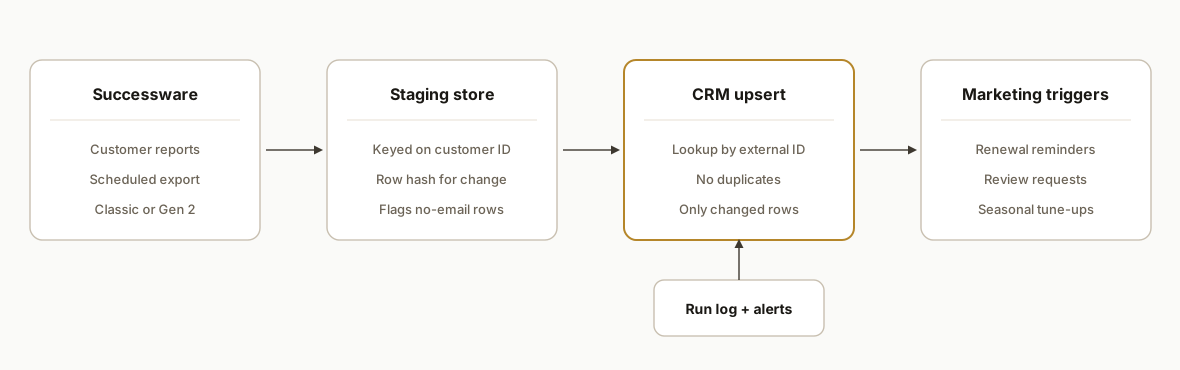
The architecture is a three-stage pipeline. A scheduled extract gets data out of Successware. A staging layer cleans and keys it. A writer upserts it into the CRM and triggers marketing logic.
Extract layer: The first job is establishing which export path your account supports. On Classic, the customer-based report and marketing list route is the documented one. On Gen 2 (cloud), confirm with Successware what is available before designing anything.
Staging store: Every extracted row lands in a small database (Postgres or a Google Sheet for smaller shops) keyed on a stable Successware customer identifier. Staging is where you detect what changed since the last run.
Normalizer: Phone numbers, addresses and names are cleaned, and records without an email are tagged rather than dropped, so the CRM still gets a phone-only contact.
CRM writer: An upsert against your CRM keyed on the external customer ID, so a re-run never creates duplicates. Job and agreement events become tasks, deal stages or custom fields.
Marketing triggers: Tags and field changes drive sequences, such as agreement renewal reminders, post-service review requests and seasonal tune-up outreach.
Step-by-step: how to build it
Step 1: Confirm your Successware version and export path
Before writing code, find out whether the account is Classic or Gen 2, and ask Successware support exactly which exports and scheduled reports your plan allows. Do not assume an API exists. We could not confirm one publicly, and one third-party vendor describes its Successware access as unofficial, which is not something to build a business process on.
Discovery checklist
- Successware version: Classic or Gen 2 (cloud)
- Can customer-based reports be saved and scheduled?
- Can jobs and agreements be exported, and in what format?
- Is there an account-level API option, and who enables it?
- Which fields identify a customer uniquely?
Step 2: Design the staging schema
Key everything on the Successware customer ID. Keep a raw table (exactly what came out) and a clean table (what you push), plus a hash of each row so you can detect change cheaply.
create table sw_customers_raw (
  sw_customer_id text primary key,
  payload jsonb not null,
  row_hash text not null,
  extracted_at timestamptz not null default now()
);

create table sw_sync_state (
  sw_customer_id text primary key,
  crm_id text,
  last_hash text,
  last_pushed_at timestamptz
);
Step 3: Build the extract job
Whatever the delivery mechanism (a scheduled file drop, an emailed report, or a supported export), the job reads the file, parses it and writes to the raw table. Treat the file as untrusted input and validate headers before loading.
import csv, hashlib, json

REQUIRED = {"customer_id", "name", "phone", "email"}

def load(path, db):
    with open(path, newline="", encoding="utf-8-sig") as f:
        reader = csv.DictReader(f)
        missing = REQUIRED - set(reader.fieldnames or [])
        if missing:
            raise ValueError(f"missing columns: {missing}")
        for row in reader:
            h = hashlib.sha256(json.dumps(row, sort_keys=True).encode()).hexdigest()
            db.upsert_raw(row["customer_id"], row, h)
Column names above are placeholders for your own export, not Successware field names.
Step 4: Normalize and flag email gaps
Marketing list exports only include customers with email addresses, so a naive sync silently loses everyone else. Keep them, tag them, and route them to a phone or SMS path.
def normalize(row):
    row["phone"] = "".join(c for c in row["phone"] if c.isdigit())[-10:]
    row["email"] = (row.get("email") or "").strip().lower()
    row["tags"] = [] if row["email"] else ["no-email"]
    return row
Step 5: Upsert into the CRM idempotently
Store the Successware ID as an external ID field in the CRM and look up before create. Only push rows whose hash changed.
def push(row, state, crm):
    if state.last_hash == row["row_hash"]:
        return
    crm_id = state.crm_id or crm.find_by_external_id(row["customer_id"])
    if crm_id:
        crm.update(crm_id, row)
    else:
        crm_id = crm.create(row | {"external_id": row["customer_id"]})
    state.save(crm_id, row["row_hash"])
Step 6: Wire marketing triggers
Tags and date fields become sequences: agreement renewal 60 days out, review request after a completed job, tune-up reminders by season. Keep the trigger logic in the CRM so your marketing team can edit it without touching the pipeline.
Step 7: Monitor and alert
Log row counts per run and alert on anomalies. A run that returns zero rows or half the usual count almost always means the export changed, not that you lost customers.
Alert if: rows_today < 0.5 * rows_7day_avg
Alert if: header check fails
Alert if: CRM write error rate > 2%
Where it gets complicated
Jobs and agreements are the unconfirmed part. The documented export covers customers. We found no documented export of jobs or agreements to a CRM, so the scope for those depends on what your account and Successware support can provide. We scope that in discovery, never assume it.
Classic versus Gen 2. The export documentation we found is for Classic. Cloud customers need their own confirmation, and partner integrations such as Podium's are not compatible with Gen 2 at this time per Podium's own listing.
Email gaps distort your CRM. Customers flagged no email are excluded from marketing exports. If you only sync the export, your CRM will look smaller than your customer base, and your reactivation numbers will be wrong.
Unofficial APIs are a liability. A third party advertises a reverse-engineered Successware API. It may work today, but it is not a supported surface, and a platform update can break it without notice. We would not put a revenue workflow on it without a fallback.
Manual steps break pipelines. If the only export path is a person running a report, the sync is only as reliable as that person. We push to scheduled delivery wherever the platform allows and build a clear alert for when a file does not arrive.
What this actually changes
The structural change is that the CRM stops being a stale copy. Customers and, where an export path exists, job and agreement data arrive on a schedule, so renewal reminders and review requests fire from current data instead of whenever someone remembers to export. We have not shipped this specific integration, so we are not quoting results. What we can say from our own builds is that export-driven adapters work well when you design for idempotency and loud failure. For an adjacent example of the same scheduled-export pattern applied to a platform with no API, see our iClassPro to GoHighLevel automation.
Frequently asked questions
Does Successware have a public API?
We could not confirm one. We found no official developer portal, base URL, authentication method or rate limits. One third-party vendor describes its access as unofficial and reverse-engineered. Ask Successware support what your account can enable before planning around an API.
Can Successware connect to Zapier or Make?
We found no confirmed Successware connector for either. Successware's integrations page describes partnerships with best-in-class providers, which are packaged integrations rather than open automation connectors.
What can you export from Successware today?
The documented route is a marketing list built from any customer-based report, exported for campaigns. It covers customers with email addresses and is a manual action. We found no documented export of jobs or agreements to a CRM, so that needs confirming for your account.
Does this work on Gen 2 cloud Successware?
It depends on the export path your account supports. The documentation we found is for Classic, and Podium states its integration is not compatible with Gen 2. We confirm the version and available exports first, then scope the build.
How long does a custom Successware sync take to build?
A customer-only sync from a working scheduled export is typically a matter of a couple of weeks. Jobs and agreements add scope and depend on what export path exists. We give a fixed estimate after a discovery step confirms your version and options.
Can my office manager run this without a developer?
Day to day, yes. Once built, the pipeline runs on a schedule and alerts when something looks wrong. Changing the extract or mapping needs a developer, but marketing sequences live in your CRM and your team can edit them.
If you run Successware and want customers, jobs and agreements flowing into your CRM, our workflow automation services cover exactly this kind of export-driven build. See also how we handled a similar closed-system gap in Jackrabbit Class to CRM sync, then book a 20 minute call and we will tell you which export path your account supports.
Sources
- 1.Sales & Marketing Softwaresuccessware.com
- 2.Back to Directorypodium.com
- 3.Classic - Successware Integrationssuccessware.zendesk.com
Want us to build this for you?
Nine questions, about 90 seconds. You see the revenue it is costing you, then pick a time. No pitch.
See your options